Ga door naar hoofdinhoud
Word lid van de reparatiegemeenschap - Account aanmaken

Motorola Moto 360 LCD Display Replacement

Wat je nodig hebt

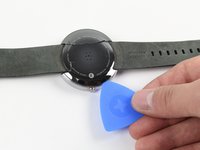
  1. Motorola Moto 360 LCD Display Replacement, Rear Cover: stap 1, afbeelding 1 van 1
    • Set the watch face down on a flat surface.

    • Place the heated iOpener on the face of the rear cover to loosen the adhesive underneath.

    Vraag FixBot
  2. Vraag FixBot
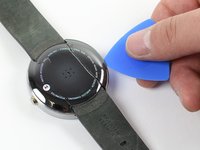
  3. Motorola Moto 360 LCD Display Replacement: stap 3, afbeelding 1 van 2 Motorola Moto 360 LCD Display Replacement: stap 3, afbeelding 2 van 2
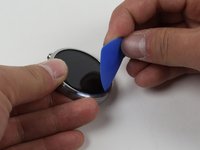
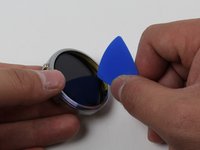
    • Gently slide the blue opening pick between the rear cover and the metal casing.

    • The rear cover is extremely fragile. Be very delicate when using the opening pick.

    • Work your way entirely around the rear cover.

    • It may take several attempts of reheating the adhesive to get the rear cover loose enough to pull off.

    Vraag FixBot
  4. Motorola Moto 360 LCD Display Replacement: stap 4, afbeelding 1 van 1
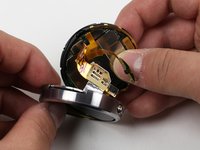
    • Once the adhesive has been successfully loosened, gently pull the rear cover off.

    Vraag FixBot
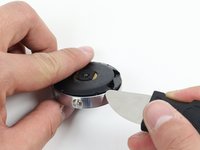
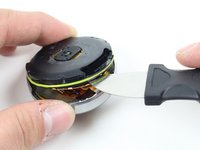
  5. Motorola Moto 360 LCD Display Replacement, O-Ring: stap 5, afbeelding 1 van 2 Motorola Moto 360 LCD Display Replacement, O-Ring: stap 5, afbeelding 2 van 2
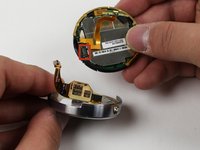
    • To get to the O-Ring, use the Jimmy to gently pry off the rear housing.

    Vraag FixBot
  6. Motorola Moto 360 LCD Display Replacement: stap 6, afbeelding 1 van 1
    • Pinch the green rubber O-Ring and slide it off of the watch.

    • The O-Ring is delicate and is easily severed. Use care around sharp objects.

    Vraag FixBot
  7. Motorola Moto 360 LCD Display Replacement, LCD Display: stap 7, afbeelding 1 van 1
    • Set the Moto 360 face up on a flat surface.

    • Place the iOpener on the face of the device screen.

    Vraag FixBot
  8. Motorola Moto 360 LCD Display Replacement: stap 8, afbeelding 1 van 2 Motorola Moto 360 LCD Display Replacement: stap 8, afbeelding 2 van 2
    • Gently slide the opening pick between the screen and the metal casing.

    • Work your way around the face of the screen, loosening the adhesive.

    Vraag FixBot
  9. Motorola Moto 360 LCD Display Replacement: stap 9, afbeelding 1 van 2 Motorola Moto 360 LCD Display Replacement: stap 9, afbeelding 2 van 2
    • Detach the copper ribbon connecting the motherboard to the display.

    • For reassembly, attach copper ribbon where it is marked.

    • The copper ribbon is fragile and easily disconnects. Remember where it goes so as to reconnect it properly.

    Vraag FixBot
  10. Motorola Moto 360 LCD Display Replacement: stap 10, afbeelding 1 van 1
    • Slide the display out of the metal casing.

    Vraag FixBot
Conclusie

To reassemble your device, follow these instructions in reverse order.

15 andere personen hebben deze handleiding voltooid.

Cole Twitchell

Lid sinds: 01/30/15

1.688 Reputatie

2 handleidingen geschreven

Team

Cal Poly, Team 17-32, Amido Winter 2015 Lid van Cal Poly, Team 17-32, Amido Winter 2015

CPSU-AMIDO-W15S17G32

4 Leden

18 handleidingen geschreven

7Gids Commentaar

Good morning,

It is possible to replace the display unit for the Moto 360 2nd with 1.56" display?

Thanks in advance and best regards,

Stephan

Stephan Müller - Antwoord Deel

Were could i buy a new lcd screen for the moto 360 1st gen??

Sebastian Galvan - Antwoord Deel

hey mate you can buy one from aliexpress aliexpress moto 360 screen see link below

https://goo.gl/ZSMTVW

Faddy Oraha - Antwoord Deel

Where can I get a LCD display for a Moto 360 2 gen 42mm. Thanks hope you can help

Glenn Patoska - Antwoord Deel

Bonjour,

Où est-il possible de trouver des pièces détachées ?

Le fond du boitier.

Merci de votre réponse.

DOGUE - Antwoord Deel

Voeg opmerking toe

Weergavestatistieken:

Afgelopen 24 uren: 1

Afgelopen 7 dagen: 12

Afgelopen 30 dagen: 59

Altijd: 22,541