Deze vertaling is door een computer gegenereerd en is nog niet door iemand nagekeken. Spreek je deze taal? Bekijk het hier.
Inleiding
Deze handleiding helpt je bij het verwijderen van de antenne in een Motorola Atrix 4G.
Wat je nodig hebt
-
-
Gereedschap gebruikt in deze stap:Spudger$3.99
-
Plaats een spudger in de kleine inkeping aan de basis van de accu in het basisgedeelte.
-
Til de accu uit de telefoon.
-
-
-
Gereedschap gebruikt in deze stap:T5 Torx Screwdriver$5.49
-
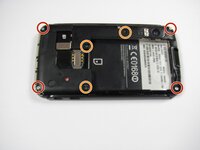
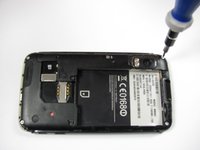
Verwijder de vier 5,0 mm Torx-schroeven met een T5 Torx-schroevendraaier.
-
Verwijder de drie 5,5 mm Torx-schroeven met een T5 Torx-schroevendraaier.
-
-
-
Gereedschap gebruikt in deze stap:iFixit Opening Tool$1.99
-
Til het zwarte rubberen klepje op met een Openingsgereedschap.
-
Verwijder de enkele 5,5 mm T5 Torx-schroef met een T5 Torx-schroevendraaier.
-
-
Gereedschap gebruikt in deze stap:iFixit Opening Tool$1.99
-
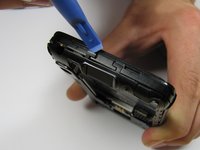
Til voorzichtig de lipjes aan de bovenkant van de telefoon op met een Openingsgereedschap.
-
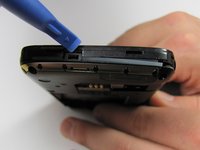
Til voorzichtig het lipje aan de onderkant van de telefoon op met hetzelfde gereedschap.
-
-
Gereedschap gebruikt in deze stap:iFixit Opening Tool$1.99
-
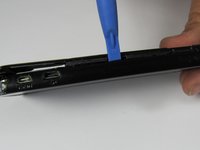
Steek een openingsgereedschap tussen de voor- en achterkant van de behuizing.
-
Schuif het gereedschap langs de zijkant van de telefoon.
-
Herhaal hetzelfde proces voor de andere kant.
-
-
Gereedschap gebruikt in deze stap:iFixit Opening Tool$1.99
-
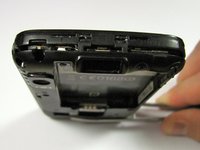
Schuif een openingsgereedschap onder de antenne en til deze recht omhoog vanaf het moederbord.
-
-
-
Haal de antenne voorzichtig uit de geleider langs de zijkant van de telefoon.
-
Verwijder de achterkant en de antenne van de telefoon.
-
-

 Vraag FixBot








Volg deze instructies in omgekeerde volgorde om je apparaat weer in elkaar te zetten.
Annuleren: ik heb deze handleiding niet afgemaakt.
5 andere personen hebben deze handleiding voltooid.

Team

Cal Poly, Team 9-42, Regan Spring 2012 Lid van Cal Poly, Team 9-42, Regan Spring 2012
CPSU-REGAN-S12S9G42
6 Leden
77 handleidingen geschreven
