Deze vertaling is door een computer gegenereerd en is nog niet door iemand nagekeken. Spreek je deze taal? Bekijk het hier.
Inleiding
Gebruik deze handleiding om een luidruchtige of doorgebrande ventilator te vervangen.
Wat je nodig hebt
-
-
-
Verwijder de volgende tien schroeven:
-
Drie 14.4 mm lange Phillips #00 schroeven
-
Drie 3.5 mm lange Phillips #00 schroeven
-
Vier 3.5 mm lange geschouderde Phillips #00 schroeven
 Vraag FixBot
-
-
-
Gebruik je vingers om de onderste behuizing, van de body van de MacBook, in de buurt van de ventilatieopening, weg te wrikken.
-
Verwijder de onderste behuizing.
-
-
-
-
-
Gebruik de voor- of achterkant van een spudger om de batterijaansluiting uit het contact op het moederbord omhoog te wrikken.
-
-
-
-
Buig de kabel van de batterij weg van het contact op het logic board zodat het niet per ongeluk contact kan maken met het contact terwijl je aan het werk bent.
-
-
-
-
-
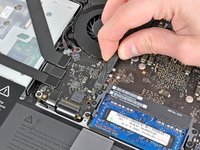
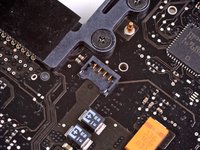
Gebruik de rand van een spudger om de fan-kabelaansluiting voorzichtig uit het stopcontact op het logic board omhoog te wippen.
-
-
-
Verwijder de volgende drie schroeven waarmee de ventilator aan het moederbord vastzit:
-
Eén 7,2 mm T6 Torx-schroef
-
Twee 5,3 mm T6 Torx-schroeven
-
-
-
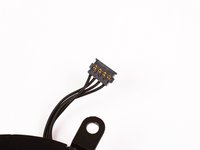
Til de ventilator uit de uitsparing in het logic board en let op de kabel die klem kan komen te zitten.
-
-




Volg deze instructies in omgekeerde volgorde om uw apparaat weer in elkaar te zetten.
Annuleren: ik heb deze handleiding niet afgemaakt.
178 andere personen hebben deze handleiding voltooid.


7Gids Commentaar
Repair done as presented. The fan connection was a little tricky to get out but apart from that non eventful. New fan working nicely.
Hi! Thank you for very understandable and good guides!
After successfully changing the fan and battery in my Mac, the screen light changes from time to time, sometimes it is more yellow and sometimes it is more blue. Have I accidentally changed some cable, or what it is that could have happened?
Many thanks,
Maja
You described the colors very well, and that leads me to believe that your display preferences in the System Preferences Control Panel may simply have switched to automatic. It changes the hues to what they think are easier on the eyes for day and night. Go to
“Apple Menu”
“System Preferences” (it’s also in the Dock by default)
“Displays”
“Night Shift”
and adjust it the way you like. BTW, if it seems to be happening at times other than Sunrise and Sunset, make sure the Time Zone is set for your local area and proper Daylight Savings (if applicable) or Standard Time.
Good Luck,
Beowulf
Thanks, job done nicely
