
MacBook Core 2 Duo Vervanging van de RAM

iRobot en 12 andere bijdragers
Voor het laatst geüpdatet op 18 aug 2026
Bekeken: 311K
Statistieken weergeven:
- Afgelopen 24 uur:
- 9
- Afgelopen 7 dagen:
- 75
- Afgelopen 30 dagen:
- 217
- Altijd:
- 310.561
Commentaar: 51
32 opmerkingen over de stappen, 19 opmerkingen op de handleiding.
Bekijk de opmerkingen bij de handleidingVoltooid: 456 457
456 mensen hebben deze handleiding als "voltooid" gemarkeerd. Ben jij de volgende?
457 personen hebben deze handleiding als "voltooid" gemarkeerd. Een daarvan ben jij—lekker bezig!
Favorieten: 87 88
87 mensen hebben deze handleiding als favoriet gemarkeerd en volgen deze. Ben jij de volgende?
88 personen hebben deze handleiding als favoriet gemarkeerd (en blijven daarmee op de hoogte van meldingen)—een daarvan ben jij!
Uitgelichte handleiding
De iFixit-werknemers vonden deze handleiding uitzonderlijk cool.
Inleiding
Ga naar stap 1 ↓Het vervangen van de RAM in deze computer is eenvoudig en vereist weinig demontage.
Het 2.13 GHz-model dat halverwege 2009 is gelanceerd is de enige A1181 MacBook die gebruik maakt van een PC2-6400 RAM.
Wat je nodig hebt
Reparatiesets
Deze sets bevatten alle onderdelen en tools om deze handleiding te voltooien.


Onderdelen
-
-
-
-
-
PC2-6400 1 GB RAM Chip$29.99
-
-


Gereedschap


-
-
-
Gebruik een muntstuk of een spudger om de batterijvergrendelingsschroef 90 graden met de klok mee te draaien.
 Vraag FixBot
-
-
-
-
-
Draai de drie gelijkmatig verdeelde Phillips 000-schroeven langs de achterwand van het batterijcompartiment los.
-
-
-
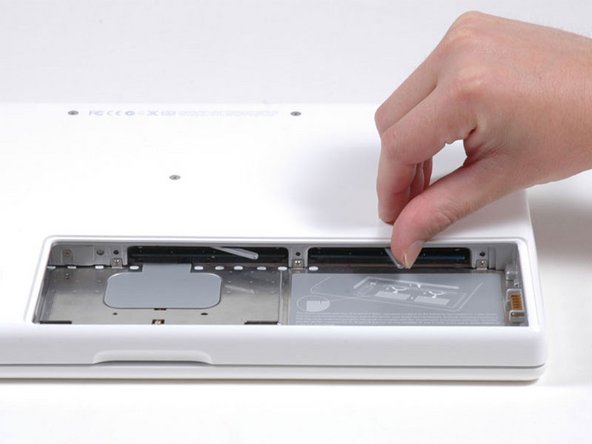
Pak het rechteruiteinde van de L-vormige geheugenafdekking vast en trek deze vervolgens naar u toe totdat deze vrijkomt uit de opening van het batterijcompartiment.
-
Til de geheugenafdekking omhoog en uit de computer.
-
-
-
-
-
-
Trek de metalen hendel naar achteren en schuif de RAM uit het contact.
-
-


Volg onderstaande instructies in omgekeerde volgorde om je apparaat weer in elkaar te zetten.
Annuleren: ik heb deze handleiding niet afgemaakt.
456 andere personen hebben deze handleiding voltooid.
Met dank aan deze vertalers:
100%


Deze vertalers helpen ons de wereld te repareren! Doe je mee?
Begin met vertalen ›

19Gids Commentaar
another great tutorial ~ this was very easy, took maybe 10 minutes max, and now i have a noticeably faster computer. i agree with the previous comment that you need to push the new ram in rather firmly.
Success! Fifth time was the charm! I tried to move up from the original 2x1Gb RAM configuration in my MacBook 6.4 Ghz Core 2 Duo to 6 Gb RAM (1x4 Gb + 1x2 Gb, all from iFixit). Followed instructions exactly after grounding myself several times etc, put the 4Gb module on the left and 2 Gb on the right but got the dreaded "three beep." Tried re-installing w/ the 4Gb module on the right--no joy. Tried re-installing old 1+1; no problem, so obviously I was seating the modules correctly. Fourth time: Just installed the new 2 GB and left on of the old 1 Gb--success! The 4 Gb module seemed to be the problem. Tried one more time--attempt number FIVE. Put the 4 Gb back in for the third time (in place of one of the old 1 Gb of course--SUCCESS. I heard a different click this time too. Anyway--I now have six times the RAM I originally had installed--Yea! Thanks, iFixit! Now, I'll work in my iMac!
someone told me that the macbook 2,1 could take 4 gb ram but only make use of 3 gb.... ?
can someone verify if this is true ?? and is it then posible to combine 1gb and 2gb of 2ddr pc5300 ?
