Deze vertaling is door een computer gegenereerd en is nog niet door iemand nagekeken. Spreek je deze taal? Bekijk het hier.
Inleiding
Het verwijderen van het RAM-geheugen van de mid 2010 Mac mini is een eenvoudige taak waarvoor geen gereedschap nodig is.
Wat je nodig hebt
-
-
-
Plaats uw duimen in de uitsparingen in de onderkap.
-
Draai de onderkap tegen de klok in totdat de witte stip op de onderkap is uitgelijnd met de ring op de behuizing.
 Vraag FixBot
-
-
-
-
Kantel de mini voldoende om de onderklep uit de buitenbehuizing te laten vallen.
-
Verwijder de onderklep en leg deze opzij.
-
-
-
-
-
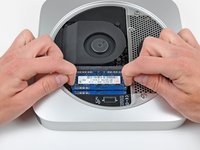
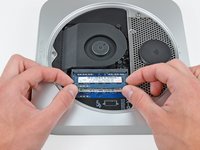
Maak de vergrendellipjes aan weerszijden van de RAM chip los door beide lipjes tegelijkertijd van de RAM af te duwen.
-
Nadat de RAM chip omhoog is gekomen, trek je deze recht uit het stopcontact.
-
-


Volg deze instructies in omgekeerde volgorde om uw apparaat weer in elkaar te zetten.
Annuleren: ik heb deze handleiding niet afgemaakt.
101 andere personen hebben deze handleiding voltooid.

15Gids Commentaar
Do the RAM chips have to be paired, or could I replace a one gig bar with a 4 gig bar?
Thanks for any hints!
They don't need to be paired, although that is the optimum. Just remember, it is best to make sure they are the same speed, or the Mac will just operate both RAMs at the speed of the slowest stick. For example, if you have 2x 1GB PC8500 sticks in there, and you replace one of them with a 4GB PC10600 stick (fastest speed this Mac Mini will run) you will get a benefit form the extra memory, but not the full speed upgrade as both RAMs will operate at the speed of the 8500 stick. Does that make sense? So replacing both with 2x 2GB PC10600 will give you better performance.
This Mac Mini will run PC10600 RAM sticks, although I believe only 4GB per slot.
