Inleiding
You will be shown step by step how to disassemble the device down to where the battery is located. From here we will show you how to replace the battery and then reassemble the device.
Wat je nodig hebt
-
-
-
Use the plastic opening tool to pull the screen away from the back cover.
 Vraag FixBot
-
-
-
-
Once you have seperated the back plate and the screen from each other like so, you will then begin to lift the battery peeling it off of its sticky pads.
-
-
-
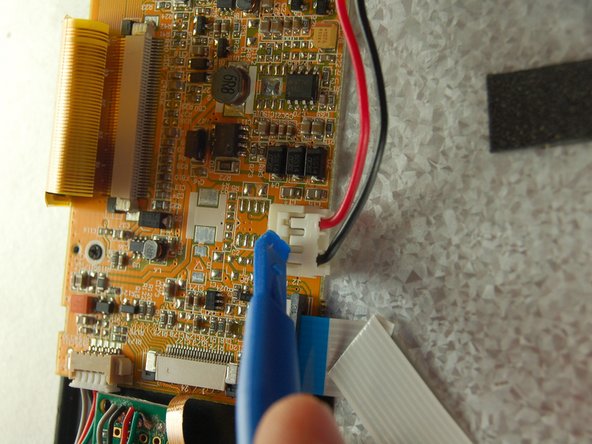
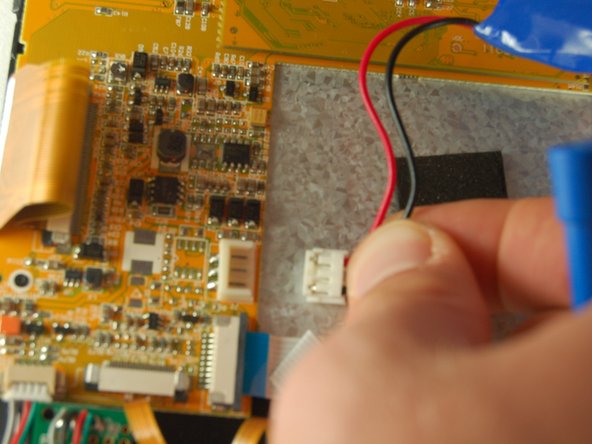
Unplug the battery at the plug indicated by the plastic opening tool. (The best way to do this is to place a finger on both sides of the plug and pull out gently) Once you have removed the old battery, plug the new battery into the same plug the old one came from.
-
-


To reassemble your device, follow these instructions in reverse order.

Team

Texas Tech, Team 38-1, Bennett Fall 2016 Lid van Texas Tech, Team 38-1, Bennett Fall 2016
TTU-BENNETT-F16S38G1
3 Leden
4 handleidingen geschreven
