Ga door naar hoofdinhoud
Word lid van de reparatiegemeenschap - Account aanmaken

Logitech UE MegaBoom Power Button Replacement

Wat je nodig hebt

    1. Logitech UE MegaBoom Power Button Replacement, Outer Mesh: stap 1, afbeelding 1 van 3 Logitech UE MegaBoom Power Button Replacement, Outer Mesh: stap 1, afbeelding 2 van 3 Logitech UE MegaBoom Power Button Replacement, Outer Mesh: stap 1, afbeelding 3 van 3
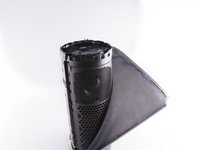
      • Locate the ends of the speaker.

      • Put a plastic opening tool in-between the rubber end and the mesh.

      • Apply a upward force in order to pry open the end.

      • Apply this procedure to the other side as well.

      • Will take force.

      • Using metal tools may permanently mar your device.

      Vraag FixBot

      Voeg opmerking toe

    2. Logitech UE MegaBoom Power Button Replacement: stap 2, afbeelding 1 van 3 Logitech UE MegaBoom Power Button Replacement: stap 2, afbeelding 2 van 3 Logitech UE MegaBoom Power Button Replacement: stap 2, afbeelding 3 van 3
      • Take the Jimmy and pry up the rubber strip that has the volume buttons on it.

      • You will hear clicks as it pries up, don't worry.

      • Remove all the rubber you pried off.

      Vraag FixBot

      Voeg opmerking toe

    3. Logitech UE MegaBoom Power Button Replacement: stap 3, afbeelding 1 van 2 Logitech UE MegaBoom Power Button Replacement: stap 3, afbeelding 2 van 2
      Gereedschap gebruikt in deze stap:
      Tweezers
      $4.99
      • Use tweezers to lift end of plastic retainer on edge of mesh out of its channel.

      • Work the plastic retainer out of the channel all the way around the speaker.

      • Be gentle, it is easy to damage the fabric.

      • Repeat for other side.

      Vraag FixBot

      Voeg opmerking toe

    1. Logitech UE MegaBoom Power Button Replacement, Power Button: stap 4, afbeelding 1 van 2 Logitech UE MegaBoom Power Button Replacement, Power Button: stap 4, afbeelding 2 van 2
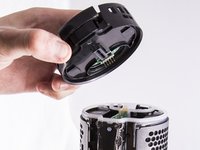
      • Locate the end of the speaker which contains the power button.

      • The circuit board which contains the power button should be visible.

      • Grasp the outer rim of this end cap and pull in an upward motion.

      • This might require some force.

      Vraag FixBot

      Voeg opmerking toe

    2. Logitech UE MegaBoom Power Button Replacement: stap 5, afbeelding 1 van 1
      • Insert a opening tool between the circuit board and one of the black clips which is holding the board in place.

      • Using the opening tool pry up on the clip allowing the board to be freed. Pry up on the second clip to fully release the board.

      • Using your fingers lift the board out of place.

      Vraag FixBot

      Voeg opmerking toe

Conclusie

To reassemble your device, follow these instructions in reverse order.

Annuleren: ik heb deze handleiding niet afgemaakt.

Één andere persoon heeft deze handleiding voltooid.

Oscar Ambriz

Lid sinds: 09/27/17

978 Reputatie

6 handleidingen geschreven

Team

Cal Poly, Team S9-G2, Banghart Fall 2017 Lid van Cal Poly, Team S9-G2, Banghart Fall 2017

CPSU-BANGHART-F17S9G2

4 Leden

30 handleidingen geschreven

3Gids Commentaar

Will it still be waterproof after repairing?

TechBrush - Antwoord Deel

that would be a negative unless you really know what you are doing and can waterproof it

Justin Doubikin - Antwoord Deel

nice piece. i was able to follow the guide and got it right taking out the board. please where can one purchase the power button board. thanks

tony - Antwoord Deel

Voeg opmerking toe

Weergavestatistieken:

Afgelopen 24 uren: 2

Afgelopen 7 dagen: 16

Afgelopen 30 dagen: 67

Altijd: 5,475