Deze vertaling is door een computer gegenereerd en is nog niet door iemand nagekeken. Spreek je deze taal? Bekijk het hier.

Logitech M171 muislaser repareren

Maimlian en een andere bijdrager
Voor het laatst geüpdatet op 16 aug 2026
Bekeken: 7,6K
Statistieken weergeven:
- Afgelopen 24 uur:
- 9
- Afgelopen 7 dagen:
- 61
- Afgelopen 30 dagen:
- 225
- Altijd:
- 7.581
Commentaar: 6
2 opmerkingen over de stappen, 4 opmerkingen op de handleiding.
Bekijk de opmerkingen bij de handleidingVoltooid: 3 4
3 mensen hebben deze handleiding als "voltooid" gemarkeerd. Ben jij de volgende?
4 personen hebben deze handleiding als "voltooid" gemarkeerd. Een daarvan ben jij—lekker bezig!
Favorieten: 0 1
Niemand heeft deze handleiding gemarkeerd als favoriet of volgt de handleiding. Ben jij de eerste?
1 persoon heeft deze handleiding als favoriet gemarkeerd (en blijft daarmee op de hoogte van meldingen)—dat ben jij!
Opsommingstekens!
Betere coördinatie met markeringen en kleur/type bullet points om deze handleiding nog duidelijker te maken!
Behoeft meer afbeeldingen
Een paar extra plaatjes zouden de procedure in deze handleiding glashelder maken.
Door de gemeenschap gemaakte handleiding
Deze handleiding is gemaakt door een enthousiasteling uit de gemeenschap, en niet door de iFixit-stafleden.
Inleiding
Ga naar stap 1 ↓In deze handleiding laten we je zien hoe je de niet-werkende laser van je Logitech M171-muis repareert.
-
-
-
Verwijder de plastic kap aan de onderkant van de muis
 Vraag FixBot
-
-
-
De batterij en de draadloze sleutel verwijderen
-
-
-
-
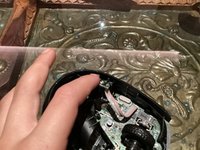
Reinig de sensor met een met alcohol bevochtigd doekje
-
-
-
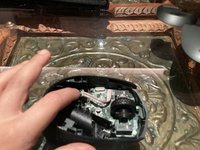
Plaats de voorplaat op de muis en druk deze naar beneden totdat deze vastklikt.
-
-
-
Installeer de accu, de USB-sleutel en de achterbehuizing en je bent klaar
-
-




Je bent klaar. Bedankt voor het voltooien van deze handleiding.
Annuleren: ik heb deze handleiding niet afgemaakt.
3 andere personen hebben deze handleiding voltooid.

4Gids Commentaar
Frying the darker plastic cover open without damaging it is near impossible. I have a problem with my mouse wheel and I don't know how to lubricate it or fix the sensor. Can someone help with that?
These are bad instructions, the top is released with 3 clips accessible under the battery cover, prising it off from above will break those clips. It can be hard to work out where the clips are and how to release them, but there are 3 one on each side and on under the battery. Aside from that the only other retention is a couple of hooks on the mouse buttons.
Agree that prizing the top off like this is going to damage it! Maybe my mouse, being blue on top, and black on bottom made this easier to spot, but it was very easy for me to see the three clips on the bottom. Hopefully anyone who wants to open theirs will see your comment and not use the opening tool like this.
es el modelo mas cercano que tengo del m170, porque necesito saber que pasa con la ruedita del ratón, por que bajo y sube, es difícil manejarlo
