Ga door naar hoofdinhoud
Word lid van de reparatiegemeenschap - Account aanmaken

Logitech G602 Motherboard Replacement

Wat je nodig hebt

  1. Logitech G602 Motherboard Replacement, Motherboard: stap 1, afbeelding 1 van 3 Logitech G602 Motherboard Replacement, Motherboard: stap 1, afbeelding 2 van 3 Logitech G602 Motherboard Replacement, Motherboard: stap 1, afbeelding 3 van 3
    • Use a spudger to pry off all 4 mouse feet from under the mouse.

    Vraag FixBot

    Voeg opmerking toe

  2. Logitech G602 Motherboard Replacement: stap 2, afbeelding 1 van 3 Logitech G602 Motherboard Replacement: stap 2, afbeelding 2 van 3 Logitech G602 Motherboard Replacement: stap 2, afbeelding 3 van 3
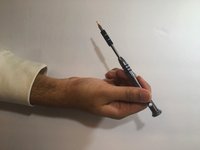
    • Use a Phillips #00 screwdriver to unscrew all 6 screws (3x5mm) from under the mouse feet.

    Vraag FixBot

    Voeg opmerking toe

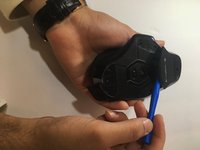
  3. Logitech G602 Motherboard Replacement: stap 3, afbeelding 1 van 2 Logitech G602 Motherboard Replacement: stap 3, afbeelding 2 van 2
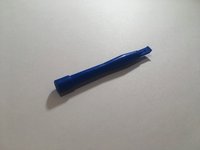
    • Use the blue spudger to prop open the battery port.

    Vraag FixBot

    Voeg opmerking toe

  4. Logitech G602 Motherboard Replacement: stap 4, afbeelding 1 van 1
    • Remove the two AA batteries from the device.

    Vraag FixBot

    Voeg opmerking toe

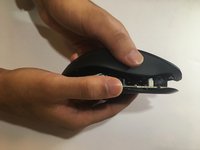
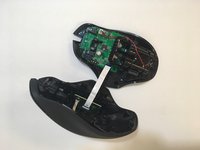
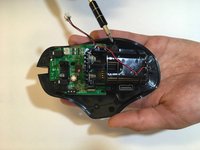
  5. Logitech G602 Motherboard Replacement: stap 5, afbeelding 1 van 2 Logitech G602 Motherboard Replacement: stap 5, afbeelding 2 van 2
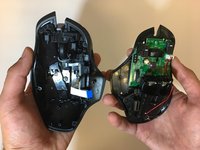
    • Lift the top of the mouse from the base of the mouse (separate mouse in half) to expose the mouse’s internal hardware.

    Vraag FixBot

    Voeg opmerking toe

  6. Logitech G602 Motherboard Replacement: stap 6, afbeelding 1 van 2 Logitech G602 Motherboard Replacement: stap 6, afbeelding 2 van 2
    Gereedschap gebruikt in deze stap:
    Tweezers
    $4.99
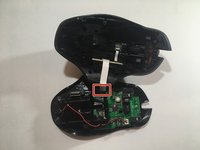
    • Use tweezers to grip and detach the white ribbon cable from the motherboard.

    Vraag FixBot

    Voeg opmerking toe

  7. Logitech G602 Motherboard Replacement: stap 7, afbeelding 1 van 1
    • Use pliers to detach the white plug from the motherboard.

    Vraag FixBot

    Voeg opmerking toe

  8. Logitech G602 Motherboard Replacement: stap 8, afbeelding 1 van 3 Logitech G602 Motherboard Replacement: stap 8, afbeelding 2 van 3 Logitech G602 Motherboard Replacement: stap 8, afbeelding 3 van 3
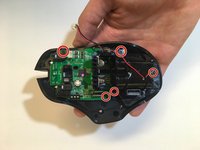
    • Use a Phillips #00 screwdriver to unscrew all 5 screws (3x5mm ) from the battery pack and motherboard.

    Vraag FixBot

    Voeg opmerking toe

  9. Logitech G602 Motherboard Replacement: stap 9, afbeelding 1 van 1
    • Remove the motherboard from the mouse.

    Vraag FixBot

    Voeg opmerking toe

Conclusie

To reassemble your device, follow these instructions in reverse order.

Annuleren: ik heb deze handleiding niet afgemaakt.

10 andere personen hebben deze handleiding voltooid.

5Gids Commentaar

So can I buy a new motherboard? Where? I don’t see one available on this site.

Kat - Antwoord Deel

Hi there Kat. Did you eventually find out where to get a new motherboard for your G602 mouse?

Luke Haasbroek - Antwoord Deel

Jerico, I’ve got a problem with my g602, as the mouse is depleting new batteries energy. I put new batteries on, and they are immediately recognized as “low batteries” by the mouse system, flashing the led indicator as low battery as well. Any thoughts?

Cristian Pereverzieff - Antwoord Deel

I'm having the same problem. Where you able to fix the problem?

Christopher Flynn - Antwoord Deel

Completed successfully.

The hardest part was to find a spare mainboard.

Brendan - Antwoord Deel

Voeg opmerking toe

Weergavestatistieken:

Afgelopen 24 uren: 2

Afgelopen 7 dagen: 24

Afgelopen 30 dagen: 91

Altijd: 12,597