Inleiding
This guide is to show how to replace the paddle assembly on the Logitech G29 Driving Force. The paddle assembly is responsible for shifting the car on the game up or down a gear.
This repair may be necessary if the car on the game is not shifting as that is crucial to this device. Have a good place to organize screws ready before doing this repair as there are a lot to take off. Make sure that the device is properly plugged and that it is still not working before tearing down the device.
Wat je nodig hebt
-
-
Remove the six 32 mm hex screws from the faceplate of the steering wheel.
 Vraag FixBot
-
-
-
Remove the six 10 mm #00 Phillips screws from the back of the steering wheel.
-
-
-
-
Carefully unplug the wire connector from the motherboard of the steering wheel.
-
-
-
Use a Phillips #1 screwdriver to remove the three 30 mm screws that are behind the steering wheel.
-
-
-
Gently pull the paddle assembly off from the base of the device and carefully thread the connector through the hole in the center.
-


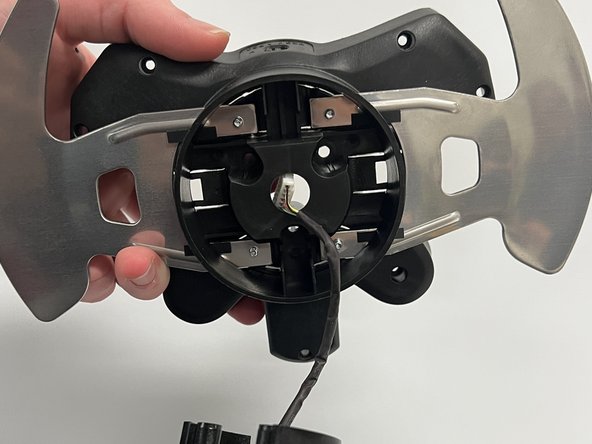
To reassemble your device, follow these instructions in reverse order.
Annuleren: ik heb deze handleiding niet afgemaakt.
5 andere personen hebben deze handleiding voltooid.

Team

Western Carolina University, Team 1-5, Virtue Fall 2022 Lid van Western Carolina University, Team 1-5, Virtue Fall 2022
WCU-VIRTUE-F22S1G5
4 Leden
14 handleidingen geschreven
3Gids Commentaar
Where can I buy the paddle assembly
@kevinjungh90689 have you found this out ? my paddle snapped off and I need to get a new one
@fizaanahmed Perhaps eBay?
