Inleiding
Het verwijderen van het onderpaneel van de Logitech G X56 HOTAS-gashendel is een noodzakelijke stap voor toegang tot interne componenten zoals led-indicatoren, schakelaars of mechanische onderdelen die te maken hebben met de beweging van de gashendel. Als u problemen ondervindt zoals slecht werkende leds, niet-reagerende schakelaars of fysieke weerstand bij het bewegen van de gashendel, kunt u door het onderpaneel te demonteren de betreffende onderdelen inspecteren, onderhouden of vervangen. Deze handleidingsstap helpt u bij het veilig verwijderen van het onderpaneel, waarbij u voorkomt dat de bedrading of interne (kabel)aansluitingen beschadigd raken.
Wat je nodig hebt
-
-
-
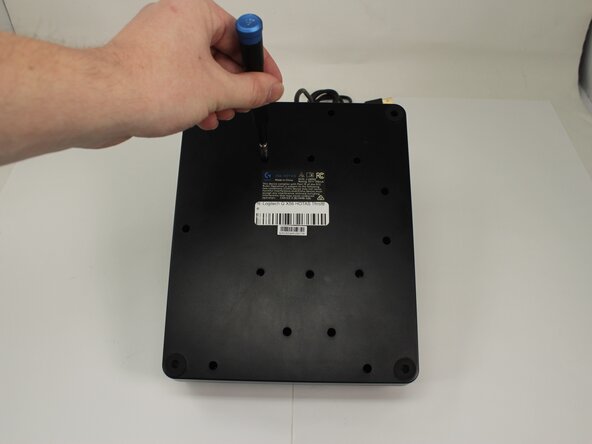
Plaats de throttle ondersteboven met het bodempaneel naar boven gericht.
 Vraag FixBot
-
-
-
-
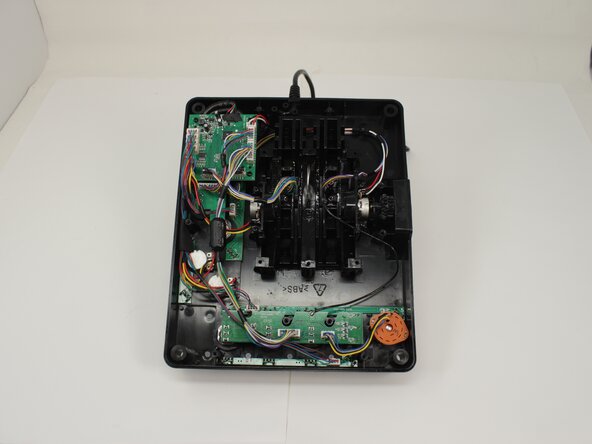
Verwijder de vijftien 13,6 mm Phillips-kruiskopschroeven waarmee het onderpaneel aan de bodemplaat is bevestigd.
-
-




Volg deze instructies in omgekeerde volgorde om uw apparaat weer in elkaar te zetten.
Annuleren: ik heb deze handleiding niet afgemaakt.
Één andere persoon heeft deze handleiding voltooid.
Met dank aan deze vertalers:
100%

Translation Bot helpt ons de wereld te repareren! Doe je mee?
Begin met vertalen ›

Team

University of Memphis, Team 3-5, Sneed Spring 2025 Lid van University of Memphis, Team 3-5, Sneed Spring 2025
UM-SNEED-S25S3G5
4 Leden
77 handleidingen geschreven
