Ga door naar hoofdinhoud
Word lid van de reparatiegemeenschap - Account aanmaken

Lens Replacement

Wat je nodig hebt

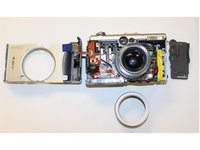
  1. Lens Replacement, Lens: stap 1, afbeelding 1 van 3 Lens Replacement, Lens: stap 1, afbeelding 2 van 3 Lens Replacement, Lens: stap 1, afbeelding 3 van 3
    • Step 1. Remove: Remove the indicated screws from the camera.

    Vraag FixBot

    Voeg opmerking toe

  2. Lens Replacement: stap 2, afbeelding 1 van 3 Lens Replacement: stap 2, afbeelding 2 van 3 Lens Replacement: stap 2, afbeelding 3 van 3
    • Step 2. Remove all the screws: Keep all the screws and disconnect the cables carefully.

    • Step 3. Lift: After removing all the cables, lift up and flip over the PCB.

    Vraag FixBot

    Voeg opmerking toe

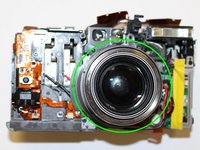
  3. Lens Replacement: stap 3, afbeelding 1 van 2 Lens Replacement: stap 3, afbeelding 2 van 2
    • Step 4. Remove: Remove marked screws on top and around the lent.

    • **Remove all the parts, be aware that there are a lot of screws and keep count them a long the way of the dissambley **

    Vraag FixBot

    Voeg opmerking toe

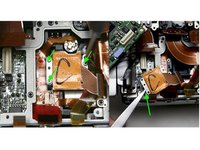
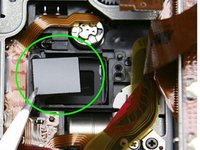
  4. Lens Replacement: stap 4, afbeelding 1 van 2 Lens Replacement: stap 4, afbeelding 2 van 2
    • Step 5. Carefully remove as much of the glue as possible before proceeding to the next step.

    • Step 6. Remove the marked focus spacers.

    • Place a bead of silicone adhesive on each side of the ir filter to fix it in position and allow to cure.

    Vraag FixBot

    Voeg opmerking toe

Conclusie

To reassemble your device, follow these instructions in reverse order.

Annuleren: ik heb deze handleiding niet afgemaakt.

Marina Bayardo

Lid sinds: 10/22/15

251 Reputatie

2 handleidingen geschreven

0Gids Commentaar

Voeg opmerking toe

Weergavestatistieken:

Afgelopen 24 uren: 2

Afgelopen 7 dagen: 12

Afgelopen 30 dagen: 45

Altijd: 1,897