Deze vertaling is door een computer gegenereerd en is nog niet door iemand nagekeken. Spreek je deze taal? Bekijk het hier.
Inleiding
Wanneer er een blauw scherm verschijnt op je Lenovo ThinkPad T495, zie je ergens op het scherm een foutcode en een scanbare QR-code die gebruikt kan worden om te achterhalen wat er mis is met je apparaat. In deze handleiding wordt het gebrek aan geheugen of defect geheugen behandeld en wordt de RAM-schijf vervangen.
Wat je nodig hebt
-
-
-
Gebruik een kruiskopschroevendraaier (#00) om de zes borgschroeven los te draaien.
 Vraag FixBot
-
-
-
Gebruik een iFixit-Openingsgereedschap om onder een van de scharnieren te beginnen met wrikken, tussen de bodemplaat en het chassis, en werk rondom de rand totdat de bodemplaat loskomt.
-
Til de bodemplaat op.
-
-
-
-
-
-
Gebruik je vingers om de twee armen aan elke kant voorzichtig horizontaal naar buiten te trekken totdat het RAM-geheugen omhoog springt.
-
Pak het RAM-geheugen tussen je vingers vast en trek er voorzichtig aan totdat het uit de poort komt.
-


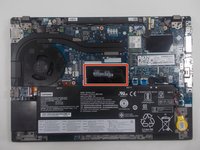
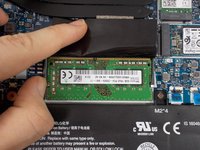


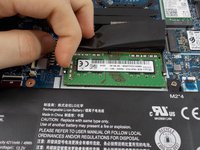
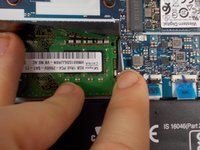
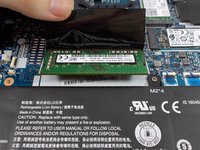
Volg deze instructies in omgekeerde volgorde om je apparaat weer in elkaar te zetten.
Annuleren: ik heb deze handleiding niet afgemaakt.
6 andere personen hebben deze handleiding voltooid.

Team

UMass Dartmouth, Team 1-6, Petersen Spring 2022 Lid van UMass Dartmouth, Team 1-6, Petersen Spring 2022
UMASSD-PETERSEN-S22S1G6
3 Leden
72 handleidingen geschreven
2Gids Commentaar
Hi, can we disable the onboard RAM from BIOS or any tool from the OS?
Big problem here. You cannot remove the RAM that comes with the laptop. The instructions above say "Use your fingers to gently pull the two arms on each side horizontally until the RAM springs up." No, the RAM does not spring up on my T495 because it is soldered! By the time I realized that, I had nearly broken one of the RAM-holding arms. The T495 comes with two RAM slots. On my laptop, one slot had an 8 GM RAM module that came with the laptop. After realizing it cannot be removed, I put in a new 16 GB RAM module on top of the old one. The new module is now held in place by only one of the arms. The other one is dislocated because of the fool I was in trying to pull the arm until the old RAM sprang up. It is soldered, as I learned the hard way.
