Ga door naar hoofdinhoud
Word lid van de reparatiegemeenschap - Account aanmaken

LG Thrill 4G Phone Buttons Replacement

Wat je nodig hebt

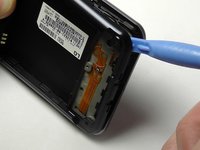
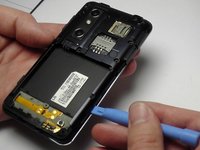
  1. LG Thrill 4G Phone Buttons Replacement, Back Cover Removal: stap 1, afbeelding 1 van 2 LG Thrill 4G Phone Buttons Replacement, Back Cover Removal: stap 1, afbeelding 2 van 2
    • Pry open the back cover by using a fingernail or a plastic opening tool.

    • There is a small notch at the bottom of the cover for easy removal.

    Vraag FixBot
  2. LG Thrill 4G Phone Buttons Replacement, Battery Removal: stap 2, afbeelding 1 van 2 LG Thrill 4G Phone Buttons Replacement, Battery Removal: stap 2, afbeelding 2 van 2
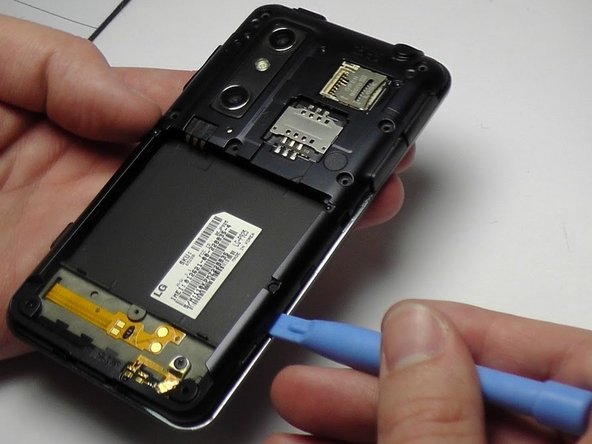
    • Remove the battery from the phone.

    • There is a small ledge located at the bottom of the battery for easy removal.

    Vraag FixBot
  3. LG Thrill 4G Phone Buttons Replacement, Screw Removal: stap 3, afbeelding 1 van 1
    • Remove the three Philips #00 screws from the bottom of the phone.

    • Two 5.5 mm screws

    • One 4 mm screw

    Vraag FixBot
  4. LG Thrill 4G Phone Buttons Replacement, Speaker Removal: stap 4, afbeelding 1 van 2 LG Thrill 4G Phone Buttons Replacement, Speaker Removal: stap 4, afbeelding 2 van 2
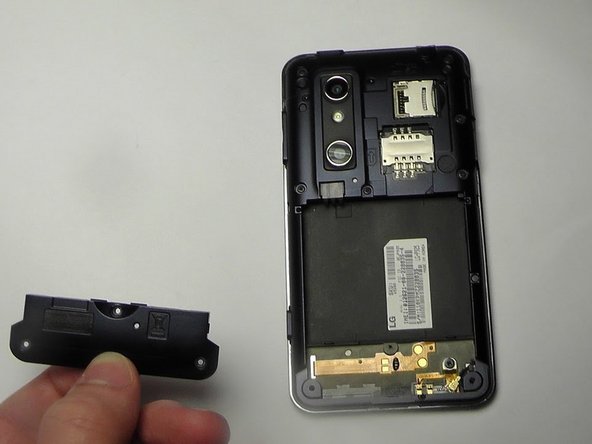
    • Use your finger or opening tool to wedge the speaker out starting at the small notch at the bottom of the phone.

    Vraag FixBot
  5. LG Thrill 4G Phone Buttons Replacement, Buttons: stap 5, afbeelding 1 van 1
    • Remove the three buttons from the side and the top of the phone.

    • Power button

    • Volume button

    • 3D camera button

    Vraag FixBot
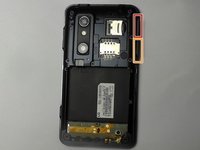
  6. LG Thrill 4G Phone Buttons Replacement: stap 6, afbeelding 1 van 3 LG Thrill 4G Phone Buttons Replacement: stap 6, afbeelding 2 van 3 LG Thrill 4G Phone Buttons Replacement: stap 6, afbeelding 3 van 3
    • Place the plastic opening tool under the bezel at either bottom corner of the HDMI cover.

    • This loosens both the HDMI and USB covers for easy removal.

    • USB Cover

    • HDMI Cover

    Vraag FixBot
  7. LG Thrill 4G Phone Buttons Replacement: stap 7, afbeelding 1 van 1
    • Remove the six Phillips #00 screws within the mid-cover bezel.

    Vraag FixBot
Conclusie

To reassemble your device, follow these instructions in reverse order.

Kenny Richmond

Lid sinds: 01/20/15

260 Reputatie

2 handleidingen geschreven

Team

USF Tampa, Team 1-6, Blackwell Winter 2015 Lid van USF Tampa, Team 1-6, Blackwell Winter 2015

USFT-BLACKWELL-W15S1G6

3 Leden

10 handleidingen geschreven

0Gids Commentaar

Voeg opmerking toe

Weergavestatistieken:

Afgelopen 24 uren: 0

Afgelopen 7 dagen: 6

Afgelopen 30 dagen: 59

Altijd: 838