Ga door naar hoofdinhoud
Word lid van de reparatiegemeenschap - Account aanmaken

LG Optimus L7 P705 Home Button Replacement

Wat je nodig hebt

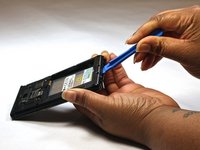
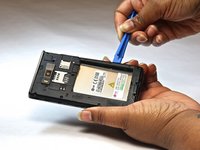
    1. LG Optimus L7 P705 Home Button Replacement, Home Button: stap 1, afbeelding 1 van 2 LG Optimus L7 P705 Home Button Replacement, Home Button: stap 1, afbeelding 2 van 2
      • Insert a plastic opening tool between the seams of the device and pry the back cover away from the phone.

      • Remove the battery and SIM card.

      Vraag FixBot

      Voeg opmerking toe

    2. LG Optimus L7 P705 Home Button Replacement: stap 2, afbeelding 1 van 1
      • Remove the twelve screws using the Phillips 000 screwdriver.

      Vraag FixBot

      Voeg opmerking toe

    3. LG Optimus L7 P705 Home Button Replacement: stap 3, afbeelding 1 van 1
      • Remove bottom plate where the charger port is located.

      Vraag FixBot

      Voeg opmerking toe

    4. LG Optimus L7 P705 Home Button Replacement: stap 4, afbeelding 1 van 2 LG Optimus L7 P705 Home Button Replacement: stap 4, afbeelding 2 van 2
      • Insert a plastic opening tool between the seams of the device and apply some pressure to lift off the cover.

      Vraag FixBot

      Voeg opmerking toe

    5. LG Optimus L7 P705 Home Button Replacement: stap 5, afbeelding 1 van 1
      • Flip over to the face of the device.

      • Lift off the glass screen (display).

      Vraag FixBot

      Voeg opmerking toe

    6. LG Optimus L7 P705 Home Button Replacement: stap 6, afbeelding 1 van 1
      • Remove the home screen button. Replace as needed.

      Vraag FixBot

      Voeg opmerking toe

Conclusie

To reassemble your device, follow these instructions in reverse order.

Annuleren: ik heb deze handleiding niet afgemaakt.

Één andere persoon heeft deze handleiding voltooid.

Bruna

Lid sinds: 10/08/14

525 Reputatie

4 handleidingen geschreven

Team

USF Tampa, Team 9-1, Leahy Fall 2014 Lid van USF Tampa, Team 9-1, Leahy Fall 2014

USFT-LEAHY-F14S9G1

3 Leden

20 handleidingen geschreven

1Gids Commentaar

in the step 2, one red ring is in the wrong position.

The ring in the midle at the left side is in the center of the telephone

Tiago - Antwoord Deel

Voeg opmerking toe

Weergavestatistieken:

Afgelopen 24 uren: 0

Afgelopen 7 dagen: 8

Afgelopen 30 dagen: 24

Altijd: 2,101