Deze vertaling is door een computer gegenereerd en is nog niet door iemand nagekeken. Spreek je deze taal? Bekijk het hier.

LG G4 camera achteraan vervangen

Austin Stratton en 4 andere bijdragers
Voor het laatst geüpdatet op 5 aug 2026
Bekeken: 18K
Statistieken weergeven:
- Afgelopen 24 uur:
- 1
- Afgelopen 7 dagen:
- 15
- Afgelopen 30 dagen:
- 96
- Altijd:
- 17.885
Commentaar: 23
6 comments on steps, 17 guide comments.
Go to guide commentsVoltooid: 18 19
18 mensen hebben deze handleiding als "voltooid" gemarkeerd. Ben jij de volgende?
19 personen hebben deze handleiding als "voltooid" gemarkeerd. Een daarvan ben jij—lekker bezig!
Favorieten: 5 6
5 mensen hebben deze handleiding als favoriet gemarkeerd en volgen deze. Ben jij de volgende?
6 personen hebben deze handleiding als favoriet gemarkeerd (en blijven daarmee op de hoogte van meldingen)—een daarvan ben jij!
Inleiding
Ga naar stap 1 ↓Deze handleiding laat zien hoe je de camera achteraan vervangt.
Wat je nodig hebt


-
-
-
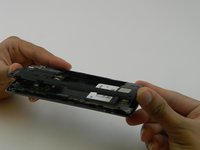
Verwijder het achterpaneel door het plastic Openingsgereedschap in de groef aan de linkerkant van de onderkant van de LG G4 te plaatsen en voorzichtig omhoog te wrikken.
 Vraag FixBot
-
-
-
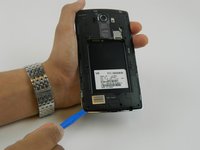
Plaats het plastic Openingsgereedschap aan de onderkant van de accu en til deze op. Verwijder de accu voorzichtig met uw handen.
-
-
-
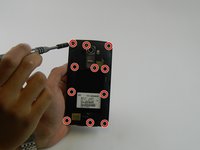
Verwijder de elf 3,9 mm Phillips-kruiskopschroeven aan de achterkant van de telefoon.
-
-
-
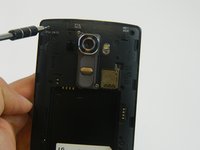
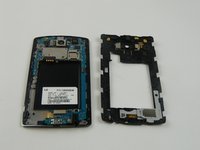
Zodra alle schroeven zijn verwijderd, plaatst u het plastic Openingsgereedschap in de linkerbenedenhoek en wipt u de klep stevig omhoog.
-
Verwijder de klep met uw vingers
-
-
-
-
-
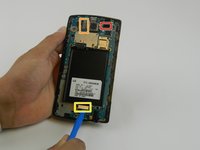
Verwijder de volgende vier drukaansluitingen met de platte kant van een spudger of Openingsgereedschap:
-
Camera vooraan-aansluiting.
-
Camera achteraan-aansluiting.
-
Digitizer-aansluiting.
-
-
-
-
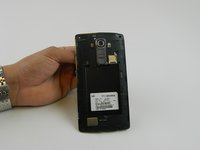
Verwijder het moederbord door het omhoog te tillen met het plastic Openingsgereedschap en uw vingers.
-
-
-
-
-
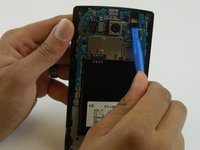
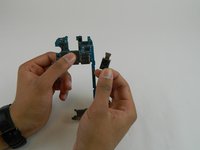
Wig voorzichtig het Openingsgereedschap onder de lintkabel waar de camera achteraan-kabel is aangesloten en til deze langzaam op om de kabel los te maken van het moederbord.
-
-








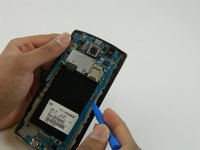
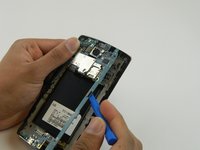

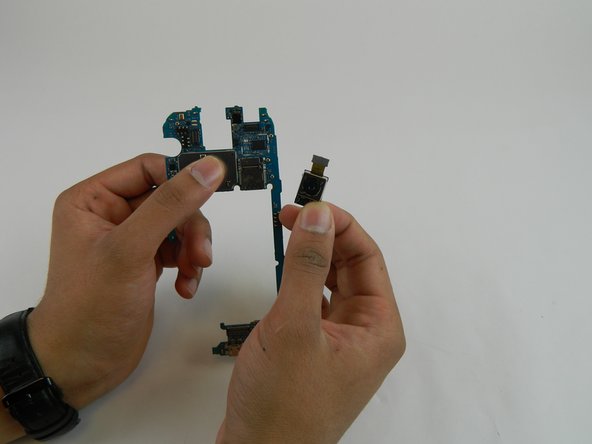
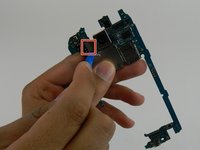
Volg deze instructies in omgekeerde volgorde om je apparaat weer in elkaar te zetten.
Annuleren: ik heb deze handleiding niet afgemaakt.
18 andere personen hebben deze handleiding voltooid.

Team

USF Tampa, Team 16-5, Wollert Fall 2015 Lid van USF Tampa, Team 16-5, Wollert Fall 2015
USFT-WOLLERT-F15S16G5
4 Leden
84 handleidingen geschreven
17Gids Commentaar
I preformed this replacement on my LG G4 and found it to be very easy. However, between Steps 5 and 6, I will note a Warning...My camera was firmly attached to the frame with double sided tape. I simply removed the cable connector for the camera prior to lifting the Motherboard off of the frame (Step 6) and then pried the camera off of the frame using the spudger tool. I was able to reuse the tape on the replacement camera.
If i power on the phone with the module removed, will it cause any shorting or damage?
I just did this last night. Phone works great but now My camera does not work.. Any tips
Also noticed my flash doesn't work anymore. Proximity sensor stopped working and the ability to tap and wake the screen doesn't work either... Any help would be much appreciated
Ordered the part from this website and my phone doesn't recognize the new part. I had to reinstall the old broken camera for it to recognize.
