Inleiding
The LG Chocolate VX 8500
You will learn how to replace the back cover of an LG Chocolate
The back cover of the LG chocolate helps the battery stay in place, and without the back cover the battery can potentially fall out which can create a whole separate problem.
If your device haves a swollen battery or its showing symptoms of a swollen battery make sure you don’t put it on the charger.
Wat je nodig hebt
-
-
Find a sliding button on the lower back side of the device and with your finger, slide it to the left firmly.
-
-
-
-
You will need to use a Phillips #00 screwdriver.
-
Remove the four screws located at the corners beneath the battery.
-
Detach the back case from the phone.
-
-
-
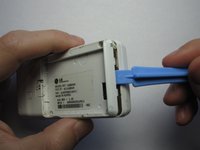
Take the case off by using a plastic opening tool.
-
Continue using the plastic opening tool around the sides of the device.
-
Unhook the eight tabs securing the back cover to the rest of the phone as seen in the second photo.
-
The back speaker will be connected to the motherboard.
-
This must be disconnected in order to remove the case.
-




To reassemble your device, follow these instructions in reverse order. Take your e-waste to an R2 or e-Stewards certified recycler.



Team

Cal Poly, Team 19-46, Regan Winter 2013 Lid van Cal Poly, Team 19-46, Regan Winter 2013
CPSU-REGAN-W13S19G46
4 Leden
22 handleidingen geschreven
