Ga door naar hoofdinhoud
Word lid van de reparatiegemeenschap - Account aanmaken

LG CF360 Front Case Replacement

Wat je nodig hebt

  1. LG CF360 Front Case Replacement, Battery: stap 1, afbeelding 1 van 2 LG CF360 Front Case Replacement, Battery: stap 1, afbeelding 2 van 2
    • On the back of the phone, place your thumb on the three raised bumps and slide the back cover upward.

    Vraag FixBot

    Voeg opmerking toe

  2. LG CF360 Front Case Replacement: stap 2, afbeelding 1 van 1
    • Lift and remove the battery.

    Vraag FixBot

    Voeg opmerking toe

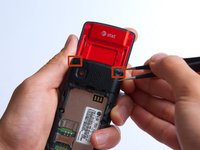
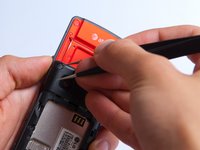
  3. LG CF360 Front Case Replacement, Back Cover: stap 3, afbeelding 1 van 2 LG CF360 Front Case Replacement, Back Cover: stap 3, afbeelding 2 van 2
    Gereedschap gebruikt in deze stap:
    Tweezers
    $4.99
    • Remove the two screw covers at the top of phone with tweezers.

    Vraag FixBot

    Voeg opmerking toe

  4. LG CF360 Front Case Replacement: stap 4, afbeelding 1 van 1
    • Remove the six Phillips #000 (3mm) screws.

    Vraag FixBot

    Voeg opmerking toe

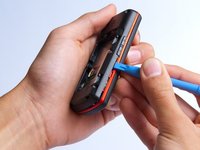
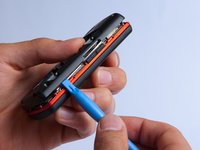
  5. LG CF360 Front Case Replacement: stap 5, afbeelding 1 van 3 LG CF360 Front Case Replacement: stap 5, afbeelding 2 van 3 LG CF360 Front Case Replacement: stap 5, afbeelding 3 van 3
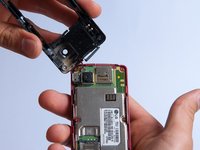
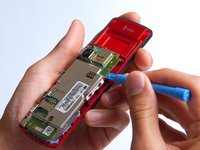
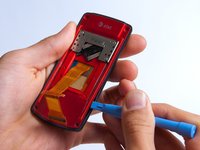
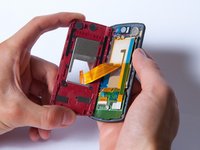
    • Use the plastic opening tool to pry the back cover off. Insert the tool between the back cover and red mid section and go around the entire phone.

    • The plastic side buttons fall out when you take the back cover off.

    • The back cover is connected to the speaker by red and black wires.

    Vraag FixBot

    Voeg opmerking toe

  6. LG CF360 Front Case Replacement: stap 6, afbeelding 1 van 1
    • Use the tweezers to remove the red and black wires connecting the speaker to the green motherboard by pinching the sides of the plastic base near the motherboard.

    • Set the back cover with the speaker aside.

    Vraag FixBot

    Voeg opmerking toe

  7. LG CF360 Front Case Replacement, Motherboard: stap 7, afbeelding 1 van 2 LG CF360 Front Case Replacement, Motherboard: stap 7, afbeelding 2 van 2
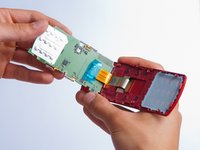
    • Use the plastic opening tool to gently lift the snapped-in motherboard from the front panel.

    • An orange ribbon from the LCD is connected to the underside of the motherboard, so do not force the motherboard from the rest of the phone yet.

    Vraag FixBot

    Voeg opmerking toe

  8. LG CF360 Front Case Replacement: stap 8, afbeelding 1 van 1
    • Gently remove the blue transparent tape from the connector.

    Vraag FixBot

    Voeg opmerking toe

  9. LG CF360 Front Case Replacement: stap 9, afbeelding 1 van 1
    • With the plastic opening tool, gently pry the LCD connector from the motherboard.

    • Set the motherboard aside.

    Vraag FixBot

    Voeg opmerking toe

  10. LG CF360 Front Case Replacement, Front Case: stap 10, afbeelding 1 van 1
    • Take the front case and unscrew the four Phillips #000 (1mm) screws around the ribbon.

    Vraag FixBot

    Voeg opmerking toe

  11. LG CF360 Front Case Replacement: stap 11, afbeelding 1 van 1
    • Gently pull the orange ribbon from the number pad casing.

    • Set the number pad case to the side once it is detached from the ribbon.

    Vraag FixBot

    Voeg opmerking toe

  12. LG CF360 Front Case Replacement: stap 12, afbeelding 1 van 1
    Gereedschap gebruikt in deze stap:
    Tweezers
    $4.99
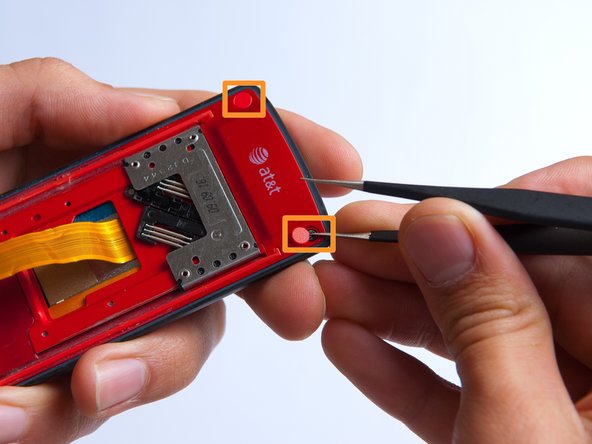
    • Remove the two red sticker screw coverings at the top corners with tweezers.

    Vraag FixBot

    Voeg opmerking toe

  13. LG CF360 Front Case Replacement: stap 13, afbeelding 1 van 1
    • Unscrew the four Phillips #000 (3mm) screws at the corners of the phone.

    Vraag FixBot

    Voeg opmerking toe

  14. LG CF360 Front Case Replacement: stap 14, afbeelding 1 van 2 LG CF360 Front Case Replacement: stap 14, afbeelding 2 van 2
    • Pry the red sliding backing from the front cover by inserting the plastic opening tool in between the two sections and going around the entire phone.

    • Set the red sliding backing and front cover to the side.

    Vraag FixBot

    Voeg opmerking toe

Conclusie

To reassemble your device, follow these instructions in reverse order.

Annuleren: ik heb deze handleiding niet afgemaakt.

Één andere persoon heeft deze handleiding voltooid.

Kathrine Muirhead

Lid sinds: 10/15/13

353 Reputatie

3 handleidingen geschreven

Team

Cal Poly, Team 4-27, Amido Fall 2013 Lid van Cal Poly, Team 4-27, Amido Fall 2013

CPSU-AMIDO-F13S4G27

4 Leden

19 handleidingen geschreven

0Gids Commentaar

Voeg opmerking toe

Weergavestatistieken:

Afgelopen 24 uren: 1

Afgelopen 7 dagen: 5

Afgelopen 30 dagen: 49

Altijd: 693