Ga door naar hoofdinhoud
Word lid van de reparatiegemeenschap - Account aanmaken

Kodak EasyShare M381 Screen Replacement

Wat je nodig hebt

  1. Kodak EasyShare M381 Screen Replacement, Battery: stap 1, afbeelding 1 van 2 Kodak EasyShare M381 Screen Replacement, Battery: stap 1, afbeelding 2 van 2
    • First, press in and slide forward the battery latch as indicated by the arrow.

  2. Kodak EasyShare M381 Screen Replacement: stap 2, afbeelding 1 van 1
    • Press down on battery until you hear a click and release it. Battery should easily slide out.

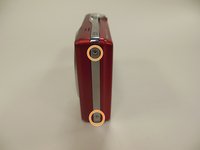
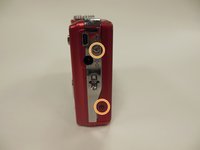
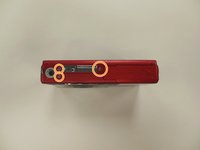
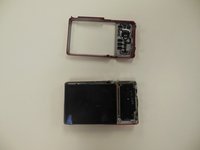
  3. Kodak EasyShare M381 Screen Replacement, Back Panel Frame: stap 3, afbeelding 1 van 3 Kodak EasyShare M381 Screen Replacement, Back Panel Frame: stap 3, afbeelding 2 van 3 Kodak EasyShare M381 Screen Replacement, Back Panel Frame: stap 3, afbeelding 3 van 3
    • Remove the 3.9 mm frame screws using a Phillips #00 screwdriver.

    • Using a magnetized surface to keep from losing screws may be very helpful.

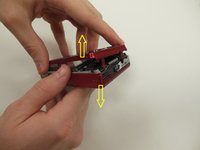
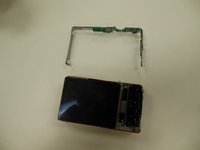
  4. Kodak EasyShare M381 Screen Replacement: stap 4, afbeelding 1 van 2 Kodak EasyShare M381 Screen Replacement: stap 4, afbeelding 2 van 2
    • Using both hands, carefully pull the frame apart from the camera.

  5. Kodak EasyShare M381 Screen Replacement, Screen: stap 5, afbeelding 1 van 1
    • Remove the two 3.85 mm screws on the bottom right of the camera, as indicated.

  6. Kodak EasyShare M381 Screen Replacement: stap 6, afbeelding 1 van 1
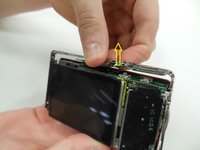
    • Remove dial button located on top of camera, by gently pulling up.

  7. Kodak EasyShare M381 Screen Replacement: stap 7, afbeelding 1 van 2 Kodak EasyShare M381 Screen Replacement: stap 7, afbeelding 2 van 2
    • Starting at one side, carefully work the chrome frame off of the camera itself.

    • Be careful not to disturb the shutter or flash buttons on top of the camera.

  8. Kodak EasyShare M381 Screen Replacement: stap 8, afbeelding 1 van 1
    • On the right side of the camera, locate and remove the two 3.25 mm screws as highlighted.

  9. Kodak EasyShare M381 Screen Replacement: stap 9, afbeelding 1 van 3 Kodak EasyShare M381 Screen Replacement: stap 9, afbeelding 2 van 3 Kodak EasyShare M381 Screen Replacement: stap 9, afbeelding 3 van 3
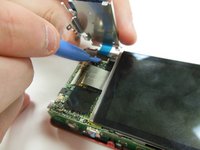
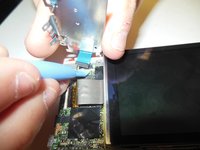
    • Carefully lift the motherboard panel up, pulling towards the left. Make sure you do not rip the blue ribbon.

    • Using a plastic opening tool, gently lift up on the ribbon fastener until it is in an upright position.

    • Slide panel away from camera.

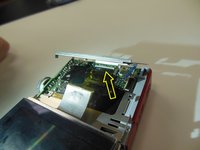
  10. Kodak EasyShare M381 Screen Replacement: stap 10, afbeelding 1 van 2 Kodak EasyShare M381 Screen Replacement: stap 10, afbeelding 2 van 2
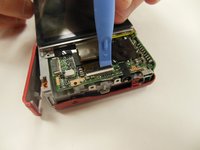
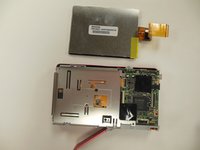
    • Using a plastic opening tool, gently lift ribbon clamp as indicated to remove the screen ribbon from the motherboard.

    • Screen should now be detached. Gently lift it away from the base of the camera.

Conclusie

To reassemble your device, follow these instructions in reverse order.

0Gids Commentaar

Voeg opmerking toe

Weergavestatistieken:

Afgelopen 24 uren: 0

Afgelopen 7 dagen: 1

Afgelopen 30 dagen: 18

Altijd: 706