Wat je nodig hebt
-
-
-
-
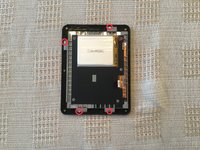
Remove the four screws from the mother board.
-
Remove the screen connector and the battery connector.
-
Remove the micro SD card.
-
Remove the motherboard from the chassis.
-


 Vraag FixBot



Annuleren: ik heb deze handleiding niet afgemaakt.
3 andere personen hebben deze handleiding voltooid.

9Gids Commentaar
Just a quick note, I noticed that the SD card in the teardown is a 4gb one. The Kobo Mini has only 2gb of storage. There's just under 2gb of unpartitioned space. You can use a partition manager to extend out the last partition to fill the card, and get close to 4gb of space.
There's a guide over on Mobile Read: https://www.mobileread.com/forums/showth...
Yes I think
Thanks for the teardown! See https://www.mobileread.com/forums/showth... and https://wiki.mobileread.com/wiki/Kobo_Mi... for more disassembly advice and information about the components used.
I would be concerned about the reliability of the 4GB micro SD cards when extended to use the full unpartitioned space. While I could imagine a situation where 4GB cards were used due to unavailability of 2GB cards, there doesn’t seem to be a good reason to only format them to 2GB unless they were only guaranteed to reliably hold 2GB of data. In other words, I wonder if they were originally 4GB cards that failed some QA test and were only rated for use as 2GB capacity cards.
How do you remove the battery connector? Simply pull? Remove the black little things on the sides in some way?
Yes you just need to pull it from the motherboard
