Deze vertaling is door een computer gegenereerd en is nog niet door iemand nagekeken. Spreek je deze taal? Bekijk het hier.

Kindle Paperwhite 11e generatie uit elkaar halen

mcvtech en een andere bijdrager
Voor het laatst geüpdatet op 16 aug 2026
Bekeken: 18K
Statistieken weergeven:
- Afgelopen 24 uur:
- 40
- Afgelopen 7 dagen:
- 232
- Afgelopen 30 dagen:
- 867
- Altijd:
- 17.746
Commentaar: 15
6 comments on steps, 9 guide comments.
Go to guide commentsVoltooid: 16 17
16 mensen hebben deze handleiding als "voltooid" gemarkeerd. Ben jij de volgende?
17 personen hebben deze handleiding als "voltooid" gemarkeerd. Een daarvan ben jij—lekker bezig!
Favorieten: 1 2
1 persoon heeft deze handleiding als favoriet gemarkeerd en volgt deze. Ben jij de volgende?
2 personen hebben deze handleiding als favoriet gemarkeerd (en blijven daarmee op de hoogte van meldingen)—een daarvan ben jij!
Door de gemeenschap gemaakte handleiding
Deze handleiding is gemaakt door een enthousiasteling uit de gemeenschap, en niet door de iFixit-stafleden.
Inleiding
Ga naar stap 1 ↓Dit apparaat is verrassend makkelijk te openen - alleen maar clips! Hoera! Ik wilde de aftrap geven met de eerste reparatiehandleiding, zodat anderen door kunnen gaan met het maken van reparatiehandleidingen. Het eerste deel is altijd het lastigst als je niet weet waar je aan begint, maar probeer het rustig en voorzichtig; je hebt het in een mum van tijd open!
Wat je nodig hebt
Gereedschap


-
-
-
Gebruik een openingsgereedschap in de vorm van een gitaarpick en/of zwarte spudger om bij een van de hoeken te beginnen en de achterbehuizing los te maken van het scherm. Zodra de hoek los is, zult u merken dat u de achterkant kunt loswrikken en uw pick naar de volgende hoek kunt schuiven.
 Vraag FixBot
-
-
-
Nu een of meer hoeken los zijn, kun je ze bijna met de hand loswrikken, maar voor de veiligheid en om het plastic niet te breken, kun je het beste met het Openingsgereedschap langs elke hoek blijven gaan (zie de foto van de geopende behuizing voor het type clip)
-
-
-
Ah, die heerlijk open Kindle... voelt goed. Makkelijker dan we dachten. Geen rommelige lijmresten. En geen kabels aan de achterbehuizing, gewoon losklikken, losklikken... klik, klik, klik.
-
-
-
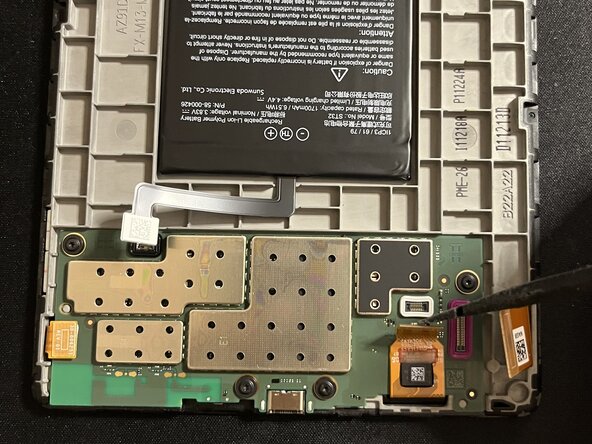
Welke reparatie je ook van plan bent, begin altijd met het loskoppelen van de batterij. Het zwarte reparatiewerktuig is hierbij je beste vriend. Succes.
-
-
-
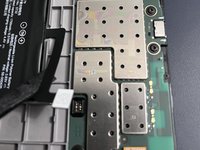
Til voorzichtig alle lintkabels van de printplaat. Een plastic of metalen spudger werkt het best. Gebruik ESD-veilig gereedschap.
-
-
-
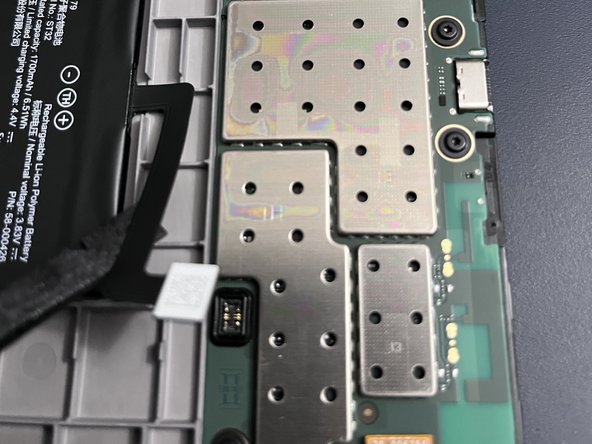
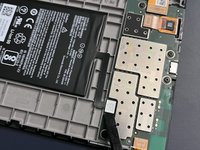
Terwijl je de volgende lintkabel optilt, moet je er rekening mee houden dat het onderste gedeelte vastgelijmd lijkt te zitten; wees voorzichtig.
-
-
-
-
Gebruik een heteluchtpistool rond de randen van het bord, aangezien dit vastgelijmd zit. Besteed extra aandacht aan de linkerbenedenhoek, omdat daar een sterkere zwarte lijmstrip zit en dit de plek is waar je het meeste zult wrikken zodra de lijm verwarmd is. Gebruik een hittebestendige mat en zorg er zoals altijd voor dat je het onderdeel niet oververhit. Werk rustig.
-
-
-
Nadat de randen en de lijm zijn verwarmd, begint u met het loswrikken van de onderste hoek terwijl het apparaat stabiel ondersteund wordt. Neem de tijd en verwarm het zo nodig opnieuw. Gebruik dunne, platte openingpicks (de dunste die u heeft) om de randen geleidelijk los te maken, en pas op dat u de printplaat niet beschadigt. Houd er rekening mee dat u de printplaat vanaf de bovenkant moet optillen, aangezien er nog steeds één kabel aan de printplaat vastzit.
-
-






Volg deze instructies in omgekeerde volgorde om je apparaat weer in elkaar te zetten.
Annuleren: ik heb deze handleiding niet afgemaakt.
16 andere personen hebben deze handleiding voltooid.


9Gids Commentaar
Amazing. Thank you! I see my screen data ribbon is missing a pin (it snapped off) but I still have it. Not sure i can fix it but perhaps can get a new ribbon. Do you know the part number?
La placa esta pegada al marco? No sale facilmente. Te has quedado en como abrirlo pero luego habria que explicar como quitar la bateria o la placa para cambiar la pantalla
looks like the battery is stuck. Did you manage to remove it (I need to change the eink screen) ?
