Inleiding
Deze handleiding laat zien hoe je de KORG Volca Sample opent en legt uit hoe de interne onderdelen werken.
Wat je nodig hebt
-
-
-
Verwijder zeven schroeven.
-
Draai daarna de Volca om. Je kunt nu de twee printplaten verwijderen. Wees voorzichtig met de luidsprekerkabel en de batterijkabel. Op mijn foto is de zwarte kabel al los.
 Vraag FixBot
-
-
-
Dit is de hoofdprocessor. Het is een Cypress FM4-Series MB9BF164L.
-
25Q03213
-
De DAC. AKM4384FT.
-
MV3241 / 49AG3 / P220
-
-
-
-
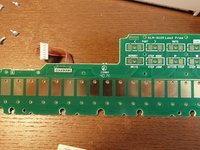
Zo horen werkende knoppen eruit te zien.
-
Als dit niet het geval is, reinig deze onderdelen dan met een wattenstaafje gedoopt in isopropanol.
-
Reinig ook deze onderdelen.
-
-
-
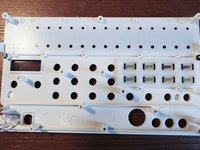
Hier is een volledig overzicht van de printplaat met de Step Touch-knoppen en de FUNC- en WRITE-knoppen
-
-



27Gids Commentaar
Hello, thanks for this post. I have an issue with my volca sample, only sound left is outputting. can you show me where the audio jack output circuit is ? Would be much appreciated. I think it’s a spike made by my soundcard while turnung it on that caused this issue.
Hi,
My Volca Sample LCD is dimmed (knob lights are not working too, however button lights works) after accidentally liquid spill. Everything else is fine. Can you give me some tip about dimmed LCD? Tnx
Hello!! I have an issue with my VS. The Button 7 keeps triggering without no reason and is a pain in the ass. I opened the VS and cleaned all the pads ans circuits but doesn´t seem to do anything. :(
