Ga door naar hoofdinhoud
Word lid van de reparatiegemeenschap - Account aanmaken

JBL Clip 3 Battery Replacement

Wat je nodig hebt

  1. JBL Clip 3 Battery Replacement, Speaker Grill: stap 1, afbeelding 1 van 2 JBL Clip 3 Battery Replacement, Speaker Grill: stap 1, afbeelding 2 van 2
    • Insert the iFixit opening tool between the speaker grill and speaker housing and pry around the entire perimeter of the device until the grill releases.

    • A strong adhesive attaches the grill to the housing, and requires some time and patience to break. Use mild heat to loosen the adhesive if necessary.

    Vraag FixBot

    Voeg opmerking toe

  2. JBL Clip 3 Battery Replacement, Speaker Housing: stap 2, afbeelding 1 van 2 JBL Clip 3 Battery Replacement, Speaker Housing: stap 2, afbeelding 2 van 2
    • Use a Phillips #1 screwdriver to remove the five 6.3 mm screws around the perimeter.

    Vraag FixBot

    Voeg opmerking toe

  3. JBL Clip 3 Battery Replacement: stap 3, afbeelding 1 van 1
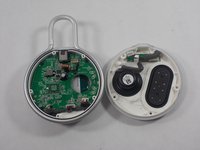
    • Separate the speaker housing from the rest of the body.

    • This requires minimal force; they are not glued together.

    Vraag FixBot

    Voeg opmerking toe

  4. JBL Clip 3 Battery Replacement: stap 4, afbeelding 1 van 2 JBL Clip 3 Battery Replacement: stap 4, afbeelding 2 van 2
    Gereedschap gebruikt in deze stap:
    Tweezers
    $4.99
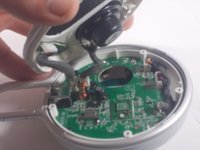
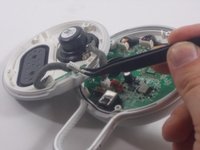
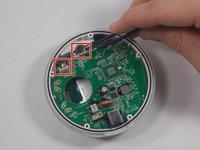
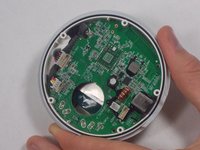
    • Use tweezers to remove the 2 pin and 4 pin connectors from the motherboard.

    Vraag FixBot

    Voeg opmerking toe

  5. JBL Clip 3 Battery Replacement, Carabiner Clip: stap 5, afbeelding 1 van 2 JBL Clip 3 Battery Replacement, Carabiner Clip: stap 5, afbeelding 2 van 2
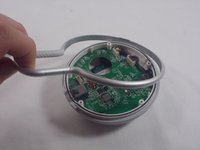
    • Lift the metal carabiner clip from the speaker housing.

    • They are not glued together and should separate easily.

    • There are alignment tabs on the clip so the whole assembly will only reassemble in one orientation.

    Vraag FixBot

    Voeg opmerking toe

  6. JBL Clip 3 Battery Replacement, Speaker Battery: stap 6, afbeelding 1 van 2 JBL Clip 3 Battery Replacement, Speaker Battery: stap 6, afbeelding 2 van 2
    Gereedschap gebruikt in deze stap:
    Tweezers
    $4.99
    • Use a pair of tweezers to lift the two cable connectors from their motherboard sockets.

    • The wires connecting to the battery are not very long, so be careful when removing them.

    Vraag FixBot

    Voeg opmerking toe

  7. JBL Clip 3 Battery Replacement: stap 7, afbeelding 1 van 1
    • Use a Phillips #1 screwdriver to remove the four screws that secure the motherboard.

    Vraag FixBot

    Voeg opmerking toe

  8. JBL Clip 3 Battery Replacement: stap 8, afbeelding 1 van 1
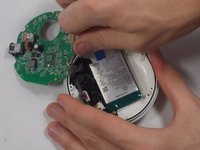
    • Gently lift the motherboard away from the speaker housing.

    • Take care not to damage the soldered connections when lifting the motherboard.

    Vraag FixBot

    Voeg opmerking toe

  9. JBL Clip 3 Battery Replacement: stap 9, afbeelding 1 van 2 JBL Clip 3 Battery Replacement: stap 9, afbeelding 2 van 2
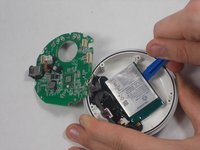
    • Use an opening tool to carefully pry your way around the battery, slowly lifting it off of the epoxy until it fully releases.

    • Avoid puncturing or bending the battery. It is a Lithium cell, so there is a bit of risk involved when completing this step. Be careful and patient, and there will not be any complications.

    • During reassembly, remember to superglue the new battery back into place.

    Vraag FixBot

    Voeg opmerking toe

Conclusie

To reassemble your device, follow these instructions in reverse order.

Annuleren: ik heb deze handleiding niet afgemaakt.

6 andere personen hebben deze handleiding voltooid.

Kyle Montague

Lid sinds: 03/28/22

265 Reputatie

2 handleidingen geschreven

Team

UMass Dartmouth, Team 1-5, Petersen Spring 2022 Lid van UMass Dartmouth, Team 1-5, Petersen Spring 2022

UMASSD-PETERSEN-S22S1G5

3 Leden

10 handleidingen geschreven

3Gids Commentaar

Thanks, but unless I missed something I don't see the recommended battery to replace with (only that it's a 1000mAh). Under "what you need" there's no mention of battery.

B.Bender - Antwoord Deel

Amazon and others sell them. Just Google "JBL Clip 3 battery for sale". Price varies widely.

CalTee - Antwoord Deel

Thank you - very helpful guide! Was able to replace my battery with no issues.

JB Zorg - Antwoord Deel

Voeg opmerking toe

Weergavestatistieken:

Afgelopen 24 uren: 2

Afgelopen 7 dagen: 32

Afgelopen 30 dagen: 167

Altijd: 10,968