Deze vertaling is door een computer gegenereerd en is nog niet door iemand nagekeken. Spreek je deze taal? Bekijk het hier.
Inleiding
Aangezien de micro-usb- / aux-poort-aansluitingen met secondelijm in de witte behuizing zijn vastgelijmd, is het vrijwel onmogelijk om deze te vervangen zonder het hele behuizingsonderdeel te vervangen. Volg deze handleiding om de witte behuizing met de micro-usb- / aux-poort te isoleren en te vervangen.
Wat je nodig hebt
-
-
-
Zorg ervoor dat het apparaat is uitgeschakeld voordat u begint met het demonteren van de luidspreker.
-
Verwijder de rand van de luidspreker met een jimmy of metalen spudger.
 Vraag FixBot
-
-
-
Gebruik de PH1-schroevendraaier om alle vijf de 6 mm lange schroeven uit het batterijdeksel te verwijderen.
-
Verwijder het batterijklepje en leg dit opzij.
-
-
-
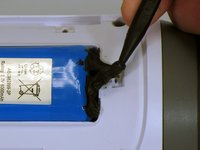
Gebruik een spudger om voorzichtig de vloeibare tape te verwijderen die de batterij in het batterijcompartiment vasthoudt.
-
-
-
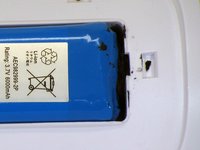
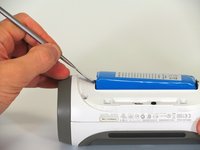
Gebruik een spudger om de batterij uit het apparaat te tillen.
-
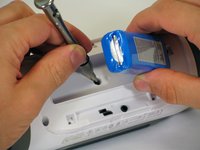
Til het uiteinde van de batterij dat geen draadaansluiting heeft op en verwijder de 16 mm PH2-schroef onder de batterij.
-
-
-
-
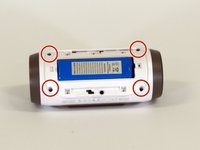
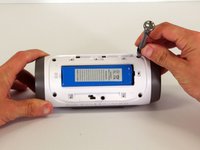
Verwijder de vier 16 mm-schroeven uit de witte plastic behuizing met behulp van de PH2-schroevendraaier.
-
-
-
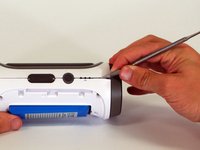
Begin in een hoek van het apparaat waar de behuizing en de zijkant samenkomen en gebruik een puntige metalen spudger om de achterkant van de luidspreker los te wrikken van de lijm die de naad bij elkaar houdt.
-
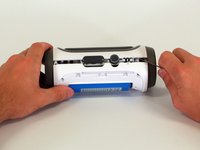
Schuif de metalen spudger langs de naad om de achterkant van de behuizing van de rest van de luidspreker te scheiden.
-
-
-
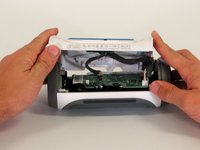
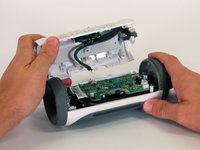
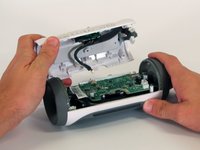
Zodra de achter behuizing open is, koppelt u de drie witte connectoren los van het moederbord.
-
Verwijder de bovenste behuizing.
-
-
-
-
-
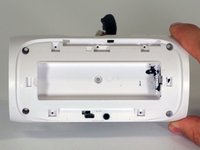
Richt je aandacht op de achterbehuizing die in stap 7 is verwijderd.
-
-
-
Verwijder met een scheermesje de lijm die de batterijkabel op zijn plaats houdt.
-
Gebruik meerdere verticale sneden om stukjes van de lijm te verwijderen.
-
-
-
Om de batterij te verwijderen, trekt u de batterijkabel door het through-hole.
-
-
-
-
-
Plaats de accu in de nieuwe witte behuizing.
-
Volg de stappen in omgekeerde volgorde om het apparaat weer in elkaar te zetten.
-
-












Volg deze instructies in omgekeerde volgorde om uw apparaat weer in elkaar te zetten.
Annuleren: ik heb deze handleiding niet afgemaakt.
14 andere personen hebben deze handleiding voltooid.

Team

Cal Poly, Team 12-4, Lancaster Spring 2015 Lid van Cal Poly, Team 12-4, Lancaster Spring 2015
CPSU-LANCASTER-S15S12G4
2 Leden
48 handleidingen geschreven
21Gids Commentaar
Hi. This is the problem my speaker is having, but all I need to know is where to buy the replacement back. That's certainly something you should have included in your guide.
The purpose of a guide is to show how to fix the device, not obtain parts. I suggest eBay.
Yeah what was the point of this if people can't actually do it. BS
The point is to guide people on the replacement of parts, not obtaining parts. I suggest eBay.
