Deze vertaling is door een computer gegenereerd en is nog niet door iemand nagekeken. Spreek je deze taal? Bekijk het hier.

InFocus LP540 Projector Speakers Replacement

Jorge L Navarro en 10 andere bijdragers
Voor het laatst geüpdatet op 5 okt 2026
Bekeken: 1,1K
Statistieken weergeven:
- Afgelopen 24 uur:
- 1
- Afgelopen 7 dagen:
- 21
- Afgelopen 30 dagen:
- 100
- Altijd:
- 1.064
Commentaar: 0
Niemand heeft een opmerking bij deze handleiding geplaatst. Ben jij de eerste?
Go to guide commentsVoltooid: 0 1
Niemand heeft deze handleiding als "voltooid" gemarkeerd. Ben jij de eerste?
1 persoon heeft deze handleiding als "voltooid" gemarkeerd. Dat ben jij—lekker bezig!
Favorieten: 1 2
1 persoon heeft deze handleiding als favoriet gemarkeerd en volgt deze. Ben jij de volgende?
2 personen hebben deze handleiding als favoriet gemarkeerd (en blijven daarmee op de hoogte van meldingen)—een daarvan ben jij!
Inleiding
Ga naar stap 1 ↓De InFocus LP540 Projector is bedoeld om helder geluid te leveren. Als uw InFocus LP540 Projector vervormd, onderbroken of helemaal geen geluid produceert, gebruik dan deze handleiding om uw audioproblemen te begrijpen en te bepalen of het vervangen van de speakers de beste stap is.
Voordat u deze handleiding gebruikt, moet u eerst problemen oplossen om vast te stellen of het vervangen van de speakers noodzakelijk is. Audioproblemen kunnen worden veroorzaakt door problemen die niets met de speaker te maken hebben, zoals een ingeschakelde mute-functie. Stappen voor probleemoplossing zijn te vinden in deze handleiding van Projector1.com.
Voordat u doorgaat met deze handleiding, moet u ervoor zorgen dat de stekker van uw projector uit het stopcontact is gehaald. Let op: "Stap 2 vereist dat u extra voorzichtig bent wanneer u het deksel optilt: beweeg langzaam en voorzichtig om te voorkomen dat de elektrische strips scheuren."
Deze handleiding bevat stapsgewijze instructies voor het verwijderen van de speakers in uw InFocus LP540 Projector. Er zijn geen speciale vaardigheden nodig; het is net zo eenvoudig als het losdraaien van schroeven en het verwijderen van de twee speakers.
Volgens de handleiding van de InFocus LP540 op Manuallibs.com, hebben de speakers een diameter van 3 inch en 8 Ohm. Dit product is niet langer leverbaar, maar vervangende speakers zijn te vinden op websites zoals Amazon.com.
Wat je nodig hebt
Gereedschap


-
-
-
Draai de projector omhoog en draai hem zo dat de achterpoorten naar u toe wijzen.
-
Verwijder de 7 mm metalen zeskantschroeven met de schroevendraaier.
-
Verwijder de twee zwarte 10 mm schroeven met de T10 Torx-schroevendraaier. De schroeven bevinden zich in het midden van het achterpaneel.
 Vraag FixBot
-
-
-
Verwijder de twee 77mm-schroeven die zich het dichtst bij de poorten van het achterpaneel bevinden met een T10 Torx-schroevendraaier.
-
Verwijder de twee 10mm-schroeven bij de lenszijde met de T10 Torx-schroevendraaier.
-
Draai de projector weer om.
-
-
-
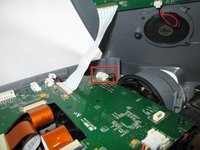
Koppel de bedrading van de luidspreker los van de printplaat door in de zijkanten te knijpen en eraan te trekken.
-
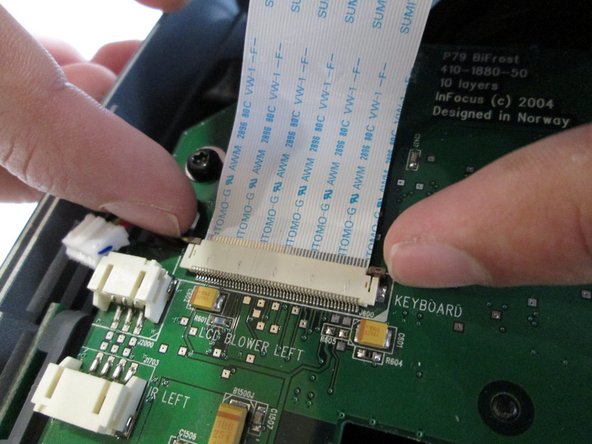
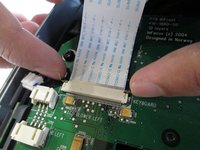
Trek aan de bruine treklipjes aan de zijkanten van de witte plastic lintkabelhouder en trek de lintkabel eruit.
-
-
-
-
Leg de bovenbehuizing van de projector neer.
-
Verwijder de bedrading van de luidspreker uit de witte lipjes.
-
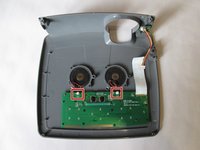
Gebruik een Phillips #0-schroevendraaier om de vier schroeven van 5,5 mm te verwijderen.
-
Til de luidsprekers voorzichtig op om ze te verwijderen.
-
-




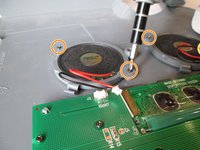
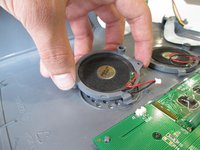
Hermontage: Sluit het speakercompartiment en vervang de lichtkap. Schroef deze weer vast om alle onderdelen te beveiligen.

Team

Cal Poly, Team 13-17, Regan Winter 2014 Lid van Cal Poly, Team 13-17, Regan Winter 2014
CPSU-REGAN-W14S13G17
6 Leden
60 handleidingen geschreven
