Deze vertaling is door een computer gegenereerd en is nog niet door iemand nagekeken. Spreek je deze taal? Bekijk het hier.
Inleiding
Het vervangen of upgraden van het RAM-geheugen van de IBM T43 kan de prestaties aanzienlijk verbeteren.
Wat je nodig hebt
-
-
-
Om de afdekking te verwijderen, moet u de enkele schroef eruit draaien.
-
Draai de schroef los totdat de afdekking loskomt.
-
Til de afdekking bij de rand op en trek deze eraf.
 Vraag FixBot
-
-
-
-
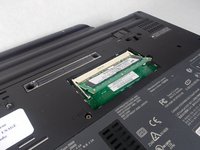
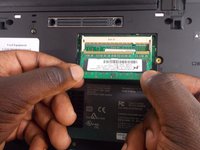
Plaats uw handen op de clips en duw ze naar buiten totdat het RAM-geheugen loskomt
-
-
-
Plaats uw handen op het RAM-geheugen en trek het naar u toe
-
Volg voor vervanging deze stappen in omgekeerde volgorde
-
-


Volg deze instructies in omgekeerde volgorde om uw apparaat weer in elkaar te zetten.
Annuleren: ik heb deze handleiding niet afgemaakt.
3 andere personen hebben deze handleiding voltooid.

Team

UMass Dartmouth, Team S6-G4, Bernier Spring 2018 Lid van UMass Dartmouth, Team S6-G4, Bernier Spring 2018
UMASSD-BERNIER-S18S6G4
4 Leden
60 handleidingen geschreven
1Gids Commentaar
There are two (2) SODIM slots on the T43 - this shows the easiest slot to access. There is a second SODIM slot underneath the keyboard. You will need to remove the palm rest and keyboard to access the second SODIM slot. This is the SODIM slot that comes populated with the 512MB SODIM.
Note you can add a 2GB SODIM in one slot with the 512MB SODIM in the other for a maximum of 2.5GB.
