Ga door naar hoofdinhoud
Word lid van de reparatiegemeenschap - Account aanmaken

HyperX QuadCast S Pop Filter Replacement

  1. HyperX QuadCast S Pop Filter Replacement, Tap-To-Mute Sensor: stap 1, afbeelding 1 van 3 HyperX QuadCast S Pop Filter Replacement, Tap-To-Mute Sensor: stap 1, afbeelding 2 van 3 HyperX QuadCast S Pop Filter Replacement, Tap-To-Mute Sensor: stap 1, afbeelding 3 van 3
    • Set the microphone on a flat surface.

    • Pull each of the support bands upwards and off of the notches to release the microphone from its base.

    • There are four support bands in total, but it does not matter which band you choose to take off first.

    Vraag FixBot

    Voeg opmerking toe

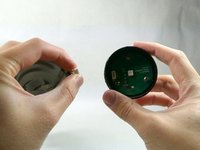
  2. HyperX QuadCast S Pop Filter Replacement: stap 2, afbeelding 1 van 3 HyperX QuadCast S Pop Filter Replacement: stap 2, afbeelding 2 van 3 HyperX QuadCast S Pop Filter Replacement: stap 2, afbeelding 3 van 3
    • Grab ahold of the tap-to-mute Sensor and pull it upwards in a clockwise motion.

    • Be careful not to damage the cable as you remove the top.

    • Once the tap-to-mute sensor detaches from the microphone, you will hear a small "pop."

    Vraag FixBot

    Voeg opmerking toe

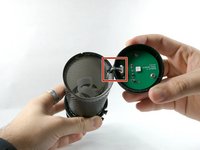
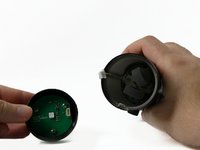
  3. HyperX QuadCast S Pop Filter Replacement: stap 3, afbeelding 1 van 3 HyperX QuadCast S Pop Filter Replacement: stap 3, afbeelding 2 van 3 HyperX QuadCast S Pop Filter Replacement: stap 3, afbeelding 3 van 3
    • Gently unplug the cable, and remove the tap to the Tap-To-Mute sensor from the microphone.

    • The square indicates the location of the cable. This is cable is very small and will require a bit of force to be unplugged.

    Vraag FixBot

    Voeg opmerking toe

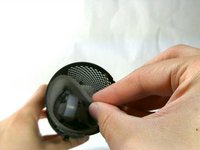
  4. HyperX QuadCast S Pop Filter Replacement, Pop Filter: stap 4, afbeelding 1 van 1
    • Once the Tap-To-Mute sensor has been removed, you will now have access to the pop filter.

    • The pop filter is just the grey foam surrounding the inside of the microphone.

    Vraag FixBot

    Voeg opmerking toe

  5. HyperX QuadCast S Pop Filter Replacement: stap 5, afbeelding 1 van 1
    • The pop filter will be in a fixed position being glued to the wire. Remove glue residue before continuing to remove the pop filter.

    • When you replace the pop filter, remember that you will need to glue it back into place as before.

    Vraag FixBot

    Voeg opmerking toe

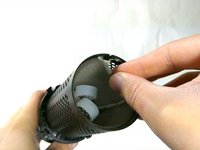
  6. HyperX QuadCast S Pop Filter Replacement: stap 6, afbeelding 1 van 2 HyperX QuadCast S Pop Filter Replacement: stap 6, afbeelding 2 van 2
    • Reach into the microphone and remove the pop filter.

    Vraag FixBot

    Voeg opmerking toe

Conclusie

To reassemble your device, follow these instructions in reverse order.

Annuleren: ik heb deze handleiding niet afgemaakt.

Één andere persoon heeft deze handleiding voltooid.

Nathan Arruda

Lid sinds: 10/25/22

765 Reputatie

6 handleidingen geschreven

Team

UMass Dartmouth, Team 4-1, Sinclaire Fall 2022 Lid van UMass Dartmouth, Team 4-1, Sinclaire Fall 2022

UMASSD-SINCLAIRE-F22S4G1

5 Leden

9 handleidingen geschreven

3Gids Commentaar

"Grab ahold of the tap-to-mute Sensor and pull it upwards in a clockwise motion."

This part is keyed. It literally cannot be pulled in any rotational motion...

Kyle Villalovos - Antwoord Deel

Is there a place where you recomend i can get a replacement peice of foam for the pop filter. I cant find one anywhere online.

Liam Henesy - Antwoord Deel

did you happen to find anything?

Kamen C-Swartz - Antwoord Deel

Voeg opmerking toe

Weergavestatistieken:

Afgelopen 24 uren: 2

Afgelopen 7 dagen: 30

Afgelopen 30 dagen: 112

Altijd: 4,425