Deze vertaling is door een computer gegenereerd en is nog niet door iemand nagekeken. Spreek je deze taal? Bekijk het hier.
Inleiding
De Honda Civic 2016 gebruikt een Keyless Remote om de motor te starten, naast een normaal vergrendelings-/ontgrendelingsmechanisme. Zonder batterij kan de auto niet worden gestart. Deze handleiding laat zien hoe je de lithiumbatterij in de Honda Civic 2016 Keyless Remote vervangt.
Wat je nodig hebt
-
-
-
Zorg dat u een reservebatterij bij de hand heeft. U heeft 1 stuks CR 2032-lithiumbatterij nodig.
-
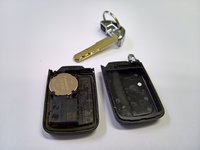
Verwijder de metalen sleutel door de schakelaar aan de achterkant van de afstandsbediening te verschuiven en de sleutel eruit te trekken.
 Vraag FixBot
-
-
-
Nadat u de sleutel hebt verwijderd, ziet u 2 plastic staven. Dit is de plek waar u de afstandsbediening open kunt wippen.
-
De fabrikant raadt aan om een munt te gebruiken, maar elk hard gereedschap of zelfs de sleutel zelf werkt ook.
-
De fabrikant raadt aan om een doekje over uw munt/gereedschap te leggen om te voorkomen dat u deuken in de plastic staven maakt.
-
-
-
-
Nu kun je het voorzichtig openwrikken
-
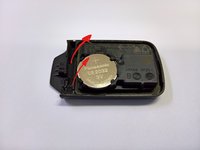
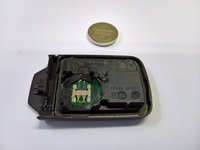
De oude batterij aan de linkerkant verwijderen.
-
Onthoud dat de +-kant van de batterij naar boven gericht is.
-
-
-
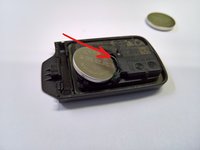
Plaats een nieuwe CR 2032-batterij eerst vanaf de rechterkant en druk de batterij vervolgens naar beneden. Het zou een duidelijk 'klik'-geluid moeten maken.
-
Zorg er nogmaals voor dat de +-kant van de batterij naar boven is gericht.
-
-





Volg deze instructies in omgekeerde volgorde om je apparaat weer in elkaar te zetten.
Annuleren: ik heb deze handleiding niet afgemaakt.
18 andere personen hebben deze handleiding voltooid.


