Ga door naar hoofdinhoud
Word lid van de reparatiegemeenschap - Account aanmaken

Hard Drive

Wat je nodig hebt

  1. Hard Drive, Battery: stap 1, afbeelding 1 van 1
    • Before proceeding, power down your Laptop and remove the power cable.

    • Close the display and lay it on a flat surface, top-side down.

    Vraag FixBot
  2. Hard Drive: stap 2, afbeelding 1 van 1
    • Unlock the battery by sliding the battery lock to the unlock part.

    Vraag FixBot
  3. Hard Drive: stap 3, afbeelding 1 van 1
    • Slide the middle lock to the right and the battery will pop up.

    Vraag FixBot
  4. Hard Drive: stap 4, afbeelding 1 van 1
    • If you want to replace the battery and nothing else then now is the time to do so.

    • Once the battery hatch is unlocked you can now safely remove the battery.

    Vraag FixBot
  5. Hard Drive, Hard Drive: stap 5, afbeelding 1 van 1
    • Use a Philips J1 driver to remove two screws securing the hard drive cover.

    Vraag FixBot
  6. Hard Drive: stap 6, afbeelding 1 van 1
    • If the hard drive is not located here, then it will be located in the next step.

    • Now you can remove, replace or upgrade the hard drive to an SSD if you need to.

    Vraag FixBot
  7. Hard Drive: stap 7, afbeelding 1 van 1
    • If your hard drive was not located in the previous spot or you have two drives then this one is located here.

    • Use a Philips J1 driver to remove eight screws securing the bottom case.

    Vraag FixBot
  8. Hard Drive: stap 8, afbeelding 1 van 1
    • After removing the bottom panel cover, then you should spot the hard drive right here.

    Vraag FixBot
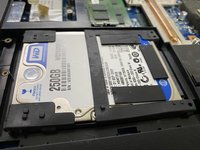
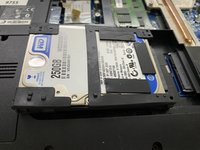
  9. Hard Drive: stap 9, afbeelding 1 van 2 Hard Drive: stap 9, afbeelding 2 van 2
    • While removing the hard drive, try to be gentle.

    • Now you can simply upgrade, replace or remove the hard drive right here. To remove it, push it from the two corners and it should come off like in the next picture.

    Vraag FixBot
Conclusie

To reassemble your device, follow these instructions in reverse order.

Één andere persoon heeft deze handleiding voltooid.

Regome

Lid sinds: 01/20/23

866 Reputatie

7 handleidingen geschreven

0Gids Commentaar

Voeg opmerking toe

Weergavestatistieken:

Afgelopen 24 uren: 1

Afgelopen 7 dagen: 8

Afgelopen 30 dagen: 42

Altijd: 398