Ga door naar hoofdinhoud
Word lid van de reparatiegemeenschap - Account aanmaken

Hannspree Hannspad SN1AT71 Left and Right Speaker Replacement

Wat je nodig hebt

  1. Hannspree Hannspad SN1AT71 Left and Right Speaker Replacement, Back Panel: stap 1, afbeelding 1 van 1
    • Place the tablet screen side up.

    • Make sure the device is turned off to avoid damage.

    Vraag FixBot

    Voeg opmerking toe

  2. Hannspree Hannspad SN1AT71 Left and Right Speaker Replacement: stap 2, afbeelding 1 van 2 Hannspree Hannspad SN1AT71 Left and Right Speaker Replacement: stap 2, afbeelding 2 van 2
    • Use the metal spudger to press an opening between the screen and back cover.

    • The plastic tabs are located on each corner of the back cover.

    • Be careful, as the plastic tabs are delicate.

    Vraag FixBot

    Voeg opmerking toe

  3. Hannspree Hannspad SN1AT71 Left and Right Speaker Replacement: stap 3, afbeelding 1 van 1
    • Wedge the plastic opening tool between the screen and the back panel to prevent re-engagement

    Vraag FixBot

    Voeg opmerking toe

  4. Hannspree Hannspad SN1AT71 Left and Right Speaker Replacement: stap 4, afbeelding 1 van 2 Hannspree Hannspad SN1AT71 Left and Right Speaker Replacement: stap 4, afbeelding 2 van 2
    • Slide the metal spudger around the casing to separate it from the inside of the tablet.

    Vraag FixBot

    Voeg opmerking toe

  5. Hannspree Hannspad SN1AT71 Left and Right Speaker Replacement: stap 5, afbeelding 1 van 2 Hannspree Hannspad SN1AT71 Left and Right Speaker Replacement: stap 5, afbeelding 2 van 2
    • Flip the tablet over so the screen side is down after all the tabs are separated.

    • Remove the back panel by delicately lifting it straight up.

    Vraag FixBot

    Voeg opmerking toe

  6. Hannspree Hannspad SN1AT71 Left and Right Speaker Replacement, Battery: stap 6, afbeelding 1 van 2 Hannspree Hannspad SN1AT71 Left and Right Speaker Replacement, Battery: stap 6, afbeelding 2 van 2
    • Remove the adhesive tape from the power connection cables.

    Vraag FixBot

    Voeg opmerking toe

  7. Hannspree Hannspad SN1AT71 Left and Right Speaker Replacement: stap 7, afbeelding 1 van 3 Hannspree Hannspad SN1AT71 Left and Right Speaker Replacement: stap 7, afbeelding 2 van 3 Hannspree Hannspad SN1AT71 Left and Right Speaker Replacement: stap 7, afbeelding 3 van 3
    Gereedschap gebruikt in deze stap:
    Tweezers
    $4.99
    • Instructions for desoldering can be found on the iFixit website.

    • The soldering iron is hot. It can burn you and it can cause damage to the wires and motherboard.

    • Grab hold of the red wire using the tweezers.

    • Desolder the red wire connection from the motherboard using the tip of the soldering iron.

    • Move the wire connection away from the motherboard.

    • Do not let the red wire connection touch other wires or the motherboard.

    Vraag FixBot

    Voeg opmerking toe

  8. Hannspree Hannspad SN1AT71 Left and Right Speaker Replacement: stap 8, afbeelding 1 van 3 Hannspree Hannspad SN1AT71 Left and Right Speaker Replacement: stap 8, afbeelding 2 van 3 Hannspree Hannspad SN1AT71 Left and Right Speaker Replacement: stap 8, afbeelding 3 van 3
    • Desolder the black and yellow wire connection from the motherboard by following the previous step.

    • When moving the wire connections, do not let the red wire connection touch other wires or the motherboard.

    Vraag FixBot

    Voeg opmerking toe

  9. Hannspree Hannspad SN1AT71 Left and Right Speaker Replacement: stap 9, afbeelding 1 van 3 Hannspree Hannspad SN1AT71 Left and Right Speaker Replacement: stap 9, afbeelding 2 van 3 Hannspree Hannspad SN1AT71 Left and Right Speaker Replacement: stap 9, afbeelding 3 van 3
    • Insert the flat end of the nylon spudger between the battery and the case.

    • The battery is connected to the tablet with an adhesive tape and will come free slowly.

    • Do not puncture or bend the battery while removing. If your battery is swollen, take appropriate precautions.

    Vraag FixBot

    Voeg opmerking toe

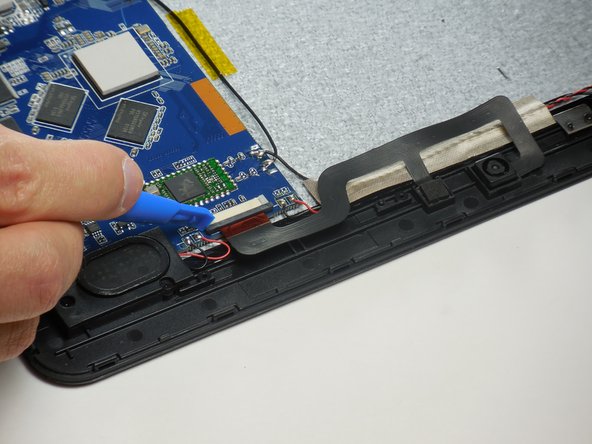
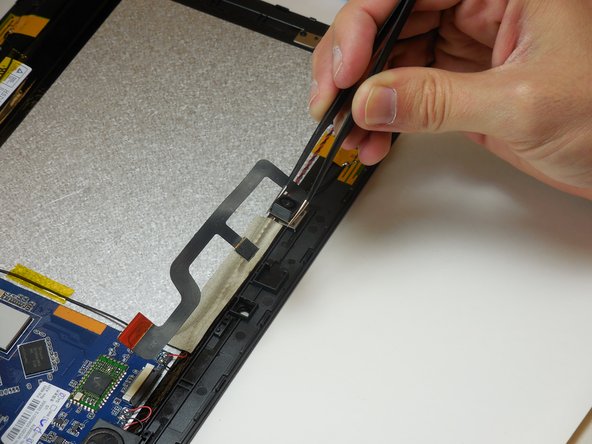
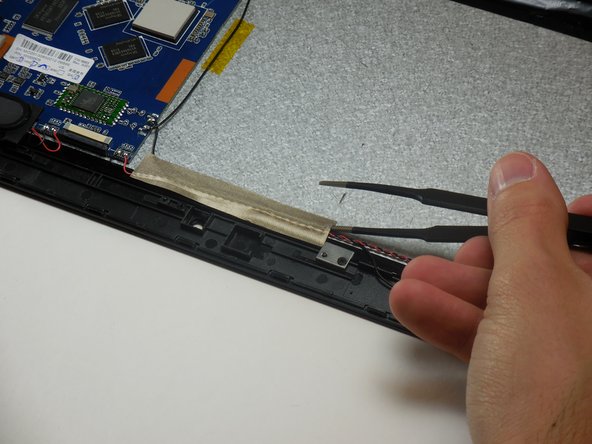
  10. Hannspree Hannspad SN1AT71 Left and Right Speaker Replacement, Front and Rear Camera Replacement: stap 10, afbeelding 1 van 2 Hannspree Hannspad SN1AT71 Left and Right Speaker Replacement, Front and Rear Camera Replacement: stap 10, afbeelding 2 van 2
    • Identify the ribbon connecter attached to the camera and where it connects to the circuit board.

    • The two cameras are connected with one ribbon cable.

    • Zero insertion force connector.

    Vraag FixBot

    Voeg opmerking toe

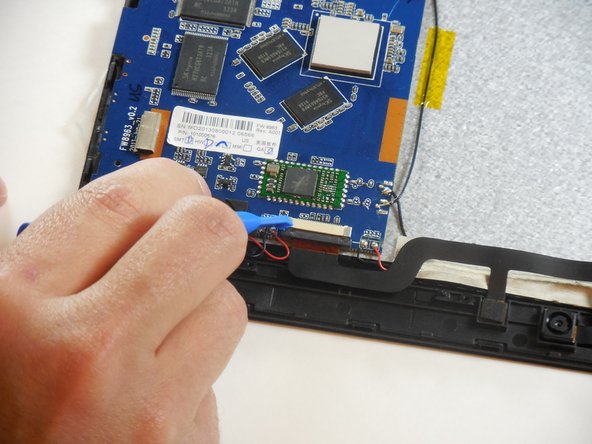
  11. Hannspree Hannspad SN1AT71 Left and Right Speaker Replacement: stap 11, afbeelding 1 van 3 Hannspree Hannspad SN1AT71 Left and Right Speaker Replacement: stap 11, afbeelding 2 van 3 Hannspree Hannspad SN1AT71 Left and Right Speaker Replacement: stap 11, afbeelding 3 van 3
    • Disconnect the sliding zero insertion force (ZIF). Use the plastic opening tool or a fingernail to slide the tab out, then pull the cable out.

    Vraag FixBot

    Voeg opmerking toe

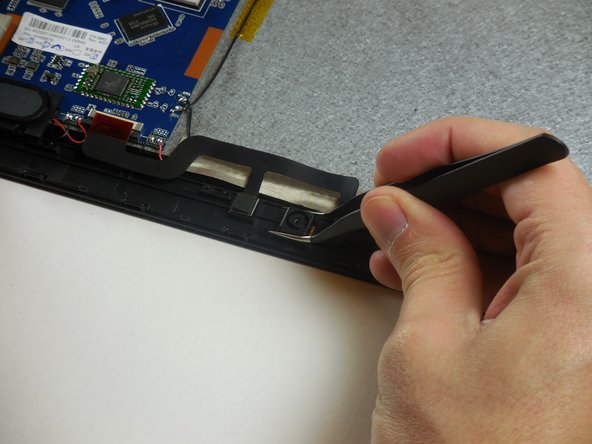
  12. Hannspree Hannspad SN1AT71 Left and Right Speaker Replacement: stap 12, afbeelding 1 van 3 Hannspree Hannspad SN1AT71 Left and Right Speaker Replacement: stap 12, afbeelding 2 van 3 Hannspree Hannspad SN1AT71 Left and Right Speaker Replacement: stap 12, afbeelding 3 van 3
    • Pull the cameras out of their resting places in a straight upward motion.

    Vraag FixBot

    Voeg opmerking toe

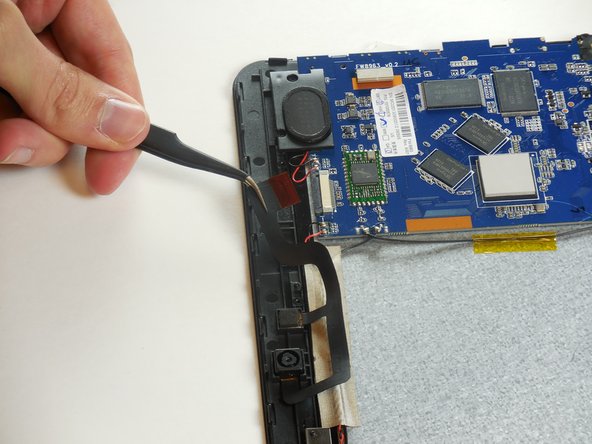
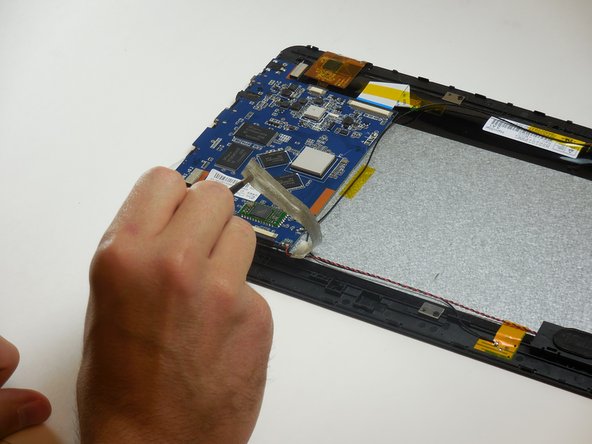
  13. Hannspree Hannspad SN1AT71 Left and Right Speaker Replacement, Left and Right Speaker: stap 13, afbeelding 1 van 3 Hannspree Hannspad SN1AT71 Left and Right Speaker Replacement, Left and Right Speaker: stap 13, afbeelding 2 van 3 Hannspree Hannspad SN1AT71 Left and Right Speaker Replacement, Left and Right Speaker: stap 13, afbeelding 3 van 3
    Gereedschap gebruikt in deze stap:
    Tweezers
    $4.99
    • Identify the speakers.

    • Use a pair of tweezers to peel the adhesive tape holding the speaker wires down.

    Vraag FixBot

    Voeg opmerking toe

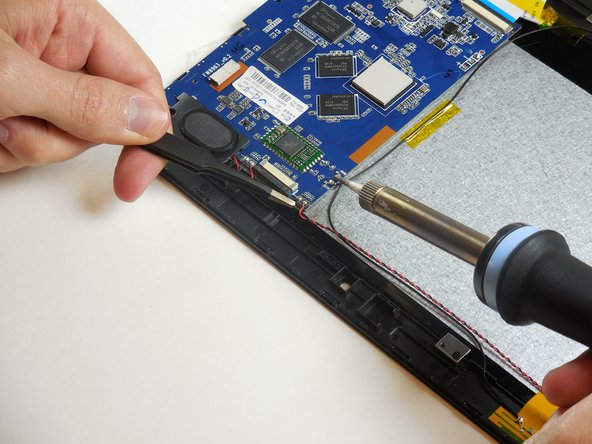
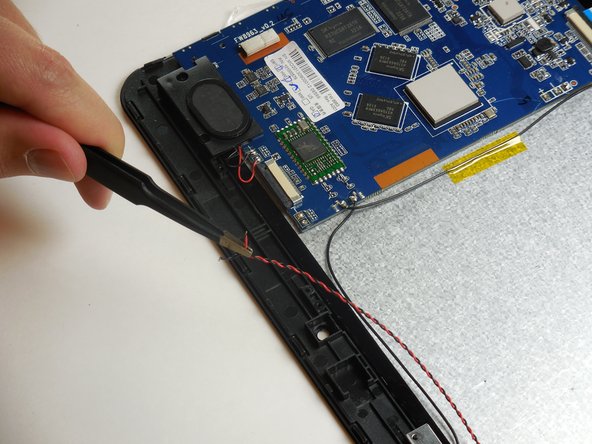
  14. Hannspree Hannspad SN1AT71 Left and Right Speaker Replacement: stap 14, afbeelding 1 van 3 Hannspree Hannspad SN1AT71 Left and Right Speaker Replacement: stap 14, afbeelding 2 van 3 Hannspree Hannspad SN1AT71 Left and Right Speaker Replacement: stap 14, afbeelding 3 van 3
    • Desolder the red and black wire to the left and the right of the ZIF connector.

    • Remember the placement of both wires.

    • Both the soldering iron and the wires will be hot.

    Vraag FixBot

    Voeg opmerking toe

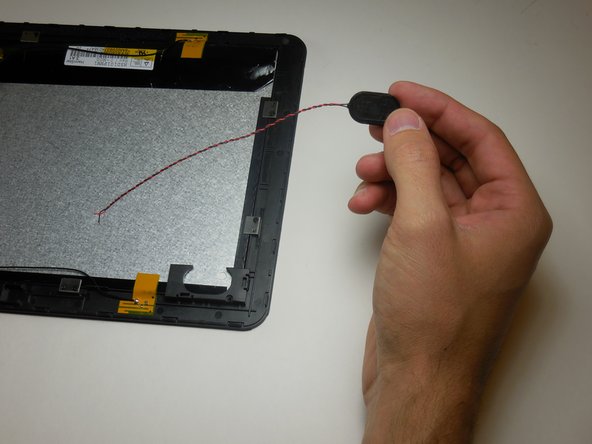
  15. Hannspree Hannspad SN1AT71 Left and Right Speaker Replacement: stap 15, afbeelding 1 van 2 Hannspree Hannspad SN1AT71 Left and Right Speaker Replacement: stap 15, afbeelding 2 van 2
    • Remove the right and left speaker.

    Vraag FixBot

    Voeg opmerking toe

Conclusie

To reassemble your device, follow these instructions in reverse order.

Annuleren: ik heb deze handleiding niet afgemaakt.

Één andere persoon heeft deze handleiding voltooid.

matthew vandeventer

Lid sinds: 03/11/15

950 Reputatie

5 handleidingen geschreven

Team

Colorado Springs, Team 9-4, Panko Spring 2015 Lid van Colorado Springs, Team 9-4, Panko Spring 2015

UCCS-PANKO-S15S9G4

3 Leden

10 handleidingen geschreven

0Gids Commentaar

Voeg opmerking toe

Weergavestatistieken:

Afgelopen 24 uren: 2

Afgelopen 7 dagen: 10

Afgelopen 30 dagen: 39

Altijd: 692