Inleiding
You may need to replace the battery for multiple reasons; for example, you may have over charged it which makes it more likely to not work. This guide will show you how to replace the defective battery.
Wat je nodig hebt
-
-
-
Flip your phone over and hold the phone with the back facing you.
 Vraag FixBot
-
-
-
-
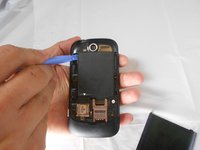
Place the prying tool into the notch at the bottom of the case and pull up to remove.
-
-
-
Use the plastic prying tool in the upper left-hand corner notch of the battery to remove.
-
-


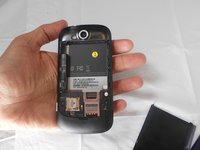
To reassemble your device, follow these instructions in reverse order.
Annuleren: ik heb deze handleiding niet afgemaakt.
Één andere persoon heeft deze handleiding voltooid.

Team

USF Tampa, Team 16-5, Watkins Spring 2014 Lid van USF Tampa, Team 16-5, Watkins Spring 2014
USFT-WATKINS-S14S16G5
2 Leden
35 handleidingen geschreven
