Ga door naar hoofdinhoud
Word lid van de reparatiegemeenschap - Account aanmaken

HP Touchsmart IQ506 RAM (Memory) Replacement

Wat je nodig hebt

  1. HP Touchsmart IQ506 RAM (Memory) Replacement, Change note: stap 1, afbeelding 1 van 2 HP Touchsmart IQ506 RAM (Memory) Replacement, Change note: stap 1, afbeelding 2 van 2
    Gereedschap gebruikt in deze stap:
    Essential Electronics Toolkit
    $29.95
    • Due to the EET missing several components present in the Pro Tech Go and only being $20 cheaper, the EET has been removed. The EET will work for this guide as-is, but if you are shopping for a new toolkit to complete this guide, the Pro Tech Go (new or refurbished, refurbished is ~$32 cheaper), or Pro Tech ($79 new/~$59.95 refurb) is the current recommended toolkit for this guide.

    • If you are interested in a refurbished kit stock levels change frequently but can be found here.

    Vraag FixBot
  2. HP Touchsmart IQ506 RAM (Memory) Replacement, Unplug the system: stap 2, afbeelding 1 van 2 HP Touchsmart IQ506 RAM (Memory) Replacement, Unplug the system: stap 2, afbeelding 2 van 2
    • Unplug the power brick from the system.

    Vraag FixBot
  3. HP Touchsmart IQ506 RAM (Memory) Replacement, Remove the RAM door: stap 3, afbeelding 1 van 3 HP Touchsmart IQ506 RAM (Memory) Replacement, Remove the RAM door: stap 3, afbeelding 2 van 3 HP Touchsmart IQ506 RAM (Memory) Replacement, Remove the RAM door: stap 3, afbeelding 3 van 3
    • Unscrew the RAM door using a Phillips #1 screwdriver. Snap the RAM door off from the bottom and slide it off.

    Vraag FixBot
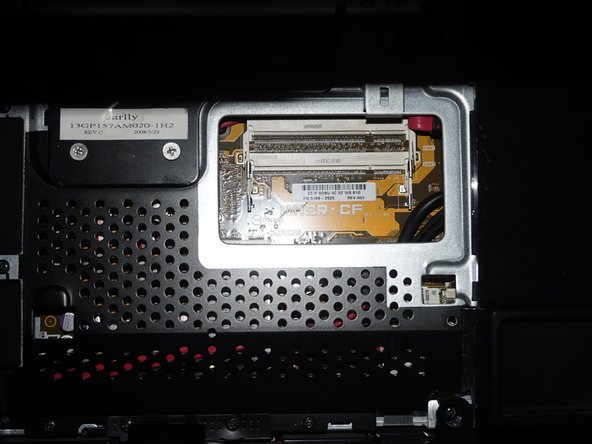
  4. HP Touchsmart IQ506 RAM (Memory) Replacement, Remove the RAM: stap 4, afbeelding 1 van 2 HP Touchsmart IQ506 RAM (Memory) Replacement, Remove the RAM: stap 4, afbeelding 2 van 2
    • With the RAM exposed, remove the RAM from the slots on the system by pushing the tabs back. Once you do this the RAM will pop up and you can remove it.

    • Install the new RAM. Make sure you line the tab up on the memory with the slot in the system. It should only go in one way.

    Vraag FixBot
Conclusie

To reassemble your device, follow these instructions in reverse order.

Nick

Lid sinds: 11/10/09

103.188 Reputatie

68 handleidingen geschreven

0Gids Commentaar

Voeg opmerking toe

Weergavestatistieken:

Afgelopen 24 uren: 2

Afgelopen 7 dagen: 15

Afgelopen 30 dagen: 54

Altijd: 1,119