Ga door naar hoofdinhoud
Word lid van de reparatiegemeenschap - Account aanmaken

HP Slate 7 4601 Battery Replacement

Wat je nodig hebt

    1. HP Slate 7 4601 Battery Replacement, Battery: stap 1, afbeelding 1 van 2 HP Slate 7 4601 Battery Replacement, Battery: stap 1, afbeelding 2 van 2
      • Begin your replacement by using a T3 or T4 Torx screwdriver.

      • Remove the two 1.4mm x 3mm Torx Head screws at the top of the device.

      Vraag FixBot

      Voeg opmerking toe

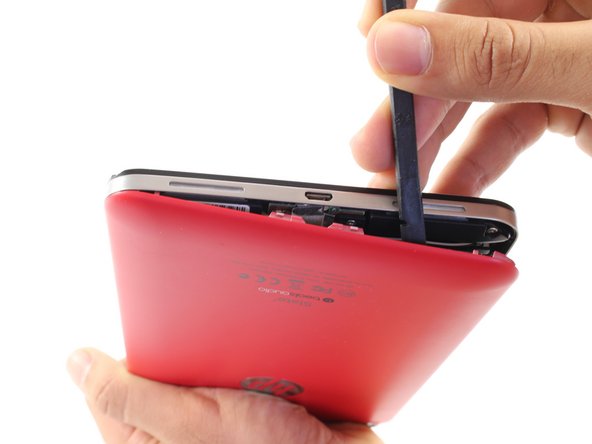
    2. HP Slate 7 4601 Battery Replacement: stap 2, afbeelding 1 van 2 HP Slate 7 4601 Battery Replacement: stap 2, afbeelding 2 van 2
      • With the pointed end of the spudger, remove the thin metal band.

      • It is easiest to remove the metal band through the headphone opening.

      Vraag FixBot

      Voeg opmerking toe

    3. HP Slate 7 4601 Battery Replacement: stap 3, afbeelding 1 van 2 HP Slate 7 4601 Battery Replacement: stap 3, afbeelding 2 van 2
      • Using the flat end of the spudger, pry back the rear plastic cover.

      • As you work your way around the edge, several "pop" noises will be made. These noises are caused by the plastic clips coming undone.

      Vraag FixBot

      Voeg opmerking toe

    4. HP Slate 7 4601 Battery Replacement: stap 4, afbeelding 1 van 1
      • Remove the rear cover.

      Vraag FixBot

      Voeg opmerking toe

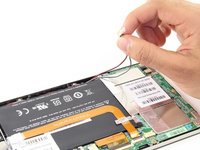
    5. HP Slate 7 4601 Battery Replacement: stap 5, afbeelding 1 van 1
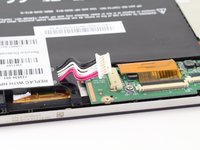
      • Locate and remove the yellow tape covering the red and white speaker wires.

      Vraag FixBot

      Voeg opmerking toe

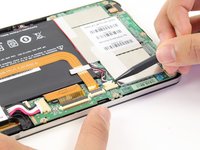
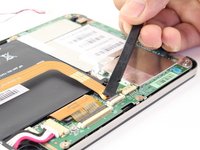
    6. HP Slate 7 4601 Battery Replacement: stap 6, afbeelding 1 van 2 HP Slate 7 4601 Battery Replacement: stap 6, afbeelding 2 van 2
      • Using the pointed end of the spudger, push both sides of the speaker wire connector out of its base.

      • Push the same amount on both sides of the connector to avoid jamming or twisting its metal pins.

      • Do not yank or pull on the speaker wires, since they are fragile. Only push on the white connector.

      Vraag FixBot

      Voeg opmerking toe

    7. HP Slate 7 4601 Battery Replacement: stap 7, afbeelding 1 van 1
      • Gently pull back the foil covering the gold charging port ribbon.

      Vraag FixBot

      Voeg opmerking toe

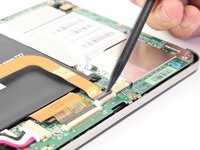
    8. HP Slate 7 4601 Battery Replacement: stap 8, afbeelding 1 van 2 HP Slate 7 4601 Battery Replacement: stap 8, afbeelding 2 van 2
      • Using the flat end of the spudger, lift up the black panel covering the charging port connector.

      • Gently slide the charging port ribbon out from its housing.

      • It may be easier to use the pointed end of the spudger than your fingers.

      Vraag FixBot

      Voeg opmerking toe

    9. HP Slate 7 4601 Battery Replacement: stap 9, afbeelding 1 van 1
      • Lift gold charging strip away from the battery.

      Vraag FixBot

      Voeg opmerking toe

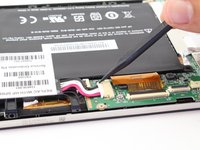
    10. HP Slate 7 4601 Battery Replacement: stap 10, afbeelding 1 van 2 HP Slate 7 4601 Battery Replacement: stap 10, afbeelding 2 van 2
      • Push the white battery connector out of its housing using the pointed end of the spudger.

      Vraag FixBot

      Voeg opmerking toe

    11. HP Slate 7 4601 Battery Replacement: stap 11, afbeelding 1 van 1
      • Using the #00 Phillips Head screwdriver, remove the 5 screws holding the battery in place.

      • The four 1.75mm x 3mm silver Phillips Head screws circled in red are interchangeable.

      • The black 1.75mm x 4mm Phillips Head screw must go back to the same spot during reassembly.

      Vraag FixBot

      Voeg opmerking toe

    12. HP Slate 7 4601 Battery Replacement: stap 12, afbeelding 1 van 1
      • Lift battery out of its place and set aside.

      Vraag FixBot

      Voeg opmerking toe

Conclusie

To reassemble your device, follow these instructions in reverse order.

Annuleren: ik heb deze handleiding niet afgemaakt.

18 andere personen hebben deze handleiding voltooid.

Zachary

Lid sinds: 04/14/14

1.453 Reputatie

2 handleidingen geschreven

Team

Cal Poly, Team 13-30, Maness Spring 2014 Lid van Cal Poly, Team 13-30, Maness Spring 2014

CPSU-MANESS-S14S13G30

3 Leden

24 handleidingen geschreven

4Gids Commentaar

Buenas tardes, como están? Consulta, la batería se puede reemplazar por otra genérica, existe algún repuesto?

Javier Sanchez - Antwoord Deel

Thanx for this amazing demo steps. Sir i need battery of this tab, coz i cant find this battery anywhere then someone told me to go online purchase it wil you so i decided to go online n finally i found ur page so plz arrange me the battery of this tab. My HP Slate 7 battery is not charging . I m from pakistan n my email is aasifbrothers79@gmail.com. Sir i m looking forward for ur kind reply .Thanx

Regards, Asif Sultan

Asif Sultan - Antwoord Deel

where do i buy the battery in india… there is a site Maxbhi, I ordered the battery, they never send the battery neither returned the money…

Kapil Baidya - Antwoord Deel

I tried to plug the wrong cable into my HP Prime and have apparently damaged the connection in the calculator. Is there a procedure to repair that connection?

Stuart

Stuart L Filler - Antwoord Deel

Voeg opmerking toe

Weergavestatistieken:

Afgelopen 24 uren: 3

Afgelopen 7 dagen: 8

Afgelopen 30 dagen: 51

Altijd: 30,628