Inleiding
This guide will help you replace the optical drive, otherwise known as the CD drive. Be sure that no disks are within the drive before replacing the drive.
Wat je nodig hebt
-
-
-
Slide the two release latches on either side of the battery.
-
Gently tilt the battery upward and remove it from its socket.
 Vraag FixBot
-
-
-
-
-
Turn the computer so the bottom is facing towards you.
-
Remove the one 3.0 mm Phillips PM2.0x3.0 security screw.
-
Slide the release latches then pull the door towards you. Lift the door away to completely remove it.
-
-
-
-
-
-
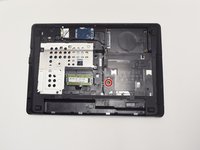
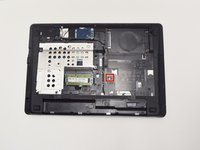
Remove one 6.0 mm Phillips PM2.5x6.0 screw that is securing the optical drive.
-
-
-
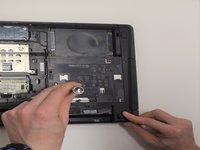
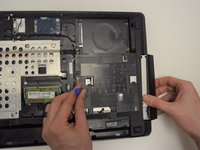
Press the optical drive tab to release the drive component.
-
Gently pull and remove the component from the computer.
-
-




To reassemble your device, follow these instructions in reverse order.
Annuleren: ik heb deze handleiding niet afgemaakt.
3 andere personen hebben deze handleiding voltooid.

Team

UW Tacoma, Team 1-5, Rose Fall 2016 Lid van UW Tacoma, Team 1-5, Rose Fall 2016
UWT-ROSE-F16S1G5
4 Leden
6 handleidingen geschreven
