Deze vertaling is door een computer gegenereerd en is nog niet door iemand nagekeken. Spreek je deze taal? Bekijk het hier.

HP PSC 2355 reflecterende documentmat vervangen

Amber Gabaldon en 3 andere bijdragers
Voor het laatst geüpdatet op 19 aug 2026
Bekeken: 1,3K
Statistieken weergeven:
- Afgelopen 24 uur:
- 2
- Afgelopen 7 dagen:
- 21
- Afgelopen 30 dagen:
- 94
- Altijd:
- 1.264
Commentaar: 2
2 guide comments.
Go to guide commentsVoltooid: 0 1
Niemand heeft deze handleiding als "voltooid" gemarkeerd. Ben jij de eerste?
1 persoon heeft deze handleiding als "voltooid" gemarkeerd. Dat ben jij—lekker bezig!
Favorieten: 0 1
Niemand heeft deze handleiding gemarkeerd als favoriet of volgt de handleiding. Ben jij de eerste?
1 persoon heeft deze handleiding als favoriet gemarkeerd (en blijft daarmee op de hoogte van meldingen)—dat ben jij!
Inleiding
Ga naar stap 1 ↓Een beschadigde reflecterende documentmat kan afbeeldingen van slechte kwaliteit veroorzaken. U kunt deze mat in een paar eenvoudige stappen vervangen.
Wat je nodig hebt
Gereedschap
-
Spudger4.9

-
-
-
Pak de klep van de scanner aan de voorzijde van het apparaat vast en til deze volledig omhoog totdat deze uit zichzelf blijft staan.
 Vraag FixBot
-
-
-
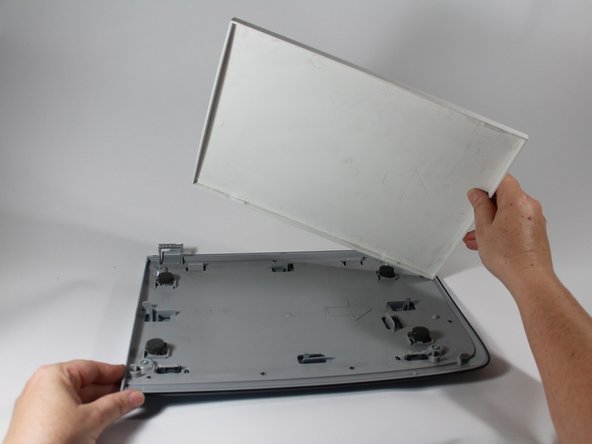
Pak het deksel met beide handen aan beide kanten bij de scharnieren vast en til het recht omhoog om het deksel uit elk scharnier los te maken.
-
-
-
-
-
Zodra het deksel is verwijderd, legt u het op een vlakke ondergrond met de witte mat naar boven.
-
Gebruik de platte kant van een plastic spudger om de mat bij een van de voorste hoeken los te wrikken. Doe dit opnieuw voor de andere voorste hoek.
-
-
-
-
Zodra beide voorste hoeken uit de plastic klemmen zijn losgemaakt, zou de rest van de mat gemakkelijk los moeten komen.
-
Recycle of gooi de beschadigde mat weg.
-
-


Volg deze instructies in omgekeerde volgorde om uw apparaat weer in elkaar te zetten.

Team

New Mexico State, Team 1-4, Sheppard Spring 2014 Lid van New Mexico State, Team 1-4, Sheppard Spring 2014
NMSU-SHEPPARD-S14S1G4
3 Leden
48 handleidingen geschreven
