Ga door naar hoofdinhoud
Word lid van de reparatiegemeenschap - Account aanmaken

HP G62-223CL Wireless Card Replacement

Wat je nodig hebt

    1. HP G62-223CL Wireless Card Replacement, Battery Removal: stap 1, afbeelding 1 van 2 HP G62-223CL Wireless Card Replacement, Battery Removal: stap 1, afbeelding 2 van 2
      • Removing the battery while the laptop is still on may corrupt your files.

      • Turn the device over to expose the bottom of the device.

      • Slide the battery release all the way to the left.

      • There will be a click and the battery will be released from its compartment.

      Vraag FixBot

      Voeg opmerking toe

    2. HP G62-223CL Wireless Card Replacement: stap 2, afbeelding 1 van 1
      • Carefully remove the battery from its compartment.

      Vraag FixBot

      Voeg opmerking toe

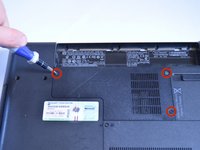
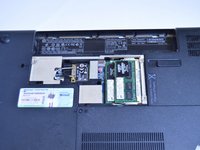
    1. HP G62-223CL Wireless Card Replacement, Wireless Card: stap 3, afbeelding 1 van 2 HP G62-223CL Wireless Card Replacement, Wireless Card: stap 3, afbeelding 2 van 2
      • Locate three Phillips head retaining screws which secure the compartment.

      • Use a Phillips #0 screwdriver to loosen the retaining screws.

      • Remove the panel covering the compartment.

      • Ground yourself before attempting to touch any components. To ground yourself, touch a conductive metal to eliminate any static buildup in your body, which can damage computer components.

      Vraag FixBot

      Voeg opmerking toe

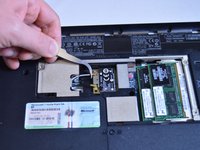
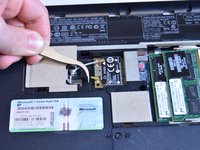
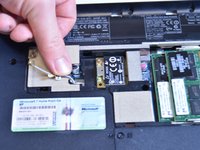
    2. HP G62-223CL Wireless Card Replacement: stap 4, afbeelding 1 van 3 HP G62-223CL Wireless Card Replacement: stap 4, afbeelding 2 van 3 HP G62-223CL Wireless Card Replacement: stap 4, afbeelding 3 van 3
      Gereedschap gebruikt in deze stap:
      Tweezers
      $4.99
      • Use tweezers to disconnect the gray cable and the black cable from the wireless card.

      Vraag FixBot

      Voeg opmerking toe

    3. HP G62-223CL Wireless Card Replacement: stap 5, afbeelding 1 van 1
      • Use a Phillips #0 screwdriver to remove the single 4mm screw from the corner of the wireless card.

      Vraag FixBot

      Voeg opmerking toe

    4. HP G62-223CL Wireless Card Replacement: stap 6, afbeelding 1 van 1
      • Carefully lift and pull wireless card. It is removed!

      Vraag FixBot

      Voeg opmerking toe

Conclusie

To reassemble your device, follow these instructions in reverse order.

Annuleren: ik heb deze handleiding niet afgemaakt.

Garret Layton

Lid sinds: 01/13/15

687 Reputatie

5 handleidingen geschreven

Team

USF Tampa, Team 1-4, Sullivan Winter 2015 Lid van USF Tampa, Team 1-4, Sullivan Winter 2015

USFT-SULLIVAN-W15S1G4

4 Leden

30 handleidingen geschreven

0Gids Commentaar

Voeg opmerking toe

Weergavestatistieken:

Afgelopen 24 uren: 0

Afgelopen 7 dagen: 5

Afgelopen 30 dagen: 17

Altijd: 1,451