Ga door naar hoofdinhoud
Word lid van de reparatiegemeenschap - Account aanmaken

HP Compaq 6710b Screen Replacement

Wat je nodig hebt

  1. HP Compaq 6710b Screen Replacement, Battery: stap 1, afbeelding 1 van 1
    • Turn off your computer! Taking out the battery while it's still on is dangerous!

    • Flip the laptop over to the back.

    • Using two hands, push on the tabs while gently taking out the battery.

    Vraag FixBot

    Voeg opmerking toe

  2. HP Compaq 6710b Screen Replacement, Keyboard: stap 2, afbeelding 1 van 3 HP Compaq 6710b Screen Replacement, Keyboard: stap 2, afbeelding 2 van 3 HP Compaq 6710b Screen Replacement, Keyboard: stap 2, afbeelding 3 van 3
    • Turn off computer before starting.

    • Flip to the backside of the laptop.

    • Using a Phillips #1 screwdriver, unscrew the 5mm screw and take off the shown cover.

    • Using the same screwdriver, unscrew the 8mm screws.

    • The screws may not completely fall out of the laptop, just ensure they are unscrewed as far as they will go.

    Vraag FixBot

    Voeg opmerking toe

  3. HP Compaq 6710b Screen Replacement: stap 3, afbeelding 1 van 1
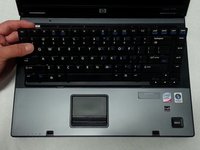
    • Flip over the laptop to the top side, and open the laptop.

    • Slide the locking tabs down using a blue plastic opening tool or your fingernail.

    Vraag FixBot

    Voeg opmerking toe

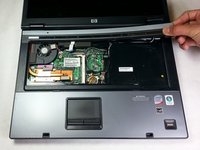
  4. HP Compaq 6710b Screen Replacement: stap 4, afbeelding 1 van 2 HP Compaq 6710b Screen Replacement: stap 4, afbeelding 2 van 2
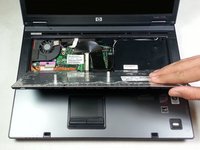
    • Using the plastic prying tool, lift the keyboard gently towards you.

    • Don't take the keyboard completely off because it is still attached with a ribbon cable to the computer.

    Vraag FixBot

    Voeg opmerking toe

  5. HP Compaq 6710b Screen Replacement: stap 5, afbeelding 1 van 1
    • Pull up on both sides of the black locking tab of the connector.

    • The keyboard should now be free of the computer.

    Vraag FixBot

    Voeg opmerking toe

  6. HP Compaq 6710b Screen Replacement, Power Button Panel: stap 6, afbeelding 1 van 1
    • Put a finger under each side of the plastic lock on the ribbon cable and pull up.

    Vraag FixBot

    Voeg opmerking toe

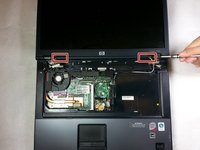
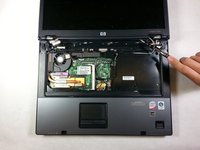
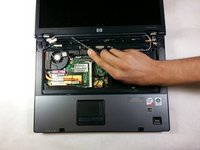
  7. HP Compaq 6710b Screen Replacement: stap 7, afbeelding 1 van 3 HP Compaq 6710b Screen Replacement: stap 7, afbeelding 2 van 3 HP Compaq 6710b Screen Replacement: stap 7, afbeelding 3 van 3
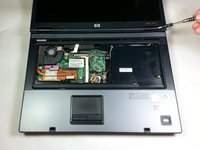
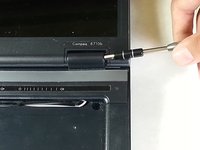
    • Using a flathead screwdriver, get under each plastic hinge cover until they pop.

    • Lift the right edge of plastic strip covering the power button and gently pull it up until the whole strip comes free.

    Vraag FixBot

    Voeg opmerking toe

  8. HP Compaq 6710b Screen Replacement, Screen: stap 8, afbeelding 1 van 1
    • Using a flathead screwdriver, work both sides of the connector next to the fan and take it out.

    Vraag FixBot

    Voeg opmerking toe

  9. HP Compaq 6710b Screen Replacement: stap 9, afbeelding 1 van 1
    • Using the T9 Torx screwdriver, remove one 7mm screw on the left hinge.

    • We recommend replacing this screw shortly after removing the cable as it helps hold the hinge to the lower half of the laptop.

    Vraag FixBot

    Voeg opmerking toe

  10. HP Compaq 6710b Screen Replacement: stap 10, afbeelding 1 van 1
    • Using the blue plastic opening tool, pull the rubber covers off the screen screws.

    Vraag FixBot

    Voeg opmerking toe

  11. HP Compaq 6710b Screen Replacement: stap 11, afbeelding 1 van 1
    • Using a T9 Torx screwdriver, remove the top four 5 mm screws.

    • Remove the bottom two 6 mm screws with the same screwdriver.

    Vraag FixBot

    Voeg opmerking toe

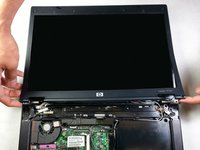
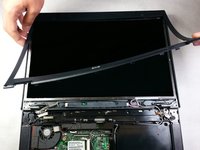
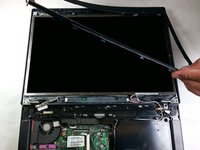
  12. HP Compaq 6710b Screen Replacement: stap 12, afbeelding 1 van 3 HP Compaq 6710b Screen Replacement: stap 12, afbeelding 2 van 3 HP Compaq 6710b Screen Replacement: stap 12, afbeelding 3 van 3
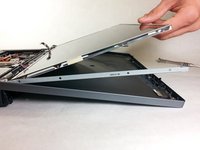
    • Using a flat head screwdriver, pry the plastic panel over the screen up starting at one of the hinges.

    • Using the flathead, continue running the it under the the plastic screen edge and gently pry it off.

    • If you press the screwdriver tip down (by lifting the handle), the screen panel pops off easier.

    Vraag FixBot

    Voeg opmerking toe

  13. HP Compaq 6710b Screen Replacement: stap 13, afbeelding 1 van 3 HP Compaq 6710b Screen Replacement: stap 13, afbeelding 2 van 3 HP Compaq 6710b Screen Replacement: stap 13, afbeelding 3 van 3
    • Slowly pry back the of the screen.

    • It is easiest to work both sides free at the same time.

    Vraag FixBot

    Voeg opmerking toe

  14. HP Compaq 6710b Screen Replacement: stap 14, afbeelding 1 van 1
    • Using your fingers, take out the two connections near the hinges.

    Vraag FixBot

    Voeg opmerking toe

  15. HP Compaq 6710b Screen Replacement: stap 15, afbeelding 1 van 1
    • Using the T9 Torx screwdriver, unscrew the four 4mm screws.

    Vraag FixBot

    Voeg opmerking toe

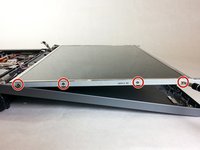
  16. HP Compaq 6710b Screen Replacement: stap 16, afbeelding 1 van 2 HP Compaq 6710b Screen Replacement: stap 16, afbeelding 2 van 2
    • Tilt the screen up from the top to gain access to the screws on the side.

    • Go just far enough to get to the bottom screws to avoid damaging the bracket.

    • Using the PH00 screwdriver, unscrew the 2.5mm screws on the side of the screen. There should be 4 on each side.

    • You can now take out the screen.

    Vraag FixBot

    Voeg opmerking toe

Conclusie

To reassemble your device, follow these instructions in reverse order.

Annuleren: ik heb deze handleiding niet afgemaakt.

8 andere personen hebben deze handleiding voltooid.

Khulan Orgil

Lid sinds: 04/14/15

1.186 Reputatie

6 handleidingen geschreven

Team

Cal Poly, Team 4-2, Maness Spring 2015 Lid van Cal Poly, Team 4-2, Maness Spring 2015

CPSU-MANESS-S15S4G2

4 Leden

6 handleidingen geschreven

1Gids Commentaar

thank you I found it very interesting

Hassan - Antwoord Deel

Voeg opmerking toe

Weergavestatistieken:

Afgelopen 24 uren: 3

Afgelopen 7 dagen: 10

Afgelopen 30 dagen: 64

Altijd: 6,156