Ga door naar hoofdinhoud
Word lid van de reparatiegemeenschap - Account aanmaken

HP 8 1401 Front-Facing Camera Replacement

Wat je nodig hebt

    1. HP 8 1401 Front-Facing Camera Replacement, Back Panel: stap 1, afbeelding 1 van 1
      • Using a Torx T4 screwdriver, remove the four 5 mm screws on the back panel.

      Vraag FixBot

      Voeg opmerking toe

    2. HP 8 1401 Front-Facing Camera Replacement: stap 2, afbeelding 1 van 1
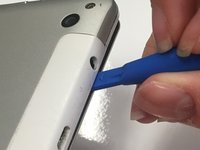
      • Insert the tip of a plastic opening tool in the seam between the front and back panels.

      Vraag FixBot

      Voeg opmerking toe

    3. HP 8 1401 Front-Facing Camera Replacement: stap 3, afbeelding 1 van 2 HP 8 1401 Front-Facing Camera Replacement: stap 3, afbeelding 2 van 2
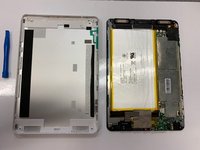
      • Slide the plastic opening tool around all edges of the device until the back panel detaches.

      • Lift off the back panel.

      Vraag FixBot

      Voeg opmerking toe

    1. HP 8 1401 Front-Facing Camera Replacement, Front-Facing Camera: stap 4, afbeelding 1 van 1
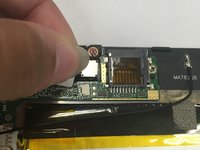
      • Place the tip of your spudger under the edge of the press fit connector, and pry the connector straight up from its socket.

      Vraag FixBot

      Voeg opmerking toe

    2. HP 8 1401 Front-Facing Camera Replacement: stap 5, afbeelding 1 van 2 HP 8 1401 Front-Facing Camera Replacement: stap 5, afbeelding 2 van 2
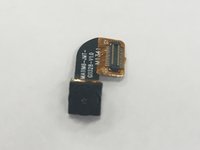
      • Lift the front-facing camera out of the tablet.

      Vraag FixBot

      Voeg opmerking toe

    3. HP 8 1401 Front-Facing Camera Replacement: stap 6, afbeelding 1 van 1
      • After the front-facing camera has been removed, the tablet should look like this.

      Vraag FixBot

      Voeg opmerking toe

Conclusie

To reassemble your device, follow these instructions in reverse order.

Annuleren: ik heb deze handleiding niet afgemaakt.

Katie Presz

Lid sinds: 01/16/19

641 Reputatie

6 handleidingen geschreven

0Gids Commentaar

Voeg opmerking toe

Weergavestatistieken:

Afgelopen 24 uren: 0

Afgelopen 7 dagen: 5

Afgelopen 30 dagen: 17

Altijd: 297