Ga door naar hoofdinhoud
Word lid van de reparatiegemeenschap - Account aanmaken

HP 15-d076nr Wireless Card Replacement

Wat je nodig hebt

    1. HP 15-d076nr Wireless Card Replacement, Battery: stap 1, afbeelding 1 van 1
      • Orient the laptop upside down so that the back of the laptop, where the battery is located, faces you.

      • Locate the left and right switches at the bottom of the laptop.

      Vraag FixBot

      Voeg opmerking toe

    2. HP 15-d076nr Wireless Card Replacement: stap 2, afbeelding 1 van 1
      • Move the right switch to the left so that the orange unlock symbol is showing.

      Vraag FixBot

      Voeg opmerking toe

    3. HP 15-d076nr Wireless Card Replacement: stap 3, afbeelding 1 van 1
      • Move the left switch to the right, covering the battery symbol, and hold.

      Vraag FixBot

      Voeg opmerking toe

    4. HP 15-d076nr Wireless Card Replacement: stap 4, afbeelding 1 van 1
      • While holding the left switch in place, slide the battery towards you and away from the laptop.

      Vraag FixBot

      Voeg opmerking toe

    1. HP 15-d076nr Wireless Card Replacement, Wireless Card: stap 5, afbeelding 1 van 1
      • Re-orient the laptop, so that the back of the laptop faces away from you.

      Vraag FixBot

      Voeg opmerking toe

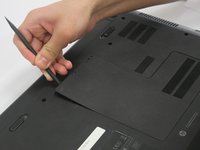
    2. HP 15-d076nr Wireless Card Replacement: stap 6, afbeelding 1 van 1
      • Locate the small screw on the panel at the center of the laptop.

      • Loosen the small screw using a Philips # 1 screwdriver.

      • The screw does not come free from the panel. It only needs to be loosened enough so that the panel can be lifted/pried.

      Vraag FixBot

      Voeg opmerking toe

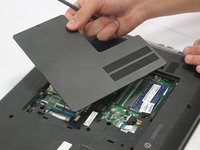
    3. HP 15-d076nr Wireless Card Replacement: stap 7, afbeelding 1 van 2 HP 15-d076nr Wireless Card Replacement: stap 7, afbeelding 2 van 2
      • Carefully pry the middle panel up using a plastic spudger, or other prying tool .

      • Pull the panel away from the laptop and set it off to the side.

      Vraag FixBot

      Voeg opmerking toe

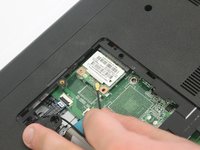
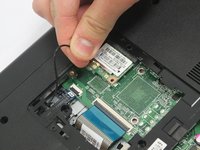
    4. HP 15-d076nr Wireless Card Replacement: stap 8, afbeelding 1 van 2 HP 15-d076nr Wireless Card Replacement: stap 8, afbeelding 2 van 2
      • Gently wiggle and lift the black antenna wire away from the wireless card.

      • If there is also a white wire attached, both black and white wires will need to be removed from the wireless card.

      Vraag FixBot

      Voeg opmerking toe

    5. HP 15-d076nr Wireless Card Replacement: stap 9, afbeelding 1 van 3 HP 15-d076nr Wireless Card Replacement: stap 9, afbeelding 2 van 3 HP 15-d076nr Wireless Card Replacement: stap 9, afbeelding 3 van 3
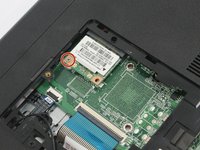
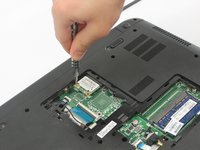
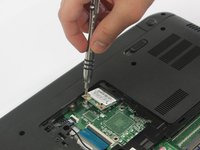
      • Locate the Phillips 2.0x3.0mm screw on the upper left corner of the wireless card.

      • Carefully remove the 2.0x3.0mm screw using a Philips #0 screwdriver.

      Vraag FixBot

      Voeg opmerking toe

    6. HP 15-d076nr Wireless Card Replacement: stap 10, afbeelding 1 van 1
      • Slide the wireless card to the left to remove it from the socket.

      Vraag FixBot

      Voeg opmerking toe

Conclusie

To reassemble your device, follow these instructions in reverse order.

Annuleren: ik heb deze handleiding niet afgemaakt.

Één andere persoon heeft deze handleiding voltooid.

Gabrielle Farren

Lid sinds: 01/12/17

161 Reputatie

1 Handleiding geschreven

Team

0Gids Commentaar

Voeg opmerking toe

Weergavestatistieken:

Afgelopen 24 uren: 0

Afgelopen 7 dagen: 4

Afgelopen 30 dagen: 19

Altijd: 797