Ga door naar hoofdinhoud
Word lid van de reparatiegemeenschap - Account aanmaken

GoPro Hero3+ Silver Edition Image Sensor Replacement

Wat je nodig hebt

  1. GoPro Hero3+ Silver Edition Image Sensor Replacement, Battery: stap 1, afbeelding 1 van 2 GoPro Hero3+ Silver Edition Image Sensor Replacement, Battery: stap 1, afbeelding 2 van 2
    • Push the tab on the back of the device left to remove the plate covering the battery.

    Vraag FixBot

    Voeg opmerking toe

  2. GoPro Hero3+ Silver Edition Image Sensor Replacement: stap 2, afbeelding 1 van 1
    • Use the strip of tape on the battery to remove the battery from the housing.

    Vraag FixBot

    Voeg opmerking toe

  3. GoPro Hero3+ Silver Edition Image Sensor Replacement, Front Panel: stap 3, afbeelding 1 van 1
    • Insert a plastic opening tool in between the front face plate and the black housing.

    • Make sure you insert the plastic opening tool next to the microSD card slot. There is a small gap that will help separate the face plate.

    Vraag FixBot

    Voeg opmerking toe

  4. GoPro Hero3+ Silver Edition Image Sensor Replacement: stap 4, afbeelding 1 van 1
    • Continue to use the plastic opening tool and separate the front face plate from the rest of the device.

    • There is adhesive that helps attach the front face plate. Some extra prying may be required to separate the face plate, but do not use excessive force.

    Vraag FixBot

    Voeg opmerking toe

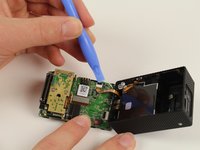
  5. GoPro Hero3+ Silver Edition Image Sensor Replacement, Image Sensor: stap 5, afbeelding 1 van 3 GoPro Hero3+ Silver Edition Image Sensor Replacement, Image Sensor: stap 5, afbeelding 2 van 3 GoPro Hero3+ Silver Edition Image Sensor Replacement, Image Sensor: stap 5, afbeelding 3 van 3
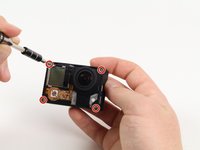
    • Locate the four 8.1mm PH00 screws on the corners of the GoPro and unscrew them using the phillips screwdriver.

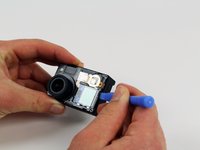
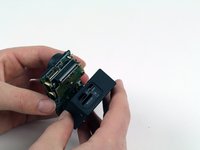
    • Gently remove the motherboard by using a plastic opening tool to pry it out of the housing.

    • Be careful not to damage the ribbon cable connected to the GoPro housing and motherboard.

    Vraag FixBot

    Voeg opmerking toe

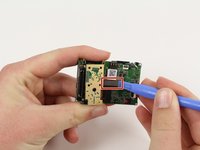
  6. GoPro Hero3+ Silver Edition Image Sensor Replacement: stap 6, afbeelding 1 van 2 GoPro Hero3+ Silver Edition Image Sensor Replacement: stap 6, afbeelding 2 van 2
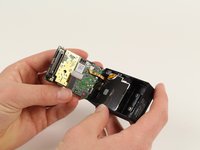
    • Remove the ribbon cable by carefully flipping the black clip up with the plastic opening tool and pulling the cable out.

    Vraag FixBot

    Voeg opmerking toe

  7. GoPro Hero3+ Silver Edition Image Sensor Replacement: stap 7, afbeelding 1 van 1
    • Remove the four 4mm PH00 screws attaching the image sensor to the motherboard with your screwdriver.

    Vraag FixBot

    Voeg opmerking toe

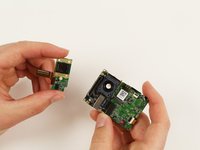
  8. GoPro Hero3+ Silver Edition Image Sensor Replacement: stap 8, afbeelding 1 van 2 GoPro Hero3+ Silver Edition Image Sensor Replacement: stap 8, afbeelding 2 van 2
    • Pry off the last ribbon cable with a plastic opening tool.

    • Remove the image sensor from the motherboard.

    Vraag FixBot

    Voeg opmerking toe

Conclusie

To reassemble your device, follow these instructions in reverse order.

Annuleren: ik heb deze handleiding niet afgemaakt.

4 andere personen hebben deze handleiding voltooid.

Patrick Cook

Lid sinds: 10/01/15

699 Reputatie

3 handleidingen geschreven

Team

Cal Poly, Team 5-8, Maness Fall 2015 Lid van Cal Poly, Team 5-8, Maness Fall 2015

CPSU-MANESS-F15S5G8

4 Leden

12 handleidingen geschreven

0Gids Commentaar

Voeg opmerking toe

Weergavestatistieken:

Afgelopen 24 uren: 0

Afgelopen 7 dagen: 9

Afgelopen 30 dagen: 41

Altijd: 1,149