Ga door naar hoofdinhoud
Word lid van de reparatiegemeenschap - Account aanmaken

GoPro Hero Micro USB/MicroSD Card Daughter BoardReplacement

Wat je nodig hebt

  1. GoPro Hero Micro USB/MicroSD Card Daughter BoardReplacement, Casing: stap 1, afbeelding 1 van 1
    • Power off your GoPro before beginning disassembly.

    • Unclip the black latch to the camera case and open the case.

    Vraag FixBot

    Voeg opmerking toe

  2. GoPro Hero Micro USB/MicroSD Card Daughter BoardReplacement: stap 2, afbeelding 1 van 1
    • Gently pry the back open by inserting a metal spudger between the case and back panel.

    Vraag FixBot

    Voeg opmerking toe

  3. GoPro Hero Micro USB/MicroSD Card Daughter BoardReplacement: stap 3, afbeelding 1 van 1
    • Disconnect the battery from the motherboard by unplugging the red, white, and black wires from the white adapter.

    Vraag FixBot

    Voeg opmerking toe

  4. GoPro Hero Micro USB/MicroSD Card Daughter BoardReplacement: stap 4, afbeelding 1 van 1
    • Disconnect the ribbon cable from the lens by lifting the black latch and gently pulling the ribbon cable from the socket.

    Vraag FixBot

    Voeg opmerking toe

  5. GoPro Hero Micro USB/MicroSD Card Daughter BoardReplacement: stap 5, afbeelding 1 van 1
    • Use a Phillips screwdriver (PH000) to remove the four screws around the white plastic piece.

    • Make sure to keep track of these screws as they are very small.

    Vraag FixBot

    Voeg opmerking toe

  6. GoPro Hero Micro USB/MicroSD Card Daughter BoardReplacement: stap 6, afbeelding 1 van 1
    • Carefully remove the motherboard and white plastic piece from the case.

    Vraag FixBot

    Voeg opmerking toe

  7. GoPro Hero Micro USB/MicroSD Card Daughter BoardReplacement, Micro USB/MicroSD Card Daughter Board: stap 7, afbeelding 1 van 2 GoPro Hero Micro USB/MicroSD Card Daughter BoardReplacement, Micro USB/MicroSD Card Daughter Board: stap 7, afbeelding 2 van 2
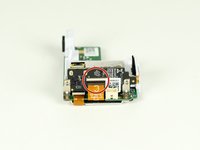
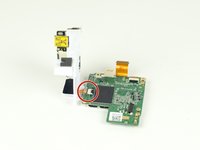
    • Remove the larger ribbon cable from the daughter board by lifting the black latch and pulling the ribbon cable gently from the socket.

    • Disconnect the smaller ribbon cable leading from the white plastic piece by simply pulling it from the socket.

    Vraag FixBot

    Voeg opmerking toe

  8. GoPro Hero Micro USB/MicroSD Card Daughter BoardReplacement: stap 8, afbeelding 1 van 1
    • Remove the two screws located on each side of the board with a Phillips screwdriver.

    • The screws go through an L metal bracket that will come off with the screws.

    Vraag FixBot

    Voeg opmerking toe

  9. GoPro Hero Micro USB/MicroSD Card Daughter BoardReplacement: stap 9, afbeelding 1 van 1
    • Separate the daughter board from the white plastic piece.

    Vraag FixBot

    Voeg opmerking toe

Conclusie

To reassemble your device, follow these instructions in reverse order.

Annuleren: ik heb deze handleiding niet afgemaakt.

5 andere personen hebben deze handleiding voltooid.

River Drake

Lid sinds: 04/02/15

1.065 Reputatie

5 handleidingen geschreven

Team

Cal Poly, Team 12-2, Lancaster Spring 2015 Lid van Cal Poly, Team 12-2, Lancaster Spring 2015

CPSU-LANCASTER-S15S12G2

4 Leden

18 handleidingen geschreven

4Gids Commentaar

Wo kann ich ein daughterboard kaufen habt ihr da was für mich?

Lukas Blohm - Antwoord Deel

bravo! è scritto molto bene ed è stato utile. ma dove trovo il ricambio? non ci riesco!!!

michele - Antwoord Deel

Terrific guide. Does anyone know where to buy the “daughter board”?

fedebossert - Antwoord Deel

ide. Does anyone know where to buy the “daughter board”?

fedebossert - 05/27/20

<a href="https://www.w3schools.com/">Visit W3Schools.com!</a>

pavan kalyan - Antwoord Deel

Voeg opmerking toe

Weergavestatistieken:

Afgelopen 24 uren: 2

Afgelopen 7 dagen: 25

Afgelopen 30 dagen: 85

Altijd: 5,545