Ga door naar hoofdinhoud
Word lid van de reparatiegemeenschap - Account aanmaken

GoPro Hero 3 Silver Rear Housing Replacement

Wat je nodig hebt

    1. GoPro Hero 3 Silver Rear Housing Replacement, Battery: stap 1, afbeelding 1 van 2 GoPro Hero 3 Silver Rear Housing Replacement, Battery: stap 1, afbeelding 2 van 2
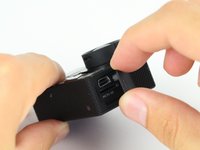
      • Pull back on the tab on the back of GoPro to open the battery cover.

      Vraag FixBot

      Voeg opmerking toe

    2. GoPro Hero 3 Silver Rear Housing Replacement: stap 2, afbeelding 1 van 1
      • Pull the battery out using the tab.

      Vraag FixBot

      Voeg opmerking toe

    1. GoPro Hero 3 Silver Rear Housing Replacement, Rear Housing: stap 3, afbeelding 1 van 2 GoPro Hero 3 Silver Rear Housing Replacement, Rear Housing: stap 3, afbeelding 2 van 2
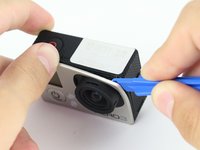
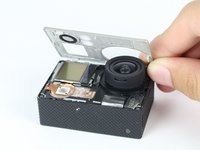
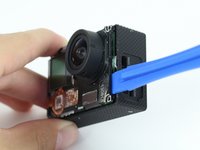
      • Use the plastic opening tool to remove the faceplate.

      • There is some adhesive and clips so be careful and the faceplate should pop right off.

      Vraag FixBot

      Voeg opmerking toe

    2. GoPro Hero 3 Silver Rear Housing Replacement: stap 4, afbeelding 1 van 2 GoPro Hero 3 Silver Rear Housing Replacement: stap 4, afbeelding 2 van 2
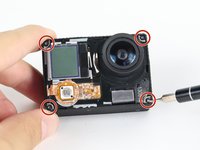
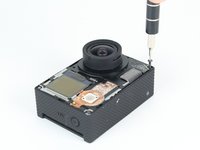
      • Now that the faceplate is off, it is time to remove the 4 screws on each corner.

      • Use the T4 tool bit from the iFixit toolkit in order to remove the 4 screws on each corner.

      Vraag FixBot

      Voeg opmerking toe

    3. GoPro Hero 3 Silver Rear Housing Replacement: stap 5, afbeelding 1 van 2 GoPro Hero 3 Silver Rear Housing Replacement: stap 5, afbeelding 2 van 2
      • Note: Make sure you remove the door cover of the USB, mini HDMI, and SD port before. Separating the motherboard will be easier.

      • Using the plastic opening tool, slowly pry open the motherboard assembly.

      Vraag FixBot

      Voeg opmerking toe

    4. GoPro Hero 3 Silver Rear Housing Replacement: stap 6, afbeelding 1 van 2 GoPro Hero 3 Silver Rear Housing Replacement: stap 6, afbeelding 2 van 2
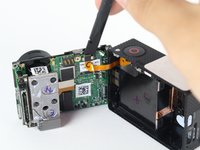
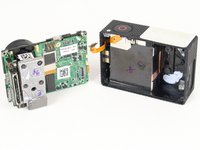
      • Use the spudger to gently pry off the connector of the housing to the motherboard.

      • You should now have the motherboard assembly and the housing separated.

      Vraag FixBot

      Voeg opmerking toe

    5. GoPro Hero 3 Silver Rear Housing Replacement: stap 7, afbeelding 1 van 1
      • In order to replace the buttons. The entire housing has to be replaced.

      Vraag FixBot

      Voeg opmerking toe

Conclusie

To reassemble your device, follow these instructions in reverse order.

Annuleren: ik heb deze handleiding niet afgemaakt.

Één andere persoon heeft deze handleiding voltooid.

Brian Alvarez

Lid sinds: 04/02/15

1.439 Reputatie

6 handleidingen geschreven

Team

Cal Poly, Team 24-7, Lancaster Spring 2015 Lid van Cal Poly, Team 24-7, Lancaster Spring 2015

CPSU-LANCASTER-S15S24G7

3 Leden

21 handleidingen geschreven

0Gids Commentaar

Voeg opmerking toe

Weergavestatistieken:

Afgelopen 24 uren: 1

Afgelopen 7 dagen: 8

Afgelopen 30 dagen: 36

Altijd: 2,873