Ga door naar hoofdinhoud
Word lid van de reparatiegemeenschap - Account aanmaken

GoPro Hero+ LCD MicroSD/Micro USB Port Assembly Replacement

Wat je nodig hebt

  1. GoPro Hero+ LCD MicroSD/Micro USB Port Assembly Replacement, Back Panel: stap 1, afbeelding 1 van 2 GoPro Hero+ LCD MicroSD/Micro USB Port Assembly Replacement, Back Panel: stap 1, afbeelding 2 van 2
    • Be sure to power off the GoPro before you start disassembly.

    • Pop up and pull back on the clip to remove the screen cover and expose the back panel with the touchscreen.

    Vraag FixBot

    Voeg opmerking toe

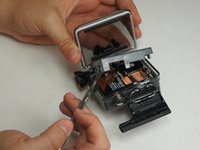
  2. GoPro Hero+ LCD MicroSD/Micro USB Port Assembly Replacement: stap 2, afbeelding 1 van 2 GoPro Hero+ LCD MicroSD/Micro USB Port Assembly Replacement: stap 2, afbeelding 2 van 2
    • Use the metal spudger to pry around the perimeter of the panel.

    • Pry the panel upwards by inserting the metal spudger into the corner crease between the panel and camera shell.

    Vraag FixBot

    Voeg opmerking toe

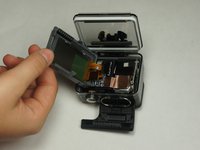
  3. GoPro Hero+ LCD MicroSD/Micro USB Port Assembly Replacement: stap 3, afbeelding 1 van 2 GoPro Hero+ LCD MicroSD/Micro USB Port Assembly Replacement: stap 3, afbeelding 2 van 2
    • Pry around the panel to ensure it is not attached to the device.

    • Move the panel to the side so you can access the internal components.

    • The panel is still attached to the rest of the device with a ribbon cable, so be sure to not tear or damage the cable.

    Vraag FixBot

    Voeg opmerking toe

  4. GoPro Hero+ LCD MicroSD/Micro USB Port Assembly Replacement, Battery: stap 4, afbeelding 1 van 1
    • Peel back the rear panel ribbon cable that is adhered to the battery until it is completely separated from the battery.

    • Be careful of metal contacts on strip; they can be sharp.

    Vraag FixBot

    Voeg opmerking toe

  5. GoPro Hero+ LCD MicroSD/Micro USB Port Assembly Replacement: stap 5, afbeelding 1 van 1
    Gereedschap gebruikt in deze stap:
    Tweezers
    $4.99
    • Using tweezers, peel off the copper tape on the right side of the battery.

    Vraag FixBot

    Voeg opmerking toe

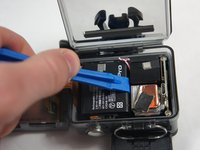
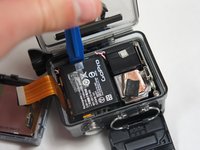
  6. GoPro Hero+ LCD MicroSD/Micro USB Port Assembly Replacement: stap 6, afbeelding 1 van 2 GoPro Hero+ LCD MicroSD/Micro USB Port Assembly Replacement: stap 6, afbeelding 2 van 2
    • Place the plastic opening tool at one of the edges of the battery then pry until the battery is removed from the GoPro.

    Vraag FixBot

    Voeg opmerking toe

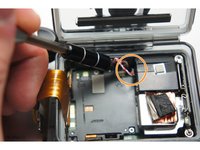
  7. GoPro Hero+ LCD MicroSD/Micro USB Port Assembly Replacement: stap 7, afbeelding 1 van 1
    • Use a pair of tweezers to disconnect the battery connector from the motherboard.

    • Gently pull the battery off the motherboard. Pulling vertically off the motherboard will give a clean release.

    Vraag FixBot

    Voeg opmerking toe

  8. GoPro Hero+ LCD MicroSD/Micro USB Port Assembly Replacement, MicroSD/Micro USB Port Assembly: stap 8, afbeelding 1 van 3 GoPro Hero+ LCD MicroSD/Micro USB Port Assembly Replacement, MicroSD/Micro USB Port Assembly: stap 8, afbeelding 2 van 3 GoPro Hero+ LCD MicroSD/Micro USB Port Assembly Replacement, MicroSD/Micro USB Port Assembly: stap 8, afbeelding 3 van 3
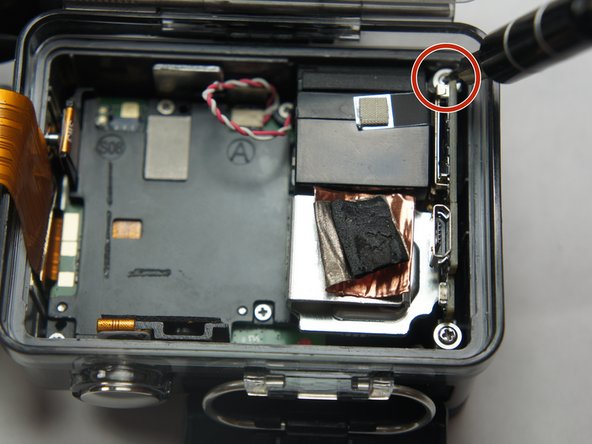
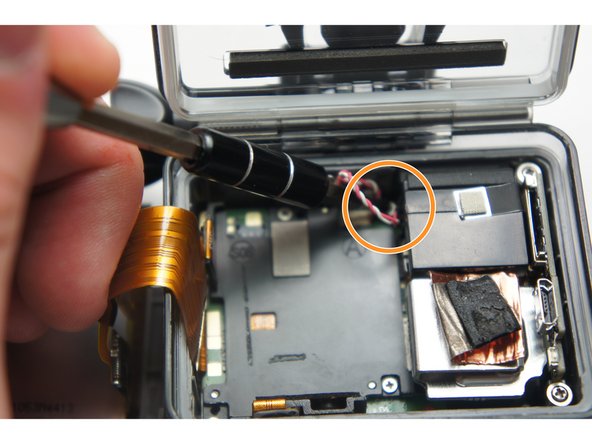
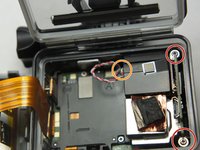
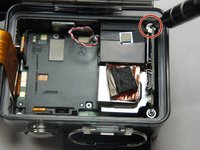
    • Remove the two 6 mm Phillips #00 screws.

    • Remove the single 4 mm Phillips #000 screws.

    Vraag FixBot

    Voeg opmerking toe

  9. GoPro Hero+ LCD MicroSD/Micro USB Port Assembly Replacement: stap 9, afbeelding 1 van 1
    • Remove the image sensor from the camera.

    • You do not have to unplug the black box to remove the USB/SD chip.

    Vraag FixBot

    Voeg opmerking toe

  10. GoPro Hero+ LCD MicroSD/Micro USB Port Assembly Replacement: stap 10, afbeelding 1 van 1
    Gereedschap gebruikt in deze stap:
    Tweezers
    $4.99
    • Grab the edge of the ribbon cable with the tweezers and gently pull until the cable is disconnected from the motherboard.

    • Be careful when removing the ribbon cable. You must pull gently or you can rip the ribbon off of its contacts.

    Vraag FixBot

    Voeg opmerking toe

  11. GoPro Hero+ LCD MicroSD/Micro USB Port Assembly Replacement: stap 11, afbeelding 1 van 1
    • Gently lift the microSD/Micro USB assembly up and out of the device.

    Vraag FixBot

    Voeg opmerking toe

Conclusie

To reassemble your device, follow these instructions in reverse order.

Annuleren: ik heb deze handleiding niet afgemaakt.

5 andere personen hebben deze handleiding voltooid.

Shariyf Mitchell

Lid sinds: 08/27/15

207 Reputatie

1 Handleiding geschreven

Team

USF Tampa, Team 2-4, Blackwell Fall 2015 Lid van USF Tampa, Team 2-4, Blackwell Fall 2015

USFT-BLACKWELL-F15S2G4

4 Leden

20 handleidingen geschreven

2Gids Commentaar

Hi were can i buy the microSD/Micro USB port assembly in your GoPro Hero+ LCD.

Hector - Antwoord Deel

Very helpful guide

Ninigo Marine Contractor - Antwoord Deel

Voeg opmerking toe

Weergavestatistieken:

Afgelopen 24 uren: 1

Afgelopen 7 dagen: 12

Afgelopen 30 dagen: 74

Altijd: 4,176