Deze vertaling is door een computer gegenereerd en is nog niet door iemand nagekeken. Spreek je deze taal? Bekijk het hier.

GoPro Hero+ LCD Batterijvervanging

Voor het laatst geüpdatet op 19 aug 2026
Bekeken: 43K
Statistieken weergeven:
- Afgelopen 24 uur:
- 8
- Afgelopen 7 dagen:
- 42
- Afgelopen 30 dagen:
- 216
- Altijd:
- 42.977
Commentaar: 17
4 comments on steps, 13 guide comments.
Go to guide commentsVoltooid: 20 21
20 mensen hebben deze handleiding als "voltooid" gemarkeerd. Ben jij de volgende?
21 personen hebben deze handleiding als "voltooid" gemarkeerd. Een daarvan ben jij—lekker bezig!
Favorieten: 3 4
3 mensen hebben deze handleiding als favoriet gemarkeerd en volgen deze. Ben jij de volgende?
4 personen hebben deze handleiding als favoriet gemarkeerd (en blijven daarmee op de hoogte van meldingen)—een daarvan ben jij!
Inleiding
Ga naar stap 1 ↓De batterij is met een paar draden verbonden met het moederbord. Wees voorzichtig bij het verwijderen van de batterij om het moederbord of de batterij niet te beschadigen.
Wat je nodig hebt


-
-
-
Wip de clip omhoog en trek deze naar achteren om de schermkap te verwijderen en de achterbehuizing met het touchscreen bloot te leggen.
 Vraag FixBot
-
-
-
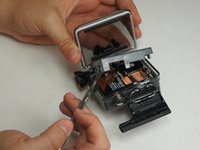
Gebruik de metalen spudger om rondom de rand van het paneel te wrikken.
-
Wrik het paneel omhoog door de metalen spudger in de hoeknaad tussen het paneel en de camerabehuizing te steken.
-
-
-
Wrik rondom het paneel om te zorgen dat het niet meer aan het apparaat vastzit.
-
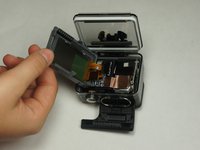
Verplaats het paneel naar de zijkant zodat je bij de interne onderdelen kunt.
-
-
-
-
-
Trek de lintkabel van het achterpaneel, die aan de accu is bevestigd, voorzichtig los totdat deze volledig van de accu is gescheiden.
-
-
Gereedschap gebruikt in deze stap:Tweezers$4.99
-
Gebruik een pincet om de koperen tape aan de rechterkant van de accu los te trekken.
-
-
-
-
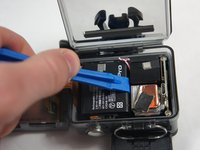
Plaats het plastic openingsgereedschap aan een van de randen van de accu en wrik totdat de accu uit de GoPro is verwijderd.
-
-
-
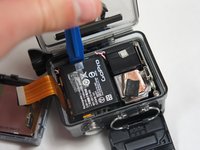
Gebruik een pincet om de (kabel)aansluiting van de accu los te koppelen van het moederbord.
-
Trek de accu voorzichtig van het moederbord af. Verticaal van het moederbord aftrekken zorgt voor een schone loskoppeling.
-
-





Volg deze instructies in omgekeerde volgorde om uw apparaat weer in elkaar te zetten.
Annuleren: ik heb deze handleiding niet afgemaakt.
20 andere personen hebben deze handleiding voltooid.

Team

USF Tampa, Team 2-4, Blackwell Fall 2015 Lid van USF Tampa, Team 2-4, Blackwell Fall 2015
USFT-BLACKWELL-F15S2G4
4 Leden
72 handleidingen geschreven
13Gids Commentaar
This is a superb guide but where can one buy a replacement battery? I have looked on the web for the one in your photo but can't find a specific one.
I want to buy one of these cameras but would like to know I can replace the battery.
Thanks.
I am also trying to find the replacement battery for a Hero+. Have found a lot of batteries for all other versions of Gopro cams, but not one single one for a Hero+.
I have also sent an email to Gopro to get help. I am not prepared for an answer but I really would like to get hold of a battery.
Does anyone know how to get one?
Please contact me: rhafsrhafs@gmail.com. Rikard from Sweden.
Thanks
Rikard
hi, do you know where i can get the housing for the gopro hero+ lcd. mine is broken and need a new one but can't find it anywhere...........
chris
not even amazon?
this is awesome thanks a lot! , i dont want to be rude, but the title says battery replacementnt , why isnt anyone preparing a battery and putting it back in?, All everyone is doing is taking th battery out
