Ga door naar hoofdinhoud
Word lid van de reparatiegemeenschap - Account aanmaken

GoPro HD Hero2 Front Case Replacement

Wat je nodig hebt

  1. GoPro HD Hero2 Front Case Replacement, Back Cover: stap 1, afbeelding 1 van 2 GoPro HD Hero2 Front Case Replacement, Back Cover: stap 1, afbeelding 2 van 2
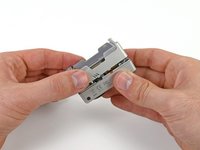
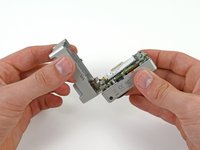
    • Place your thumb on the indentation in the back case on the side of the GoPro.

    • Gently press down with your thumb and lift the back cover away from the case to remove it.

    Vraag FixBot
  2. GoPro HD Hero2 Front Case Replacement, Battery: stap 2, afbeelding 1 van 2 GoPro HD Hero2 Front Case Replacement, Battery: stap 2, afbeelding 2 van 2
    • Slide a plastic opening tool between the battery and the rear case.

    • Gently pry the battery up and out of the rear case.

    Vraag FixBot
  3. GoPro HD Hero2 Front Case Replacement: stap 3, afbeelding 1 van 1
    • Remove the battery from the case.

    Vraag FixBot
  4. GoPro HD Hero2 Front Case Replacement, Rear Case: stap 4, afbeelding 1 van 1
    • Remove the four Phillips #00 screws securing the rear case to the rest of the device:

    • Two 5.5 mm coarse thread screws.

    • Two 4.4 mm fine thread screws.

    Vraag FixBot
  5. GoPro HD Hero2 Front Case Replacement: stap 5, afbeelding 1 van 2 GoPro HD Hero2 Front Case Replacement: stap 5, afbeelding 2 van 2
    • Slide the edge of a plastic opening tool underneath the sticker on the rear cover and gently peel the sticker up.

    • Once you have enough of the sticker peeled up with the plastic opening tool, grab an edge of it with your fingers and pull it off completely.

    Vraag FixBot
  6. GoPro HD Hero2 Front Case Replacement: stap 6, afbeelding 1 van 2 GoPro HD Hero2 Front Case Replacement: stap 6, afbeelding 2 van 2
    • Grasp the rear case and lift it off of the front case.

    • Do not try to completely remove the rear case yet, as it is still attached by the display port ribbon cable.

    Vraag FixBot
  7. GoPro HD Hero2 Front Case Replacement: stap 7, afbeelding 1 van 2 GoPro HD Hero2 Front Case Replacement: stap 7, afbeelding 2 van 2
    Gereedschap gebruikt in deze stap:
    Tweezers
    $4.99
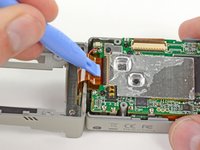
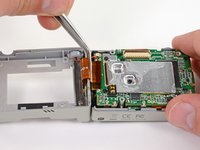
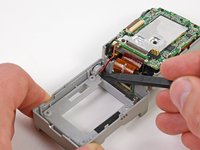
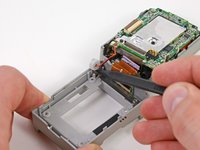
    • Using a plastic opening tool or your fingernail, flip up the locking tab on the SD board ribbon cable ZIF connector on the motherboard assembly.

    • Be careful that you are prying on the locking tab, and not the connector itself.

    • Use a pair of tweezers to remove the SD board ribbon cable from its connector on the motherboard.

    Vraag FixBot
  8. GoPro HD Hero2 Front Case Replacement: stap 8, afbeelding 1 van 3 GoPro HD Hero2 Front Case Replacement: stap 8, afbeelding 2 van 3 GoPro HD Hero2 Front Case Replacement: stap 8, afbeelding 3 van 3
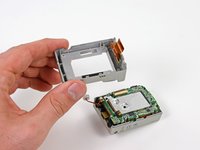
    • Lift the speaker out of the rear case with the tip of a spudger.

    • Remove the rear case.

    Vraag FixBot
  9. GoPro HD Hero2 Front Case Replacement, Motherboard Assembly: stap 9, afbeelding 1 van 1
    • Remove the three screws securing the motherboard assembly to the front case:

    • Two 10.8 mm Phillips #00 screws.

    • One 4.8 mm Phillips #00 screw.

    Vraag FixBot
  10. GoPro HD Hero2 Front Case Replacement: stap 10, afbeelding 1 van 2 GoPro HD Hero2 Front Case Replacement: stap 10, afbeelding 2 van 2
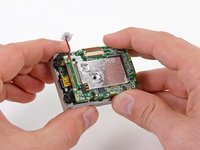
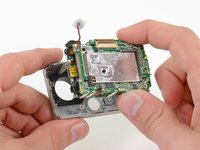
    • Gently grab the edges of the motherboard assembly and lift it out of the front case.

    Vraag FixBot
  11. GoPro HD Hero2 Front Case Replacement, Front Case: stap 11, afbeelding 1 van 1
    • The front case remains.

    Vraag FixBot
Conclusie

To reassemble your device, follow these instructions in reverse order.

5 andere personen hebben deze handleiding voltooid.

David Hodson

Lid sinds: 04/13/10

156.161 Reputatie

127 handleidingen geschreven

0Gids Commentaar

Voeg opmerking toe

Weergavestatistieken:

Afgelopen 24 uren: 2

Afgelopen 7 dagen: 11

Afgelopen 30 dagen: 82

Altijd: 7,537