Ga door naar hoofdinhoud
Word lid van de reparatiegemeenschap - Account aanmaken

Framework Laptop 16 Fastener Guide

Wat je nodig hebt

  1. Framework Laptop 16 Fastener Guide, Fasteners information: stap 1, afbeelding 1 van 2 Framework Laptop 16 Fastener Guide, Fasteners information: stap 1, afbeelding 2 van 2
    • The Fastener Kit contains the following:

    • Grey screws labeled "M1.6 1.5mm fastener with a 5.5mm diameter 0.6mm thick T5 head"

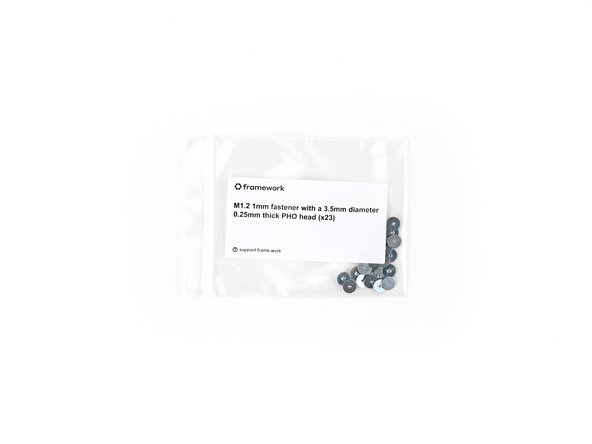
    • Silver screws labeled "M1.2 1.0mm fastener with a 3.5mm diameter 0.25mm thick PH0 head"

    • Grey screws labeled "M1.4 1.8mm fastener with a 4.0mm diameter 0.4mm thick PH0 head"

    • Gold screws labeled "M1.4 1.4mm fastener with a 4.5mm diameter 0.6mm thick T5 head"

    • Gold screws labeled "M2 3.0mm fastener with a 4.5mm diameter 0.7mm thick T5 head"

    • Black screws labeled "M2.5 3.5mm fastener with a 4.5mm diameter 0.5mm thick T5 head"

    • Your Framework Laptop comes with a spare screw of each size, attached to the chassis under the ventilation plate. You can use the Fastener Kit to replenish any screws you used there.

  2. Framework Laptop 16 Fastener Guide: stap 2, afbeelding 1 van 1
    • The Fastener Kit also comes with two additional sets of screws that aren't included with the spares:

    • Grey screws labeled "M2 2.6mm fastener with a 5.5mm diameter 0.8mm thick T5 head"

    • Grey screws labeled "M2 2.0mm fastener with a 4.5mm diameter 0.5mm thick T5 head"

  3. Framework Laptop 16 Fastener Guide, Webcam and Mainboard screws: stap 3, afbeelding 1 van 3 Framework Laptop 16 Fastener Guide, Webcam and Mainboard screws: stap 3, afbeelding 2 van 3 Framework Laptop 16 Fastener Guide, Webcam and Mainboard screws: stap 3, afbeelding 3 van 3
    • Use the grey screws labeled "M1.6 1.5mm fastener with a 5.5mm diameter 0.6mm thick T5 head" to secure the Webcam and Mainboard.

  4. Framework Laptop 16 Fastener Guide, Input Connector Board and Input Module screws: stap 4, afbeelding 1 van 3 Framework Laptop 16 Fastener Guide, Input Connector Board and Input Module screws: stap 4, afbeelding 2 van 3 Framework Laptop 16 Fastener Guide, Input Connector Board and Input Module screws: stap 4, afbeelding 3 van 3
    • Use the silver screws labeled "M1.2 1.0mm fastener with a 3.5mm diameter 0.25mm thick PH0 head" to secure the Input Connector Board and Input Module.

  5. Framework Laptop 16 Fastener Guide, Fingerprint Reader and Touchpad screws: stap 5, afbeelding 1 van 3 Framework Laptop 16 Fastener Guide, Fingerprint Reader and Touchpad screws: stap 5, afbeelding 2 van 3 Framework Laptop 16 Fastener Guide, Fingerprint Reader and Touchpad screws: stap 5, afbeelding 3 van 3
    • Use the grey screws labeled "M1.4 1.8mm fastener with a 4.0mm diameter 0.4mm thick PH0 head" to secure the Fingerprint Reader and the bottom of the Touchpad.

  6. Framework Laptop 16 Fastener Guide, Storage screws: stap 6, afbeelding 1 van 3 Framework Laptop 16 Fastener Guide, Storage screws: stap 6, afbeelding 2 van 3 Framework Laptop 16 Fastener Guide, Storage screws: stap 6, afbeelding 3 van 3
    • Use the gold screws labeled "M1.4 1.4mm fastener with a 4.5mm diameter 0.6mm thick T5 head" to secure the Primary and Secondary Storage.

  7. Framework Laptop 16 Fastener Guide, Expansion Bay Shell screws: stap 7, afbeelding 1 van 3 Framework Laptop 16 Fastener Guide, Expansion Bay Shell screws: stap 7, afbeelding 2 van 3 Framework Laptop 16 Fastener Guide, Expansion Bay Shell screws: stap 7, afbeelding 3 van 3
    • Use the gold screws labeled "M2 3.0mm fastener with a 4.5mm diameter 0.7mm thick T5 head" to secure the Expansion Bay Shell components.

  8. Framework Laptop 16 Fastener Guide, Graphics Module screws: stap 8, afbeelding 1 van 3 Framework Laptop 16 Fastener Guide, Graphics Module screws: stap 8, afbeelding 2 van 3 Framework Laptop 16 Fastener Guide, Graphics Module screws: stap 8, afbeelding 3 van 3
    • Use the gold screws labeled "M2 3.0mm fastener with a 4.5mm diameter 0.7mm thick T5 head" to secure the Graphics Module cover.

  9. Framework Laptop 16 Fastener Guide, Hinge screws: stap 9, afbeelding 1 van 3 Framework Laptop 16 Fastener Guide, Hinge screws: stap 9, afbeelding 2 van 3 Framework Laptop 16 Fastener Guide, Hinge screws: stap 9, afbeelding 3 van 3
    • Use the black screws labeled "M2.5 2.0mm fastener with a 4.5mm diameter 0.5mm thick T5 head" to secure the hinges to the bottom cover.

  10. Framework Laptop 16 Fastener Guide, Bottom Cover screws: stap 10, afbeelding 1 van 2 Framework Laptop 16 Fastener Guide, Bottom Cover screws: stap 10, afbeelding 2 van 2
    • Use the grey screws labeled "M2 2.6mm fastener with a 5.5mm diameter 0.8mm thick T5 head" to secure the Bottom Cover screws.

  11. Framework Laptop 16 Fastener Guide, Display screws: stap 11, afbeelding 1 van 2 Framework Laptop 16 Fastener Guide, Display screws: stap 11, afbeelding 2 van 2
    • Use the grey screws labeled "M2 2.0mm fastener with a 4.5mm diameter 0.5mm thick T5 head" to secure the display.

Conclusie

If you need help, contact Framework support.

Alex Diaz-Kokaisl

Lid sinds: 01/16/22

219.555 Reputatie

1.064 handleidingen geschreven

0Gids Commentaar

Voeg opmerking toe

Weergavestatistieken:

Afgelopen 24 uren: 2

Afgelopen 7 dagen: 21

Afgelopen 30 dagen: 62

Altijd: 62