Deze vertaling is door een computer gegenereerd en is nog niet door iemand nagekeken. Spreek je deze taal? Bekijk het hier.
Inleiding
Als de achterknoppen van je Flydigi Apex 5-controller niet reageren op input, kan het dochterbord voor de achterknoppen de oorzaak zijn. Het dochterbord voor de achterknoppen uit de behuizing van de controller halen en vervangen, of controleren of alles goed is aangesloten tijdens het uit elkaar halen, kan problemen met de respons van de knoppen verhelpen.
Volg deze handleiding om te leren hoe je bij het dochterbord voor de achterknoppen van de Flydigi Apex 5 komt.
Wat je nodig hebt
-
-
-
Houd de controller zo vast dat de achterkant naar je toe gericht is.
-
Oefen stevige neerwaartse druk uit om zowel de M3- als de M4-back paddles te verwijderen.
 Vraag FixBot
-
-
-
Draai de controller om zodat de voorkant naar je toe wijst.
-
Verwijder de D-pad door deze stevig van de behuizing van de controller af te trekken.
-
-
-
Verwijder het doorzichtige, magnetisch bevestigde voorpaneel van de controller door dit vanaf de rand stevig van de behuizing van de controller weg te trekken.
-
-
-
-
Verwijder het kleine achterpaneel van de controller door dit omhoog te duwen.
-
Draai de twee 5,8 mm kruiskopschroeven achter het batterijdeksel los met een Phillips #0-kruiskopschroevendraaier.
-
-
-
Draai de controller om zodat de voorkant naar je toe gericht is.
-
Draai de zes 10mm lange schroeven uit de voorkant van de controller met een Torx T6-schroevendraaier.
-
-
-
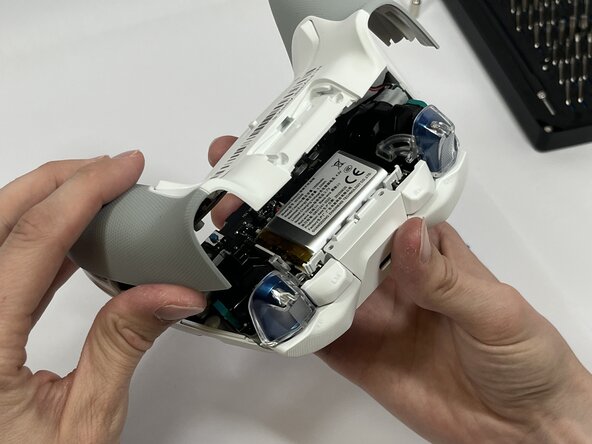
Steek het plastic Openingsgereedschap tussen de bovenste en onderste plastic behuizing van de controller en wrik totdat de twee delen loskomen.
-
-
-
Verwijder voorzichtig de lintkabel van de achterste paddle met de gebogen pincet of spudger.
-
-
-
Verwijder de vier 5 mm-schroeven van het dochterbord van de achterste peddel met een Phillips #00-schroevendraaier.
-
Til het bord voorzichtig op om het te verwijderen.
-
-




Volg deze instructies in omgekeerde volgorde om je apparaat weer in elkaar te zetten.

Team

Idaho State University, Team 1-3, Watkins Spring 2026 Lid van Idaho State University, Team 1-3, Watkins Spring 2026
ISU-WATKINS-S26S1G3
4 Leden
59 handleidingen geschreven
