Deze vertaling is door een computer gegenereerd en is nog niet door iemand nagekeken. Spreek je deze taal? Bekijk het hier.

Fairphone 2 microfoonmodule vervangen

Voor het laatst geüpdatet op 5 aug 2026
Bekeken: 130K
Statistieken weergeven:
- Afgelopen 24 uur:
- 5
- Afgelopen 7 dagen:
- 43
- Afgelopen 30 dagen:
- 122
- Altijd:
- 129.601
Commentaar: 72
34 opmerkingen over de stappen, 38 opmerkingen op de handleiding.
Bekijk de opmerkingen bij de handleidingVoltooid: 107 108
107 mensen hebben deze handleiding als "voltooid" gemarkeerd. Ben jij de volgende?
108 personen hebben deze handleiding als "voltooid" gemarkeerd. Een daarvan ben jij—lekker bezig!
Favorieten: 17 18
17 mensen hebben deze handleiding als favoriet gemarkeerd en volgen deze. Ben jij de volgende?
18 personen hebben deze handleiding als favoriet gemarkeerd (en blijven daarmee op de hoogte van meldingen)—een daarvan ben jij!
Inleiding
Ga naar stap 1 ↓Deze handleiding laat zien hoe je de microfoonmodule van de Fairphone 2 vervangt.
Wat je nodig hebt
Onderdelen
Gereedschap

-
-
-
Kies een hoek van de behuizing en duw de nagel van je duim tussen de twee delen.
-
Trek het achterste deel van de behuizing omhoog om de kleine snap fit-verbindingen van elkaar te scheiden.
-
Verwijder het achterste deel van de behuizing.
 Vraag FixBot
-
-
-
Duw de nagel van je duim nu tussen het voorste deel van de behuizing en de body van de telefoon.
-
Scheid de snap fit-verbindingen van het voorste deel door deze naar de zijkant te trekken en tegelijkertijd tegen het scherm aan te duwen.
-
-
-
-
-
-
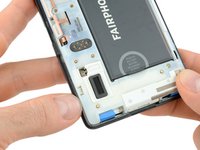
Duw de batterij richting de bovenkant van de telefoon.
-
Trek de batterij weg uit de telefoon.
-
-
-
-
-
Als je de batterij uit je telefoon hebt verwijderd, kun je de schermmodule ontgrendelen.
-
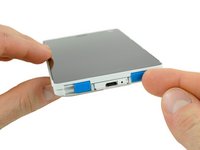
Schuif de twee blauwe vergrendelingen naar de binnenkant.
-
Schuif de schermmodule in de richting van de onderkant van de telefoon.
-
-
-
-
-
Verwijder de vier kruiskopschroeven (Phillips #0) die in de fabriek met blauwe cirkels zijn gemarkeerd.
-
-








Volg deze instructies in omgekeerde volgorde om je toestel weer in elkaar te zetten.
Informatie over wat je met de oude module moet doen, vind je op de ondersteuningspagina van Fairphone en op het forum van Fairphone.
Annuleren: ik heb deze handleiding niet afgemaakt.
107 andere personen hebben deze handleiding voltooid.

Team

Tobias Isakeit - Repairability Engineer Lid van Tobias Isakeit - Repairability Engineer
Business
1 Lid
2.268 handleidingen geschreven
38Gids Commentaar
Bonjour,
j'ai aussi galéré de peur de casser quelque chose, mais j'ai trouvé une solution sur le forum anglais de Fairphone:
https://forum.fairphone.com/t/fp2-teardo...
j'espère que ça t'aidera (faut oser un petit peu, voir comment ça glisse et faire un peu jouer tout ça... ça m'a pris 3/4 d'heure avant d'y arriver... sans rien endommager :) )
Just a little comment. I have seen many times the so called primary microphone error of the fairphone2 on the internet. I had the problem but it had nothing to do with the microphone but with the electric connection/module to the display module. If you have this problem you can check whether the mic works fine if you press tightly together the phone around the microphone module (just call another phone and try it). If this helps, there is a good chance that the true reason are worn out plastic parts around. I fixed it by putting a millimeter of tape underneath the microphone module and before screwing it on again. Now the module gets pressed a little bit against the display module and works just fine again (for the moment). Probably the little worn out outer shell was a part of the problem, I did not have a new one, but could imagine that buying a new outer shell for the fairphone2 might rather solve the problem than changing the microphone module. Just try it yourself before ordering a new microphone.
Thanks! That did the trick.
Thanks! Worked for me too after trying out different thicknesses (by adding and removing layers of tape). As well as adding tape on the inside of the microphone module (on long side of inverse 'L' shape) I added a little on the inside of the case itself (case is also breaking).
On a side note, love the ability to open up and adjust my phone!
The "millimeter tape fix" has been working fine for about a week, but now I'm back to square one: still no sound at the other end. I ordered a new hard cover but still to no avail... And Fairphone is still out of microphone modules. I'm out of options, I guess I'll just send my FP2 for repair, hoping it won't take too long.
