Ga door naar hoofdinhoud
Word lid van de reparatiegemeenschap - Account aanmaken

Evercade EXP Directional Pad Replacement

Wat je nodig hebt

  1. Evercade EXP Directional Pad Replacement, Faceplate: stap 1, afbeelding 1 van 3 Evercade EXP Directional Pad Replacement, Faceplate: stap 1, afbeelding 2 van 3 Evercade EXP Directional Pad Replacement, Faceplate: stap 1, afbeelding 3 van 3
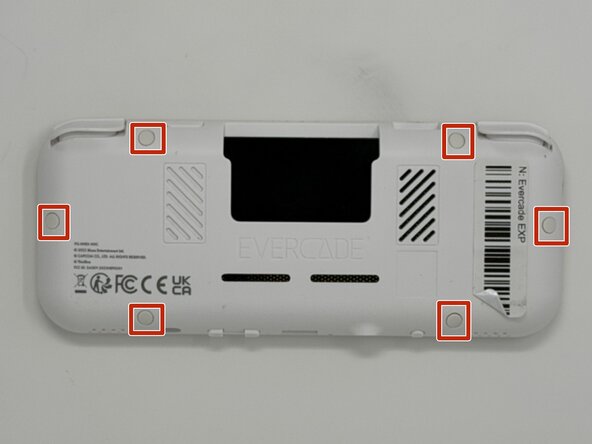
    • Lay the device on a flat surface, with the screen facing the sufrace.

    • Using angled tweezers, remove the six rubber screw covers from the sockets.

    • The covers are all identical, so they do not need to be stored separately from one another.

    Vraag FixBot

    Voeg opmerking toe

  2. Evercade EXP Directional Pad Replacement: stap 2, afbeelding 1 van 3 Evercade EXP Directional Pad Replacement: stap 2, afbeelding 2 van 3 Evercade EXP Directional Pad Replacement: stap 2, afbeelding 3 van 3
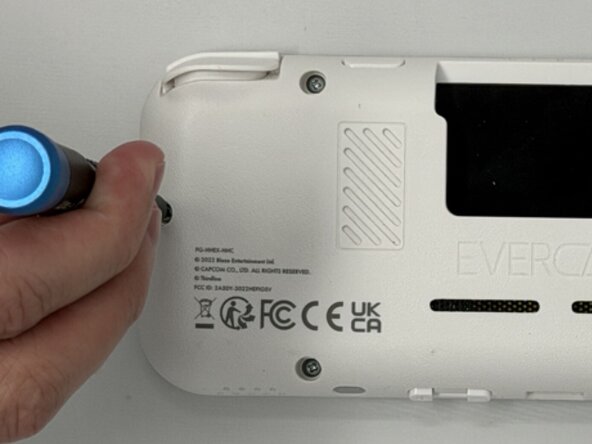
    • Using a Phillips #00 screwdriver, remove the six 8 mm screws on the lower case.

    Vraag FixBot

    Voeg opmerking toe

  3. Evercade EXP Directional Pad Replacement: stap 3, afbeelding 1 van 2 Evercade EXP Directional Pad Replacement: stap 3, afbeelding 2 van 2
    • Flip the device so the screen is facing you.

    • Four hidden retaining clips hold the pieces together even near each corner of the screen.

    • Insert a Jimmy into the seam located between the faceplate and the shell.

    • Move the a Jimmy toward the screen until you find the first clasp. Move the handle of the jimmy tool up to pop the faceplate free from the clasp.

    • Repeat until for each of the four clasps to fully release the faceplate from the shell.

    • Do not use excessive force when moving the Jimmy. The plastic may shear if too much force is applied horizontally, and it may snap if too much vertical force is applied.

    Vraag FixBot

    Voeg opmerking toe

  4. Evercade EXP Directional Pad Replacement: stap 4, afbeelding 1 van 3 Evercade EXP Directional Pad Replacement: stap 4, afbeelding 2 van 3 Evercade EXP Directional Pad Replacement: stap 4, afbeelding 3 van 3
    • Flip the faceplate away from the shell carefully. The faceplate is still connected to the motherboard via a ribbon cable.

    • Flip up the locking flap securing the display ribbon cable, then use tweezers to disconnect the ribbon cable.

    • Be careful when separating the faceplate from the shell, the buttons are held in place by the connection, so they may fall out when opening the device.

    Vraag FixBot

    Voeg opmerking toe

  5. Evercade EXP Directional Pad Replacement, Buttons: stap 5, afbeelding 1 van 3 Evercade EXP Directional Pad Replacement, Buttons: stap 5, afbeelding 2 van 3 Evercade EXP Directional Pad Replacement, Buttons: stap 5, afbeelding 3 van 3
    • Locate the four circular buttons in a diamond shape on the face plate, the two circular buttons placed next to each other, and the two small oval buttons and a circular button in a row near those in a diamond pattern.

    • Using angled tweezer, gently remove the buttons from the face plate. The buttons may fall out, so be ready to catch any that fall from the device before intended removal.

    • The buttons are held in place with the pressure of the shell and faceplate when closed. They should be removed with a nominal amount of force.

    Vraag FixBot

    Voeg opmerking toe

  6. Evercade EXP Directional Pad Replacement, Directional Pad: stap 6, afbeelding 1 van 2 Evercade EXP Directional Pad Replacement, Directional Pad: stap 6, afbeelding 2 van 2
    • The directional pad is composed of two pieces, the back of the button holds the face of the button within a small square hole. The pieces are held together by friction, and do not require very much force to seperate.

    • Using tweezers, pull the face of the directional pad from its socket in the back piece until the two separate.

    Vraag FixBot

    Voeg opmerking toe

Conclusie

To reassemble your device, follow these instructions in reverse order.

Annuleren: ik heb deze handleiding niet afgemaakt.

Michael Williams

Lid sinds: 02/03/26

356 Reputatie

3 handleidingen geschreven

Team

0Gids Commentaar

Voeg opmerking toe

Weergavestatistieken:

Afgelopen 24 uren: 5

Afgelopen 7 dagen: 16

Afgelopen 30 dagen: 22

Altijd: 57