Ga door naar hoofdinhoud

Desktop PC GPU Replacement

Wat je nodig hebt

  1. Desktop PC GPU Replacement, Create an Anti-Static Work Area: stap 1, afbeelding 1 van 1
    • Minimize exposure to items that can charge up and produce static electricity.

    • Use an anti-static wrist band.

  2. Desktop PC GPU Replacement, Turn Off Computer: stap 2, afbeelding 1 van 1
    • Power off PC via Windows.

    • Switch off Power Supply

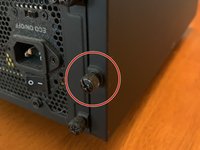
  3. Desktop PC GPU Replacement, Unscrew Case Side Panel: stap 3, afbeelding 1 van 2 Desktop PC GPU Replacement, Unscrew Case Side Panel: stap 3, afbeelding 2 van 2
    • Put screws where you wont lose them

  4. Desktop PC GPU Replacement, Unplug Power Connector to GPU: stap 4, afbeelding 1 van 1
    • Be gentle to not pull with to much force when removing power cables.

  5. Desktop PC GPU Replacement, Flip GPU Lock on Motherboard: stap 5, afbeelding 1 van 1
    • Try not to touch other components.

    • Gently pull the card out of the slot.

  6. Desktop PC GPU Replacement, Insert New GPU: stap 7, afbeelding 1 van 1
    • Verify that the notch in the connector matches the motherboard before sliding in.

    • Carefully slide in GPU until you hear a click on the motherboard.

  7. Desktop PC GPU Replacement, Connect Power Cables: stap 8, afbeelding 1 van 1
    • Insert wisdom here.

  8. Desktop PC GPU Replacement, Re-Attach Side Panel: stap 9, afbeelding 1 van 1
    • Use same screws from step 2.

    • Flip power supply switch back to on.

    • Plug in PC and turn on.

    • If PC does not post go back through the steps to see if you missed something.

    • Go to manufacturer's website or use the CD that came with the card to download the latest drivers for the GPU to ensure better stability of GPU.

    • Enjoy your new GPU.

Conclusie

To reassemble your device, follow these instructions in reverse order.

2 andere personen hebben deze handleiding voltooid.

Joseph Thompson

Lid sinds: 06/20/19

265 Reputatie

1 Handleiding geschreven

0Gids Commentaar

Voeg opmerking toe

Weergavestatistieken:

Afgelopen 24 uren: 4

Afgelopen 7 dagen: 27

Afgelopen 30 dagen: 122

Altijd: 1,443